AI Performance Metrics Explained Through How Printers Work
 MR
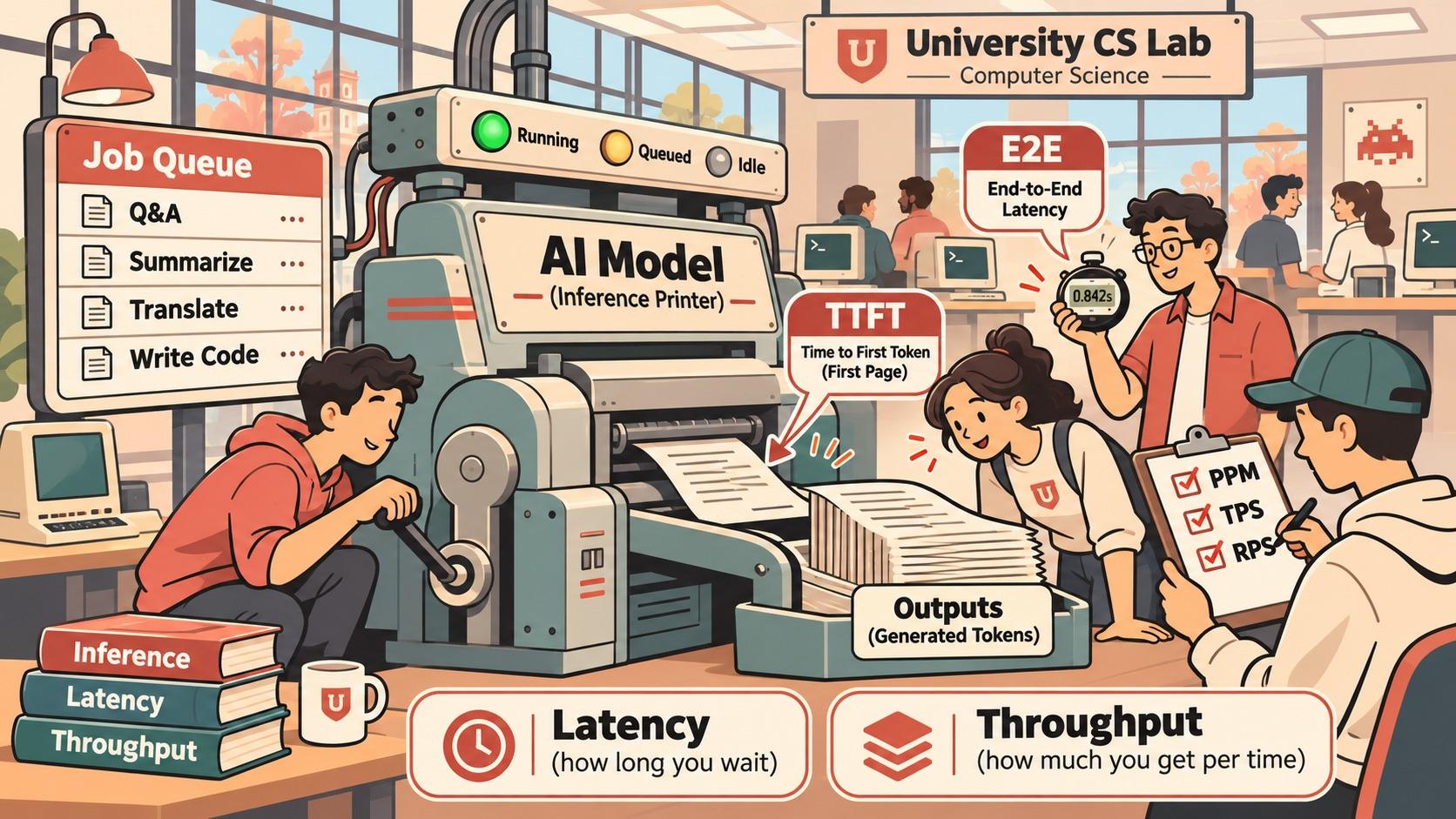
A familiar office printer can explain a lot about AI performance, from latency and throughput to memory and scheduling.
The Printer
It's 1999. Somewhere in a university computer lab.
Three computer science students are standing around a printer.
One needs to print his 40-page programming assignment. Another needs a two-page report. The third has been staring at the printer for five minutes, wondering whether it's broken.
The printer's little green light is blinking.
Nothing is happening.
"Is it printing?"
"I think so."
"How fast is this thing?"
"Thirty pages per minute."
"Then why hasn't it printed anything?"
Nobody knows.
The printer suddenly springs to life, spits out one page, pauses for an uncomfortable amount of time, and then starts producing pages at an impressive speed.
The students celebrate.
Until they realize it's printing somebody else's 200-page thesis.
Welcome to the wonderful world of computing, where a machine can be incredibly fast and still make you wait forever.
Fast-forward to today.
We've traded printers for AI models, pages for tokens, and paper jams for GPU bottlenecks.
But the engineering questions are surprisingly similar.
How long until something happens? How fast does it work? How many people can use it? How much memory does it need? And why is this incredibly expensive machine taking so damn long?
Let's figure it out.
First, What Exactly Is AI Inference?
Imagine an AI model is a shared office printer.
You send it a job (your question), it processes the job, and then it prints its answer one small piece at a time.
Several people might be using this printer simultaneously.
That's essentially what happens when you ask ChatGPT a question.
Before we begin, three terms:
- LLM (Large Language Model): A program trained to understand and generate text.
- Inference: Running that program to produce an answer. This is what happens when you use a model that has already been trained.
- Token: A small piece of text, sometimes a word, part of a word, or punctuation. Think of it as one unit of text.
An AI doesn't usually generate an entire answer at once. It generates tokens, one after another, like a printer pushing out text.
Now, how do we measure performance?
Recommended
The Race to Make Personal AI Work

I tried using the Instacart app in ChatGPT today. It didn’t really work. After spending more time on it than I wanted to, I gave up and did the shopping myself. I wanted it to work. Ordering groceries is exactly the kind…
Read next1. TTFT (Time to First Token)
How long before the printer starts printing?
You submit a job, and nothing happens for two seconds. Then the first bit of text appears.
Your TTFT is two seconds.
The delay might come from waiting in line or from the machine preparing your job.
In AI, that preparation includes processing your input before generating the first token.
Why it matters
This is what makes an AI feel responsive or sluggish. Even a fast AI feels slow if it takes forever to start.
Remember our three students? This was their first problem.
The printer was supposedly fast, but nobody knew when it would actually begin.
2. E2E (End-to-End Latency)
How long until the entire document finishes printing?
You submit your job at 12:00:00. The final piece comes out at 12:00:10.
Your total processing time is ten seconds.
This includes everything: waiting in line, preparing the job, and producing the output.
Why it matters
This is how long you wait for the complete answer.
A printer that starts instantly but takes an hour to finish isn't particularly useful either.
3. Token Generation Time
How long does the actual printing take?
The printer starts producing text after two seconds and finishes at ten seconds.
That means it spent eight seconds printing.
This excludes the initial wait.
Why it matters
It separates waiting for the machine to get started from the time spent producing the answer.
This is useful because a slow startup and slow generation are different problems requiring different solutions.
4. TPOT (Time per Output Token)
What's the printer's average speed per piece of text?
Imagine a printer producing one piece of text every 100 milliseconds.
That's its average output pace once printing has started.
TPOT measures the average time between generated tokens.
Why it matters
It tells you how quickly the AI produces text, independent of how long the answer is.
Lower is better.
Remember PPM? Pages Per Minute?
If you've ever shopped for a printer, you've probably seen something like:
30 PPM (30 pages per minute).
That's a performance specification.
In the AI world, we use something very similar:
TPS (tokens per second).
Imagine two AI models:
- Model A generates 30 tokens per second.
- Model B generates 100 tokens per second.
Model B can produce text over three times faster, assuming we're comparing the same kind of workload.
And just like printers, speed isn't everything.
A black-and-white laser printer might crank out pages incredibly fast, while a high-quality color printer takes longer to produce a beautiful photograph.
Which brings us to an interesting question.
Not All Printers Are Created Equal
Walk into an electronics store and you'll find all sorts of printers.
Laser Printers (Fast and Efficient)
Excellent for producing lots of text quickly. Great for everyday office work.
Think of a smaller, optimized AI model. It might not handle every complex task as well as a larger model, but for common jobs, speed and efficiency are hard to beat.
Color Printers (More Demanding Output)
Printing a beautiful, full-color photograph can require more time, memory, and processing than printing a plain text document.
Think of larger, more capable AI models. They may handle more sophisticated tasks, but that additional capability can come with higher computational costs.
3D Printers (A Completely Different Job)
A 3D printer doesn't simply produce a better version of a paper document.
It produces an entirely different kind of output.
That's similar to comparing a text-generating AI with an image or video generation model.
They all perform inference, but the work, output, and meaningful performance measurements differ.
These aren't literal matches between printer technologies and model architectures. They're a way to understand that different machines are designed for different workloads.
The important lesson: Speed means very little without knowing what kind of work is being performed.
A printer capable of 100 pages per minute isn't necessarily better than a 3D printer that produces one object every two hours.
And a model generating 200 tokens per second isn't necessarily better at solving your programming problem than one generating 50.
The Printer Has RAM, Too
Remember those old office printers with 8 MB of memory?
You'd send a giant, complicated document, and the printer would sit there blinking.
Sometimes it would print. Sometimes it would give up.
Sometimes you'd discover that adding more RAM was the solution.
Why?
Because the printer needs working memory to hold and process the job before it can produce the pages.
AI models have a similar problem.
They need memory to hold the model itself, process your input, and keep track of the conversation as they generate an answer.
In AI, this is often GPU memory, or VRAM.
Here's a useful way to think about it:
- Model weights: The printer's built-in machinery and calibration. These are the learned parameters that determine what the AI knows how to do.
- Context window: How much of the current document or conversation the AI can consider at once.
- KV cache: The printer's working notes about text it has already processed, so it doesn't have to start over for every new token.
- VRAM: The physical memory holding the model and its active working data.
The interesting part?
A longer conversation generally uses more working memory.
And if hundreds of people are using the same model, their active conversations all compete for memory.
Available memory also affects how many jobs your system can handle at once.
Just like a printer with insufficient RAM, a powerful AI model can run into memory limits long before it runs out of computing power.
More Memory Doesn't Mean More Intelligence
There's an important distinction here.
Adding RAM to a printer doesn't teach it how to print better photographs.
It just gives the printer more room to work.
The same applies to AI.
Adding VRAM doesn't make a model smarter. It can allow a larger model to fit, accommodate longer conversations, or handle more simultaneous requests.
And this isn't the same as the AI remembering something about you between conversations.
That's a separate software feature involving stored information.
We're talking about working memory, the temporary space needed to do the job right now.
It's the difference between making a computer smarter and giving it a bigger desk.
Which is useful, especially when your desk is covered in 200 pages of somebody else's thesis.
5. ITL (Inter-Token Latency)
Does the printer move smoothly, or does it keep stopping?
Imagine printing ten lines.
The first five appear almost immediately, then the printer freezes for two seconds before continuing.
The average speed might look fine, but the experience feels jerky.
ITL measures the individual gaps between pieces of output. TPOT averages those gaps together.
Think of watching text appear in ChatGPT.
Sometimes it flows smoothly, almost like somebody typing.
Other times it prints a sentence, stops, thinks about its life choices, and eventually continues.
That's what ITL helps reveal.
Why it matters
It identifies stutters that an average might hide.
A consistent output stream can feel better than one with a higher peak speed but unpredictable pauses.
6. Mean, Median, and P99
Is the printer fast for everyone, or just most people?
Suppose you measure how long 100 print jobs take.
- Mean: The arithmetic average across all jobs.
- Median (P50): Half the jobs finish within this time.
- P99: 99 out of 100 jobs finish within this time. Roughly the slowest 1% take longer.
Imagine most print jobs finish in two seconds, but a handful take 30 seconds.
The average might look acceptable even though some users are having a terrible experience.
This is an old engineering problem.
Your server might report an average response time of 100 milliseconds, while one unlucky user waits five seconds.
And guess what?
That unlucky user doesn't care about your average.
Why it matters
P50 tells you about the typical experience. P99 helps reveal the painful slow cases.
7. RPS (Requests per Second)
How many complete print jobs can the printer handle every second?
If your system finishes 20 jobs in one second, that's 20 RPS.
But a one-page document and a 100-page document both count as one job.
And that creates an interesting problem.
Imagine two print shops.
Shop A completes 100 one-page documents every minute.
Shop B completes ten 100-page documents every minute.
Shop A handles more requests.
Shop B produces far more pages.
Which one is faster?
Well, it depends on what you're measuring.
Why it matters
RPS counts completed requests. Each request can take a different amount of work.
8. TPS (Tokens per Second)
How much text can the entire print shop produce every second?
Instead of counting finished jobs, count the pieces of text being processed or generated.
If the system generates 5,000 tokens across all users in one second, that's 5,000 output TPS.
There's an important difference:
- RPS: How many jobs finish.
- TPS: How much text gets processed or produced.
You can also measure input TPS separately from output TPS.
Input tokens are what users send to the model.
Output tokens are what the model generates in response.
And when someone reports TPS, it's worth checking whether they mean the speed of one request or the combined output of an entire system.
The Ten-Printer Experiment
Now imagine you've built a print shop with ten identical printers.
Each printer produces 30 pages per minute.
In ideal conditions, your shop can produce:
10 printers × 30 PPM = 300 pages per minute.
Congratulations. You've built a surprisingly productive print shop.
But here's the catch.
You hand the receptionist a 30-page document.
Does it print in six seconds because there are ten printers?
No.
Assuming your job runs on just one printer, it still takes roughly a minute of printing time.
The other nine printers can work on other jobs simultaneously.
That's the difference between two extremely important concepts:
Latency: How long one person waits for their work to finish.
Throughput: How much total work the system completes.
This distinction appears everywhere in computing: CPUs, web servers, databases, networks, and AI inference.
Adding more machines can increase total throughput without making any individual job faster.
Why it matters
A server can have incredibly high overall TPS while individual users still experience slow responses.
But now we've created another problem.
Ten Printers. One Very Stressed Manager.
Remember our print shop with ten printers?
Each produces 30 pages per minute, giving us a theoretical capacity of 300 pages per minute.
Fantastic.
Except now 500 students show up, all trying to print their assignments before midnight.
Who decides which printer gets which job?
What happens when one printer is busy printing a 500-page textbook while another sits completely idle?
What if five printers run out of memory?
And who stops one particularly enthusiastic student from submitting the entire Linux kernel for printing?
Congratulations.
You've invented the need for a job scheduler.
In a real print shop, we'd want someone managing the queue and assigning jobs to available printers.
In distributed computing, we build software to do exactly that.
We call these systems load balancers, schedulers, and job queues.
They perform different but related jobs:
- Load balancer: Decides which printer or server should receive a request.
- Job queue: Holds work that can't start immediately.
- Scheduler: Decides which jobs run, when, and with what resources.
- Memory manager: Ensures the machine has enough working memory to process the jobs.
And here's where things get interesting.
More Printers Don't Automatically Mean Faster Printing
Imagine we buy ten more printers.
We've doubled our theoretical capacity.
But our manager is still handing every job to Printer #1.
The other 19 printers sit around doing absolutely nothing.
We've doubled our hardware costs and accomplished precisely zero.
This happens in computing, too.
Adding more machines increases potential capacity. Scheduling determines how much of that capacity you actually use.
AI inference systems add another twist.
They can sometimes process parts of multiple requests together in a batch, allowing the GPU to share its computing resources more efficiently.
Think of a clever print shop that groups compatible jobs rather than treating every document as an entirely separate production run.
This is called batching.
Some AI systems even add and remove requests from batches while generation is underway. That's called continuous batching.
Imagine the print shop manager.
Instead of waiting for one customer's entire 500-page document to finish before helping anyone else, the manager coordinates multiple jobs, allocating resources as they become available.
The goal is simple: keep expensive hardware busy without making individual users wait unnecessarily.
Because maximizing throughput isn't the same thing as minimizing latency.
If you pack the system with too much work, total output might increase while individual users suffer.
The Real Engineering Challenge
You now have to balance four competing concerns:
- Latency: How long does each customer wait?
- Throughput: How much total work gets done?
- Memory: How many active jobs fit?
- Scheduling: Who gets the next turn?
And that's the beautiful thing about AI infrastructure.
Underneath all the GPUs, neural networks, and impressive new terminology, we're still solving familiar computer science problems.
Queues. Memory allocation. Scheduling. Load balancing.
The same problems we were solving with shared printers, mainframes, and web servers decades ago.
Only now, instead of printing somebody's thesis, the machines are writing it.
Which, frankly, isn't helping the university's plagiarism department.
9. Goodput (How Much Useful Work Gets Done on Time?)
How many print jobs finish within the promised deadline?
Imagine your printer handles 100 jobs in ten seconds.
That's 10 RPS.
But your service promises every job will start within one second and finish within five seconds.
Only 80 jobs satisfy those requirements.
Your goodput is eight qualifying jobs per second.
The other 20 jobs finished, but they weren't fast enough to meet your performance promise.
This matters because a system can technically process an enormous amount of work while delivering a terrible experience.
Picture a print shop with a giant sign out front:
"1,000 PRINT JOBS PER HOUR!"
Sounds impressive.
Until you discover that half the customers wait three hours for their documents.
The shop is productive.
The customers are furious.
Why it matters
Goodput counts the jobs that meet your performance targets.
A system that processes 1,000 requests per second is less impressive if most users are waiting too long.
And this is why our brilliant print shop manager can't simply keep adding printers and declaring victory.
The customers don't care how busy the machines are.
They care whether their assignments are ready before class.
Putting It All Together
Imagine sending a request to an AI:
- You submit a question.
- You wait one second for the first token. TTFT = 1 second.
- The AI produces ten tokens over the next two seconds, counting from the first token to the last (nine gaps between tokens). Token generation time = 2 seconds.
- The average gap is about 222 milliseconds. TPOT ≈ 222 ms.
- Some individual gaps might be longer than others. ITL reveals those pauses.
- Your entire answer takes three seconds. E2E = 3 seconds.
Now multiply this by thousands of people simultaneously using the AI.
That's when RPS, TPS, P99, goodput, memory, and scheduling become important.
The Cheat Sheet
| Metric | Printer analogy |
|---|---|
| TTFT | Time until the first page starts |
| E2E | Total time to finish the print job |
| Token Generation Time | Time spent producing the output |
| TPOT | Average time between pieces of output |
| ITL | Individual pauses between pieces |
| P50 / P99 | Typical vs. painfully slow print jobs |
| RPS | Number of print jobs completed per second |
| TPS | Amount of text produced per second, like PPM |
| Goodput | Jobs finished within the promised deadline |
| VRAM | Printer working memory |
| Context window | Amount of document or conversation the machine can work with |
| KV cache | Working notes kept from earlier processing |
| Scheduler | The manager deciding who prints next |
| Batching | Processing compatible work together |
| Load balancing | Distributing jobs across available printers |
The Big Picture
You really only need to remember four categories:
- User experience: TTFT, E2E, Token Generation Time, TPOT, ITL
- System performance: RPS, TPS
- Consistency and reliability: P50, P99, Goodput
- Resource management: VRAM, context windows, batching, scheduling
A fast AI system starts quickly and delivers text at a steady pace. It has to keep doing that when a lot of people show up at once.
And if you've studied traditional computer science, none of this should seem particularly foreign.
We've spent decades solving variations of these problems.
Queues. Scheduling. Parallelism. Throughput. Latency. Resource contention.
The hardware has changed. The workloads have changed. The vocabulary has gotten considerably more expensive.
But the fundamental engineering questions remain surprisingly familiar.
Back in 1999, three students stood around a printer wondering why a supposedly fast machine was taking so long to produce their homework.
Today, millions of people stare at a blinking cursor, wondering why a trillion-dollar AI industry occasionally needs five seconds to answer "What's 2 + 2?"
Somewhere, that old printer is still blinking.
And for the record, it's still printing somebody else's thesis.
Comments
Checking profile…