T3 Code v0.1.11 sends hashed OpenAI and Claude account IDs at first launch

Earlier today, 陈大黄 (@realchendahuang), a developer and AI company partner in Ningbo, China, according to their X profile, posted a thread accusing T3 Code, a desktop app for running coding agents such as Codex and Claude Code, of "blatant data harvesting" (1). The post is in Chinese; translations here are ours. It has more than 13,000 likes and 1.6 million views so far. Its most serious claim is that the app reads the login files Codex and Claude Code keep on your computer and sends scrambled versions of your account IDs to T3 Code's servers.
About 90 minutes later, in a reply on the same thread, the author recommended 星尘 Agent (Stardust Agent), an app from a different account, as "the ethical version of T3Code" with "no telemetry" (2). We have not tested it.
T3 Code's CEO, Theo, replied this afternoon (3). He says the team has just removed the login-file reading (4), which it used so that one person on several computers would count as one user, and that T3 Code never uploaded files, prompts or file paths. He says a fixed stable release will follow within hours, and that he has published all 95,789 of his own analytics events.
We installed the current release on a Mac and recorded everything it sent. The post's most serious claim checks out, and so does Theo's statement about what the app doesn't send. Right now the fix is only in T3 Code's nightly builds (5), and the regular download is still the older version.
Why it matters
Imagine you download a new app and open it. Before you sign in or click anything, it checks two other apps on your computer, works out which accounts you use, and starts keeping notes on you under those accounts. You delete it, wipe its files and reinstall it, and within seconds it finds you again.
That is what T3 Code has done since March (6). The two other apps are Codex and Claude Code, the coding tools from OpenAI and Anthropic. T3 Code reads the login files they keep on your computer and labels you with your OpenAI and Claude accounts. Its welcome screen says it "collects anonymous usage data" and points to the privacy policy to opt out. There is no setting in the app.
It recorded how you use the app, not what you type: no prompts, code or files.
What we saw
We tested the regular download (7). Like many apps, T3 Code makes up a random ID to count installs. Alongside it, the app labels you with your OpenAI and Claude accounts, which it finds in the login files Codex and Claude Code keep. Those files also hold the keys that keep you signed in, plus your name and email address. T3 Code took only the account IDs. Nothing else from those files left the computer.
About ten seconds after we first opened the app, before we did anything in it, it sent a fingerprint of each account: a scrambled version of the ID that can't be unscrambled but always comes out the same. We made fingerprints from our own account IDs, and they matched. Anyone who already has your account ID can do the same and pick out your records. So from the first launch, before any sign-in, the app had tied this computer to our real accounts.
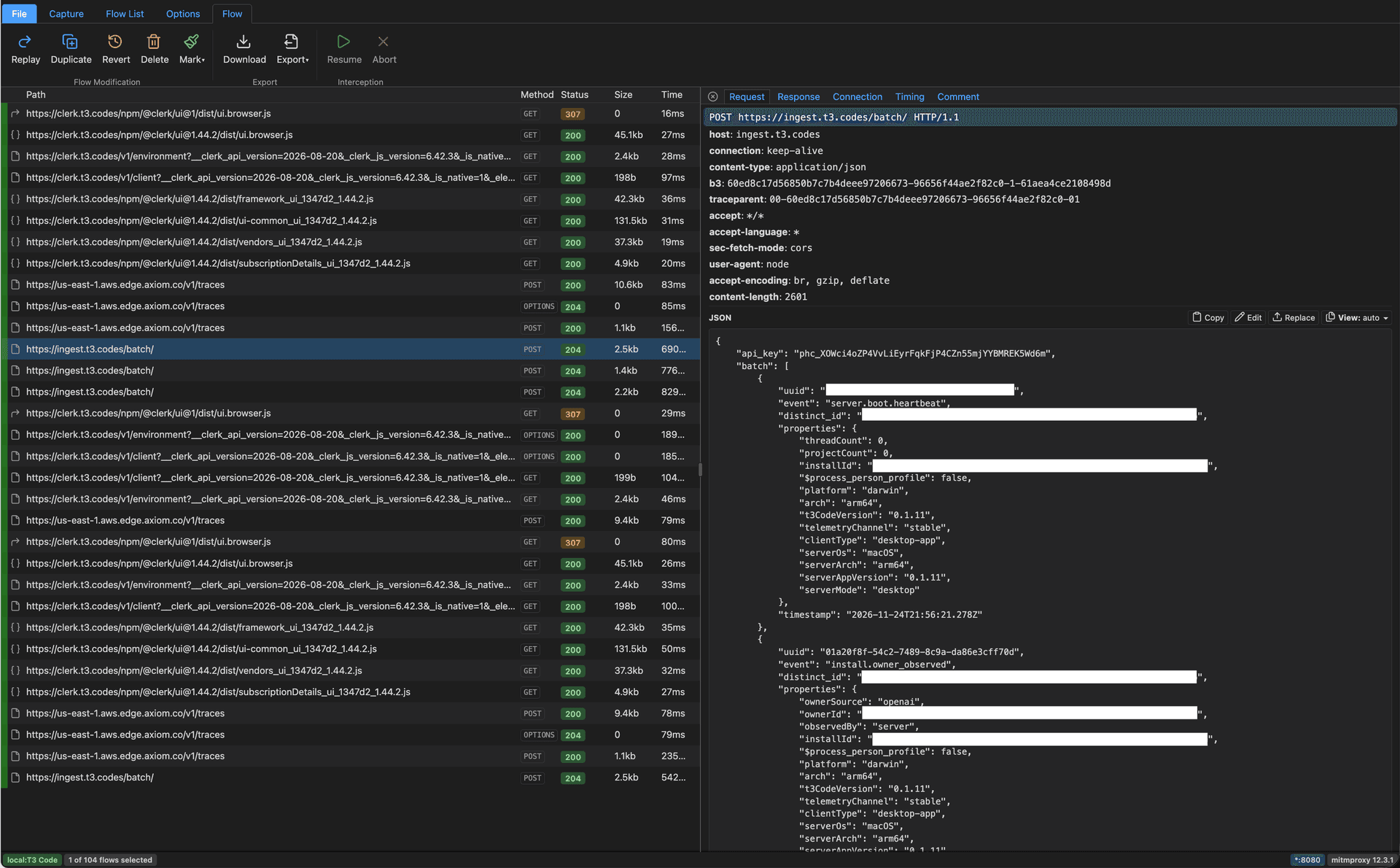
T3 Code's first upload, captured about ten seconds after we opened it and before any sign-in. We covered the ID values. Two of them are fingerprints of the ChatGPT account and OpenAI user that Codex was signed in with on this Mac.
Then we deleted T3 Code and every folder it had created, and installed it again. The app made a brand-new random ID, but within seconds it sent the same account fingerprints as before. Reinstalling doesn't give you a fresh start.
Then we used the app normally, with invented code words in the project's folder name, file name, file contents and prompt. The app reported which model we used, how many tokens it took and how long it ran, all filed under our OpenAI account's fingerprint. None of the code words, the chat title or any file path appeared in anything it sent.
The reports went to T3 Code's own analytics server, which forwards them to PostHog, an analytics company, according to T3 Code's docs (8). The app also sent a short startup diagnostic report to Axiom, a logging service, with no personal details. A test like ours shows what leaves the computer, not what happens to it afterward.
Turning it off
There is no setting in the app. T3 Code's docs say that adding one line to your shell configuration file and restarting stops both the usage reports and the diagnostic reports (8).
We tried it. The usage reports stopped. The startup diagnostic report still went to Axiom, apparently because the app decides whether to send it before it loads your shell settings. It contained no personal details.
If you use the regular release with Codex or Claude Code signed in, add the off switch below and restart, or switch to the nightly build, which no longer reads those login files.
Technical details
- Tested: T3 Code v0.1.11 (7), the latest stable release as of November 24, 2026, on macOS (Apple Silicon), captured with mitmproxy 12.3.1 in local mode. We launched the app with
NODE_EXTRA_CA_CERTSpointing at the proxy certificate, and every request decrypted. We did not test Windows, Linux, Stardust Agent or the X post's other claims. - Files read:
~/.codex/auth.json(tokens.account_id, anduser_idfrom theid_token) and~/.claude.json(oauthAccount.accountUuid). We searched every upload for the tokens, name and email address in those files and found none. - Sent at launch:
POST https://ingest.t3.codes/batch/withdistinct_idset to the unsalted SHA-256 of the Codexaccount_id, plusinstall.owner_observedevents carrying SHA-256 hashes of the OpenAIuser_idand ClaudeaccountUuid, once per server start (9). - Reinstall: App Cleaner left
~/.t3and~/Library/Application Support/t3code-v2behind, so we deleted both. After reinstalling,installIdwas new and all three account hashes were identical. - Off switch:
export T3CODE_TELEMETRY_ENABLED=falsein~/.zshrc, then restart. Administrators can also set"telemetry": falseunderlimitsin/Library/Application Support/T3Code/policy.json(10), which we did not test. - Disclosure and history: the welcome screen and the privacy policy (11) describe "anonymous usage data" and do not mention account identifiers. T3 Code's docs listed "hashed account identifiers" for OpenAI and Claude accounts (8) but not the login files they came from. The Codex hash was added in March (6), the OpenAI and Claude account hashes in October (9), and the login-file reading was removed on November 24 (4).
Comments
Checking profile…