Maestro
End-to-end UI testing framework for mobile and web apps that makes writing tests dead simple with YAML-based flows.
At a Glance
About Maestro
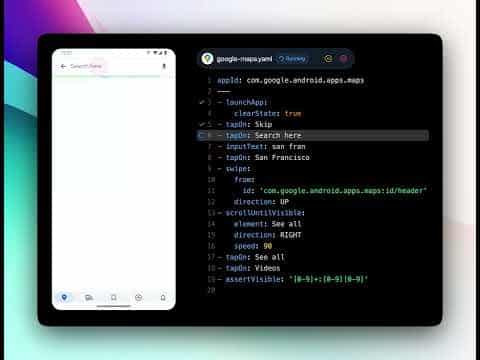
Maestro is an open-source end-to-end testing framework designed for mobile and web applications. It enables developers and testers to write UI tests in under 5 minutes using a simple YAML-based syntax. The platform supports iOS, Android, and web applications across various frameworks including React Native, Flutter, Jetpack Compose, SwiftUI, and more. Trusted by companies like Microsoft, Meta, Uber, and Stripe, Maestro offers both local testing tools and an enterprise-grade cloud infrastructure for parallel test execution.
- Maestro Studio provides an all-in-one IDE built specifically for testers with visual element inspection, action recording, and AI-assisted test generation through MaestroGPT
- Cross-Platform Support enables testing across iOS, Android, web apps, React Native, Flutter, Flutter Web, mobile browsers, web views, Jetpack Compose, SwiftUI, NativeScript, .NET MAUI, Capacitor, and Cordova
- Visual Testing allows users to find elements and build tests visually without guessing element selectors, using the built-in element inspector
- Action Recording lets users interact with the app in Maestro Studio to automatically generate the correct test commands
- AI Commands leverage AI capabilities to assist with test creation and provide intelligent suggestions for test flows
- CI Integration supports shift-left testing by integrating into continuous integration pipelines for pull requests, nightly builds, and pre-release testing
- Maestro Cloud offers enterprise-grade infrastructure to run tests in parallel across hosted Android, iOS, and web devices with unlimited test runs
- Rich Test Reporting provides detailed analytics including flow runs, failed runs, average run time, and passing percentages
To get started, download Maestro Studio for Mac, Windows, or Linux, or install the CLI. Write your first test using simple YAML syntax, then run it locally on your own devices. When ready to scale, upgrade to Maestro Cloud for parallel execution and faster results.

Community Discussions
Be the first to start a conversation about Maestro
Share your experience with Maestro, ask questions, or help others learn from your insights.
Pricing
Run Maestro Locally
Test for free on your own devices with Maestro Studio or the CLI
- Maestro CLI
- Maestro Studio
- Maestro GPT
- Maestro Slack Bot
- AI commands
Cloud Android
Enterprise-grade Maestro test execution for Android devices
- Includes everything in Local
- Hosted Android devices
- Parallel runs for faster execution
- Unlimited hosted test runs
- Rich test reporting
- CI integration
- PR/MR integration
Cloud iOS
Enterprise-grade Maestro test execution for iOS devices
- Includes everything in Local
- Hosted iOS devices
- Parallel runs for faster execution
- Unlimited hosted test runs
- Rich test reporting
- CI integration
- PR/MR integration
Cloud Web
Enterprise-grade Maestro test execution for web browsers
- Includes everything in Local
- Hosted web browsers
- Parallel runs for faster execution
- Unlimited hosted test runs
- Rich test reporting
- CI integration
- PR/MR integration
Enterprise
Custom plans & managed testing
- Everything in Cloud
- SSO
- Premium, dedicated support
- Custom contract requirements
- Fully-managed test cases
- Detailed vendor & security review
Capabilities
Key Features
- YAML-based test syntax
- Visual element inspector
- Action recording
- MaestroGPT AI assistant
- Cross-platform testing
- iOS testing
- Android testing
- Web testing
- React Native support
- Flutter support
- Jetpack Compose support
- SwiftUI support
- CI/CD integration
- PR/MR integration
- Parallel test execution
- Rich test reporting
- Deep flow analysis
- Maestro Slack Bot
Integrations
Demo Video