
airoom
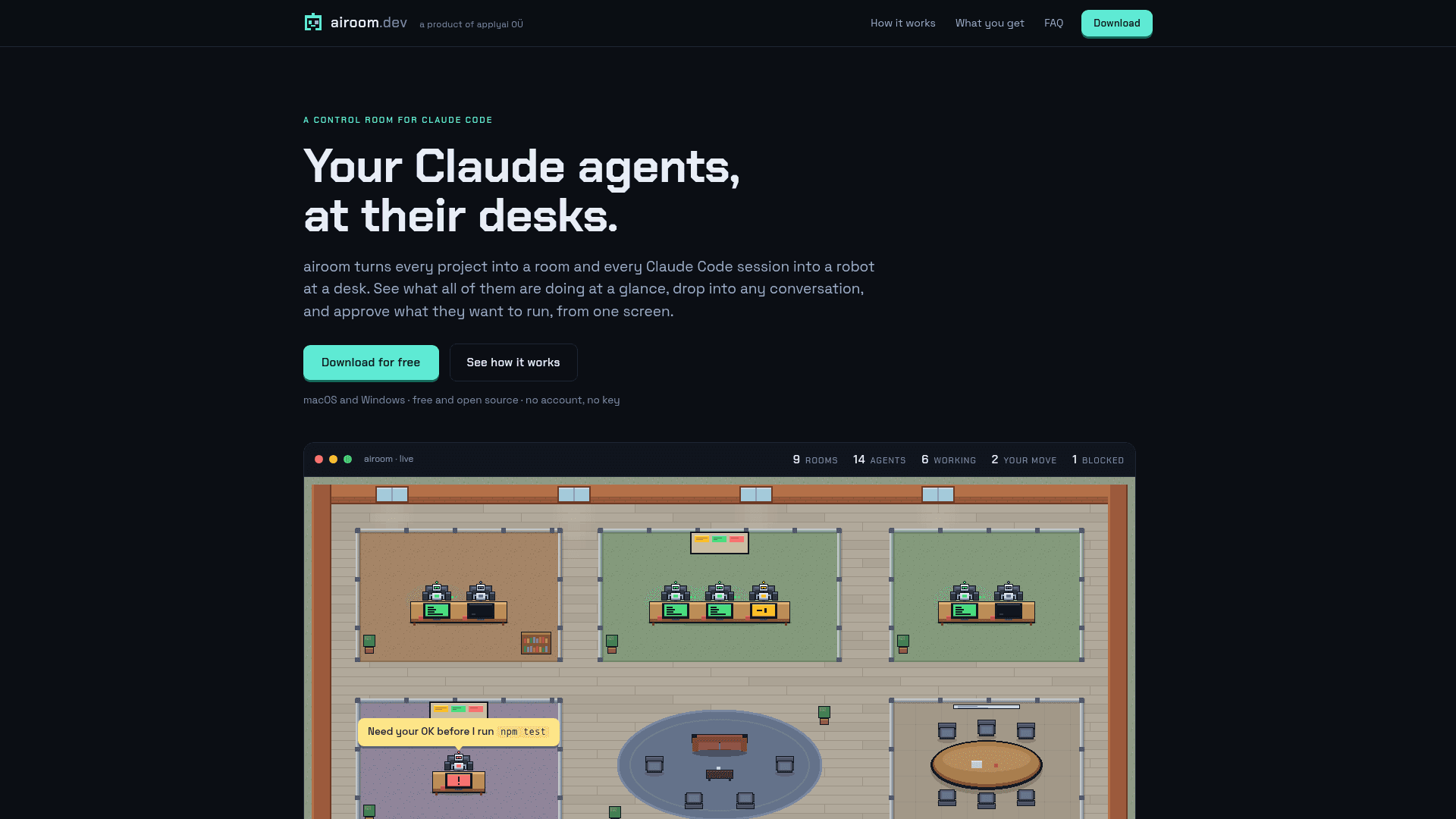
A desktop control room that shows every Claude Code session as a robot at a desk and lets you chat with agents and approve tool calls from one screen.
At a Glance
About airoom
airoom is a free, open-source desktop app from applyai OÜ that gathers Claude Code sessions into one visual office. Each project becomes a room and each session a desk, with monitor colors showing whether an agent is working, waiting on you, blocked, or idle. It runs on macOS (Apple Silicon) and Windows 11 x64 (beta) and requires Claude Code installed and signed in.
What It Is
airoom is a control room for Claude Code agents. It reads the transcripts Claude Code already writes to ~/.claude/projects and turns them into a pixel-art office. Clicking a desk opens that agent's live activity feed and a composer, so you can send a follow-up, queue a message, or interrupt a run without switching windows.
Approvals, Teams and Playbooks
Without the bypass toggle, every tool call pauses with the exact command and Allow/Deny buttons; undecided requests auto-deny after ten minutes. An empty desk can start a new session, or hire a team: a lead and a crew that work tasks in parallel, each in its own git worktree. A playbook feature reads a finished session and proposes an editable card with goal, inputs, rules, steps, and checks, so a task that worked once can be rerun.
Browser Pane and Connections
The desktop app includes a tabbed browser pane with Chrome-style profiles. Agents get an in-process MCP server named airoom-browser with tools such as navigate, snapshot, click, type, screenshot and evaluate. Pages on the local machine are open to agents, while other sites ask for approval first. Agents can alternatively use your own Chrome through Claude Code's Claude in Chrome integration. Each room also shows a patch panel of MCP connectors with status indicators and per-room switches.
Local-First Design
airoom drives the Claude Code installed on your machine under your own login, and its server listens only on 127.0.0.1. The README states it sends no telemetry; its only outbound request apart from Claude's own traffic and browser-pane pages is a version check. The project is licensed under Apache 2.0, and a hosted team office is described as a future paid product.
Community Discussions
Be the first to start a conversation about airoom
Share your experience with airoom, ask questions, or help others learn from your insights.
Pricing
Free
Free and open source under Apache 2.0, for use at home or at work. No account, no key, no trial. Requires Claude Code installed and signed in, so a Claude subscription is an external cost.
- Apache 2.0 licensed core product
- macOS 13+ (Apple Silicon) and Windows 11 x64 (beta)
- No account, no key, no trial
- Local-first: server listens only on 127.0.0.1
- Requires your own Claude Code installation and subscription (external cost)
Capabilities
Key Features
- Projects as rooms and Claude Code sessions as desks with status-colored monitors
- Live activity feed and chat with any agent
- Per-tool-call Allow/Deny approvals with auto-deny after ten minutes
- Hire a lead-and-crew team working in parallel git worktrees
- Playbooks generated from finished sessions
- Built-in tabbed browser pane with profiles and agent browser tools
- Option for agents to use your own Chrome
- MCP connector patch panel per room
- Menu-bar/tray badge and native notifications
- Command palette (⌘K / Ctrl+K)
- Local-only server bound to 127.0.0.1