Autonomy AI
AI development assistant called Fei that creates production-ready frontend code from Figma designs, text prompts, or tickets with iterative refinement.
At a Glance
About Autonomy AI
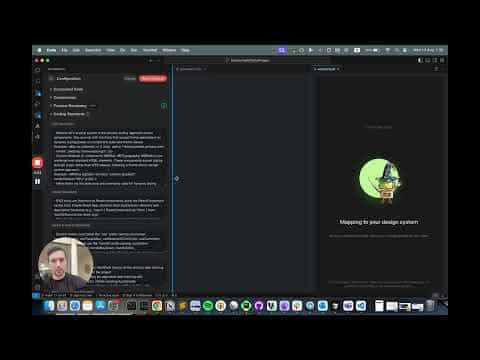
Autonomy AI provides Fei, an AI assistant that generates context-aware, production-ready frontend code from Figma designs, text descriptions, Jira/Linear tickets, or screenshots. Fei integrates directly into your IDE, understands your project's component library and coding standards, and enables iterative refinement through a diff-based review workflow. The platform is designed for designers, product managers, and developers who need to create and update UIs quickly while maintaining code quality and design system consistency.
- Multi-Input Code Generation Generate components from Figma links, text descriptions, Jira/Linear tickets, or uploaded screenshots; Fei analyzes your input and creates styled components using your project's existing design system.
- Use Case Templates Select from specialized workflows: New Component, UI Tweak, Add Functionality, Redesign Screen, New Screen Variant, New Design System Component, Update Design System Component, New Screen, and Refactor Component.
- Auto-Improved Components Fei automatically refactors and aligns reused components with your codebase standards; auto-improved components are marked with a ✨ badge for easy identification.
- Visual Preview (Beta) Preview updated components side-by-side with originals before accepting changes; preview automatically updates as you request refinements.
- Iterative Refinement Request changes through natural language; Fei updates code while keeping a diff history with orange icons showing specific change requests and grey/white icons showing overall changes.
- ReadMe Generation Each run generates a README documenting UI changes, inferred logic, and auto-improved components; provides full visibility into Fei's decision-making process.
- IDE Integration Work directly in VS Code or JetBrains IDEs; Fei applies changes in-place for existing files and creates new files in your configured output folder automatically.
- Component Reuse Intelligence Fei identifies and reuses existing components from your project; review which components will be used before generation begins.
- Diff-Based Review Compare old vs. new code with inline diffs; hover over files to see edit summaries; revert to earlier versions at any point in the workflow.
- Design System Alignment Fei detects repeated UI patterns, builds reusable components, and upgrades legacy screens to use current components and styles at scale.
To get started, open Fei in your IDE, select a use case that matches your task, provide your input (Figma link, description, ticket, or screenshot), review the generated code and preview, request refinements as needed, then click Finish Draft to apply changes to your codebase.
Community Discussions
Be the first to start a conversation about Autonomy AI
Share your experience with Autonomy AI, ask questions, or help others learn from your insights.
Pricing
Enterprise
Contact sales for pricing. Designed for teams building and refining frontend UIs with AI assistance.
- Fei AI assistant for code generation
- All use case templates (Component, Screen, Tweak, Functionality, Redesign, Variant, Refactor)
- Multi-input support (Figma, text, Jira, Linear, screenshots)
- Auto-improved components with design system alignment
- Visual preview and diff-based review
- IDE integration (VS Code and JetBrains)
- Iterative refinement workflow
- Custom code standardization
Capabilities
Key Features
- Fei AI assistant for frontend code generation
- Multi-input support: Figma, text, Jira, Linear, screenshots
- 12 specialized use case templates
- Visual preview with side-by-side comparison (Beta)
- Diff-based code review with change tracking
- Auto-improved components with ✨ badges
- Iterative refinement through natural language
- ReadMe generation for each run
- Component reuse intelligence
- Design system detection and alignment
- In-place file updates and automatic folder management
- Context-aware code generation from project standards
- IDE integration (VS Code and JetBrains)
- Version history with revert capability
- Feedback loop for continuous improvement
Integrations
Demo Video