
Main Menu
  • Tools
  • Developers
  • Topics
  • Discussions
  • News
  • Blogs
  • Builds
  • Contests
Create
Sign In
    EveryDev.ai
    Sign inSubscribe
    Home
    Tools

    1,707+ AI tools

    • New
    • Trending
    • Featured
    • Compare
    Categories
    • Agents890
    • Coding869
    • Infrastructure377
    • Marketing357
    • Design302
    • Research276
    • Projects272
    • Analytics266
    • Testing160
    • Integration157
    • Data150
    • Security131
    • MCP125
    • Learning124
    • Extensions108
    • Communication107
    • Prompts100
    • Voice90
    • Commerce89
    • DevOps70
    • Web66
    • Finance17
    Sign In
    1. Home
    2. Tools
    3. ClaudeMDEditor
    ClaudeMDEditor icon

    ClaudeMDEditor

    Configuration Management

    A macOS desktop app for visually managing AI coding assistant configuration files across multiple projects, supporting Claude Code, Cursor, Copilot, Windsurf, Gemini, and more.

    Visit Website

    At a Glance

    Pricing

    Paid
    ClaudeMDEditor: $13

    Engagement

    Available On

    macOS
    API
    CLI

    Resources

    WebsiteDocsllms.txt

    Topics

    Configuration ManagementAI Coding AssistantsDevelopment Environments

    Alternatives

    OpenSpecai-rules-syncAgent Rules Builder

    Developer

    vinczvincz builds ClaudeMDEditor, a macOS desktop app for managin…

    Listed Mar 2026

    About ClaudeMDEditor

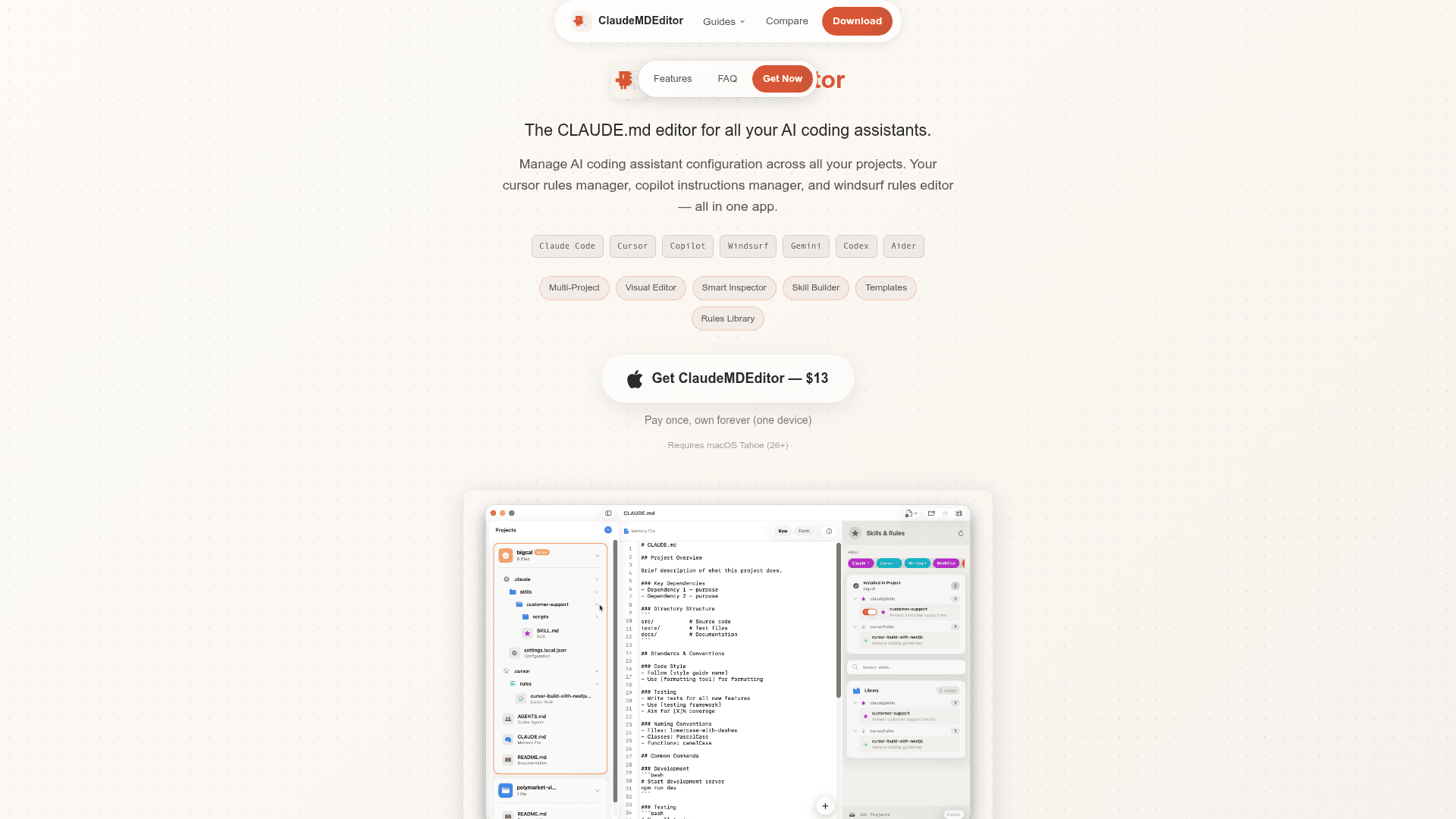
    ClaudeMDEditor is a macOS desktop application that provides a unified visual editor for all AI coding assistant configuration files. It eliminates the chaos of managing scattered config files across multiple projects by bringing CLAUDE.md, .cursorrules, copilot-instructions.md, .windsurfrules, GEMINI.md, and more into a single interface. The app is a one-time purchase designed for developers who use multiple AI coding tools and need a consistent, organized way to manage their agent rules and skills.

    • Multi-Project Manager — Auto-discovers all AI config files across your repositories, enabling instant project switching without terminal juggling.
    • Visual Editor with Two Modes — Form mode for guided, easy editing and Raw mode for full control over your configuration files.
    • Skills & Rules Builder — A wizard-driven interface to create cursor rules, Claude Code skills, and Windsurf workflows visually.
    • Skills & Rules Library — A unified library to enable or disable rules per project and install multi-project AI rules across all your repos, with filter pills for each AI tool.
    • Templates & Snippets — Pre-made sections for project overviews, coding standards, and workflows to jump-start your AI coding setup.
    • Smart Inspector — Reveals exactly what the AI reads — headers, code blocks, and file structure — so you know what your agent sees.
    • Validation — Catches errors in your configuration files before your AI assistant processes them.
    • Broad AI Tool Support — Handles Claude Code, Cursor, GitHub Copilot, Windsurf, Gemini, OpenAI Codex, and Aider with dedicated templates and smart file detection.
    • One-Time Purchase — Pay once and own the app forever on one device; no subscription required.

    To get started, download ClaudeMDEditor (requires macOS Tahoe 26+), open the app, and point it at your project directories. It will auto-find all supported AI config files and present them in the unified editor.
    ClaudeMDEditor - 1

    Community Discussions

    Be the first to start a conversation about ClaudeMDEditor

    Share your experience with ClaudeMDEditor, ask questions, or help others learn from your insights.

    Pricing

    ClaudeMDEditor

    One-time purchase for lifetime access on one device.

    $13
    one time
    • Multi-project AI config file management
    • Visual editor (Form and Raw modes)
    • Skills & Rules Builder
    • Unified Skills & Rules Library
    • Templates and snippets
    • Smart Inspector
    • Validation
    • Support for Claude Code, Cursor, Copilot, Windsurf, Gemini, Codex, Aider
    • One device license
    View official pricing

    Capabilities

    Key Features

    • Multi-project AI config file management
    • Visual editor with Form and Raw modes
    • Skills & Rules Builder wizard
    • Unified Skills & Rules Library
    • Templates and snippets for quick setup
    • Smart Inspector for file structure analysis
    • Validation of config files before AI reads them
    • Auto-discovery of AI config files across repos
    • Enable/disable rules per project
    • Support for CLAUDE.md, AGENTS.md, GEMINI.md, .cursorrules, copilot-instructions.md, .windsurfrules, CONVENTIONS.md, .mcp.json
    • One-time purchase, no subscription

    Integrations

    Claude Code
    Cursor
    GitHub Copilot
    Windsurf
    Gemini
    OpenAI Codex
    Aider
    API Available
    View Docs

    Reviews & Ratings

    No ratings yet

    Be the first to rate ClaudeMDEditor and help others make informed decisions.

    Developer

    vincz

    vincz builds ClaudeMDEditor, a macOS desktop app for managing AI coding assistant configuration files across multiple projects. The tool supports Claude Code, Cursor, Copilot, Windsurf, Gemini, Codex, and Aider in a single unified interface. vincz focuses on developer productivity tooling for the AI-assisted coding workflow.

    Read more about vincz
    WebsiteX / Twitter
    1 tool in directory

    Similar Tools

    OpenSpec icon

    OpenSpec

    A lightweight, open-source, spec-driven framework for AI coding agents that stores functional requirements alongside your code for persistent, reviewable context.

    ai-rules-sync icon

    ai-rules-sync

    A tool to synchronize AI coding rules across multiple AI coding assistants and IDEs from a single source of truth.

    Agent Rules Builder icon

    Agent Rules Builder

    Generate tailored AI coding assistant rules files for Cursor, Claude Code, GitHub Copilot, Windsurf, and more from 10,000+ community-contributed rules.

    Browse all tools

    Related Topics

    Configuration Management

    Tools for managing AI coding agent configurations, rules files, and project-level settings like CLAUDE.md, .cursorrules, AGENTS.md, and other agent-specific dotfiles.

    14 tools

    AI Coding Assistants

    AI tools that help write, edit, and understand code with intelligent suggestions.

    330 tools

    Development Environments

    AI-enhanced code editors and IDEs that improve the coding experience.

    106 tools
    Browse all topics
    Back to all tools
    Explore AI Tools
    • AI Coding Assistants
    • Agent Frameworks
    • MCP Servers
    • AI Prompt Tools
    • Vibe Coding Tools
    • AI Design Tools
    • AI Database Tools
    • AI Website Builders
    • AI Testing Tools
    • LLM Evaluations
    Follow Us
    • X / Twitter
    • LinkedIn
    • Reddit
    • Discord
    • Threads
    • Bluesky
    • Mastodon
    • YouTube
    • GitHub
    • Instagram
    Get Started
    • About
    • Editorial Standards
    • Corrections & Disclosures
    • Community Guidelines
    • Advertise
    • Contact Us
    • Newsletter
    • Submit a Tool
    • Start a Discussion
    • Write A Blog
    • Share A Build
    • Terms of Service
    • Privacy Policy
    Explore with AI
    • ChatGPT
    • Gemini
    • Claude
    • Grok
    • Perplexity
    Agent Experience
    • llms.txt
    Theme
    With AI, Everyone is a Dev. EveryDev.ai © 2026
    Sign in