
Codex-X
A free, open-source cross-platform desktop tool for managing OpenAI Codex configurations, providers, prompt injection, sessions, Skills, and MCP in a visual interface.
At a Glance
Codex-X is completely free and open source under the MIT license. All features are included at no cost.
Engagement
Available On
Alternatives
Listed Sep 2026
About Codex-X
Codex-X is a free, open-source desktop application built with Tauri 2, React 18, and Rust that provides a visual management layer for OpenAI Codex Desktop and Codex CLI users. It is independently developed and has no affiliation with OpenAI. The project is licensed under MIT and available on GitHub, where it has accumulated nearly 4,000 stars since its creation in mid-2026.
What It Is
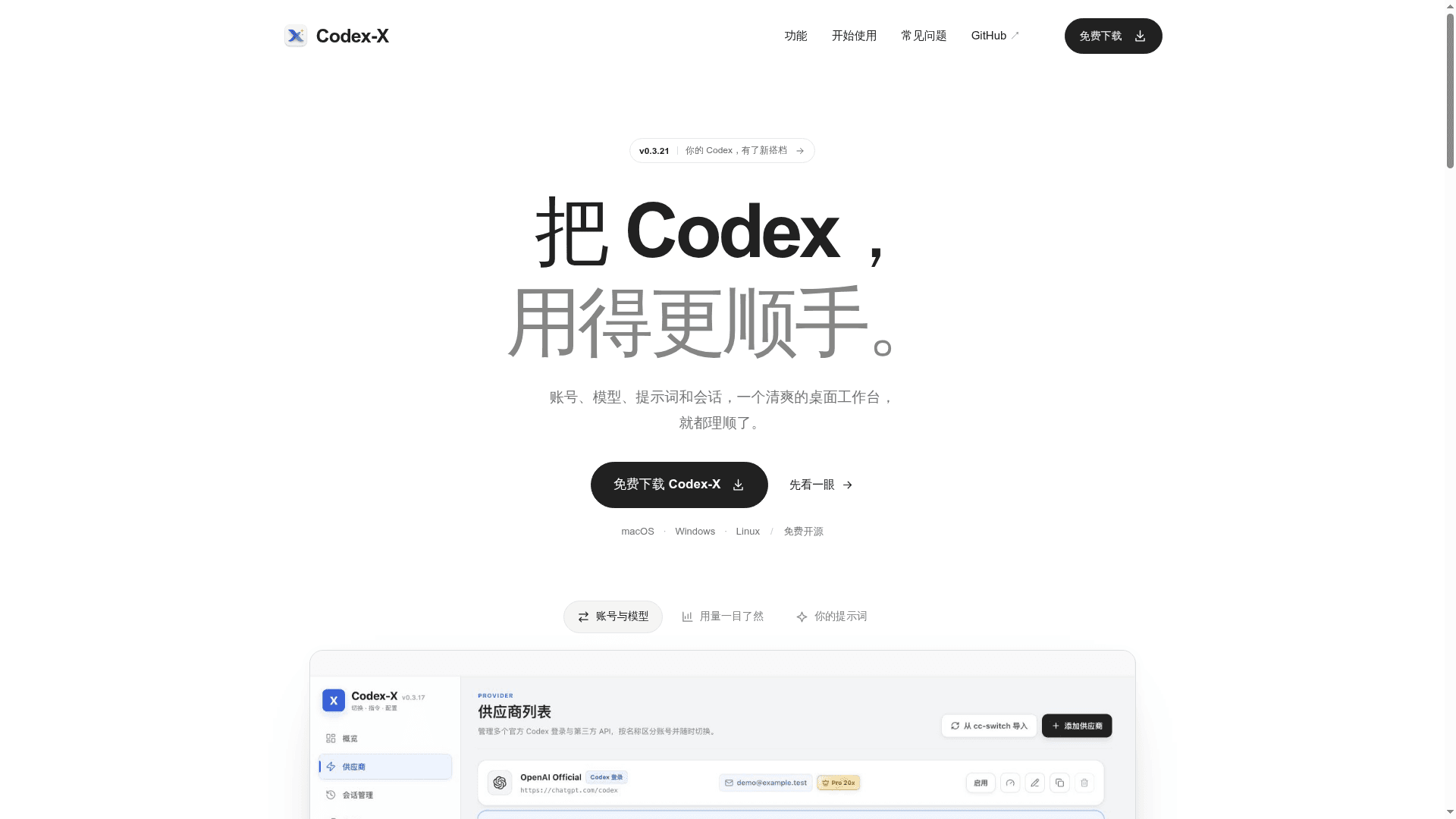
Codex-X centralizes the configuration tasks that Codex users typically handle by manually editing scattered TOML and JSON files. Instead of hand-editing ~/.codex/config.toml and auth.json, users get a desktop GUI that covers provider switching, prompt injection, session management, Skills/MCP control, and token usage analytics — all without requiring a separate account for Codex-X itself. All configuration, login credentials, and session data remain on the local machine.
Core Feature Set
The tool organizes its capabilities into several distinct areas:
- Prompt injection management — A visual library of 11 prompt templates (5 bundled offline, 6 synced from GitHub), with support for categories, Markdown import, custom prompts, and one-click enable/disable. Two injection modes are available: append to existing prompts or fully replace them.
- Provider and API management — Save and name multiple official Codex login configurations alongside third-party API providers (OpenAI, DeepSeek, MiniMax, Kimi, Qwen, GLM, MiMo, and others). Supports connection testing, model fetching, one-click copy/switch, and import from cc-switch.
- Session management — Search local sessions by title, project path, provider, or ID; group by project; sync sessions to the current provider; and permanently delete individual or bulk sessions including their derived sub-sessions.
- Skills and MCP — A unified interface to view, import, enable, disable, and update Codex Skills and MCP servers without navigating multiple config directories.
- TOML and Auth editing — Full TOML editor with syntax highlighting, automatic backup before writes, and direct editing of
auth.jsonfor official Codex login state. - Token usage analytics — Filter local token usage by date and model, view daily trends, cache hit rates, model distribution, and the 10 most recent main sessions.
Technical Architecture
Codex-X is built on the Tauri 2 desktop framework, combining a React 18 / TypeScript / Vite frontend with a Rust backend. Local data is stored in SQLite via rusqlite. Configuration is read from and written to the standard Codex config directory (~/.codex/), with environment variable overrides supported (CODEX_HOME, CODEXX_HOME, CC_SWITCH_HOME). Codex-X's own database lives at ~/.codexx/codexx.db. Releases are built and published automatically via GitHub Actions across all supported platforms.
Platform Coverage
The project ships pre-built binaries for all major desktop platforms:
- macOS: Apple Silicon DMG (~10 MB) and Intel DMG (~10.7 MB)
- Windows: Installer EXE (~5.6 MB) and portable ZIP (~7.5 MB)
- Linux: AppImage (~83 MB), DEB (Debian/Ubuntu), and RPM (Fedora/openSUSE)
Installer editions support in-app automatic updates; the Windows portable edition requires manual updates.
Update: v0.3.21
The latest stable release is v0.3.21, published on September 22, 2026. The homepage describes it as "your Codex, with a new companion," and the release is available directly from GitHub Releases. The project was created in July 2026 and has seen active development, with the repository last pushed in late September 2026. The prompt template library has grown to 11 templates across coding, debugging, code review, writing, and security/reverse-engineering workflows, signaling continued expansion of the bundled content alongside the core management features.
Community Discussions
Be the first to start a conversation about Codex-X
Share your experience with Codex-X, ask questions, or help others learn from your insights.
Pricing
Free & Open Source
Codex-X is completely free and open source under the MIT license. All features are included at no cost.
- Visual prompt injection management
- Multi-provider and API management
- Session management and search
- Skills and MCP management
- TOML and auth.json editor
Capabilities
Key Features
- Visual prompt injection management with 11 templates (5 offline, 6 GitHub-synced)
- Multiple named provider configurations for official Codex and third-party APIs
- Session search, grouping by project path, and permanent deletion
- Skills and MCP unified management with enable/disable toggles
- Full TOML and auth.json editor with syntax highlighting and auto-backup
- Token usage analytics by date and model
- Import from cc-switch for existing provider configurations
- Connection testing and model fetching for third-party providers
- Cross-platform: macOS, Windows, Linux
- In-app automatic updates for installer editions
- Local-only data storage — no Codex-X account required
- Markdown import for custom prompt templates