
Mopup
A native macOS app that finds junk, duplicates, unused apps and developer leftovers like agent worktrees and stale dev servers, and removes only what you choose.
At a Glance
Scanning is free and the first 2 GB of cleaning is free; further cleaning needs a plan.
Engagement
Available On
Listed Nov 2026
About Mopup
Mopup is a native Mac app made by Suman Maharjan that shows what is filling a Mac and removes only what the user selects. It scans for caches, logs, old installers, duplicate files, similar photos and unused apps, and it also targets developer leftovers such as build caches, merged git worktrees and dev servers left running. It requires macOS 15 or later and runs on Apple silicon and Intel.
What It Is
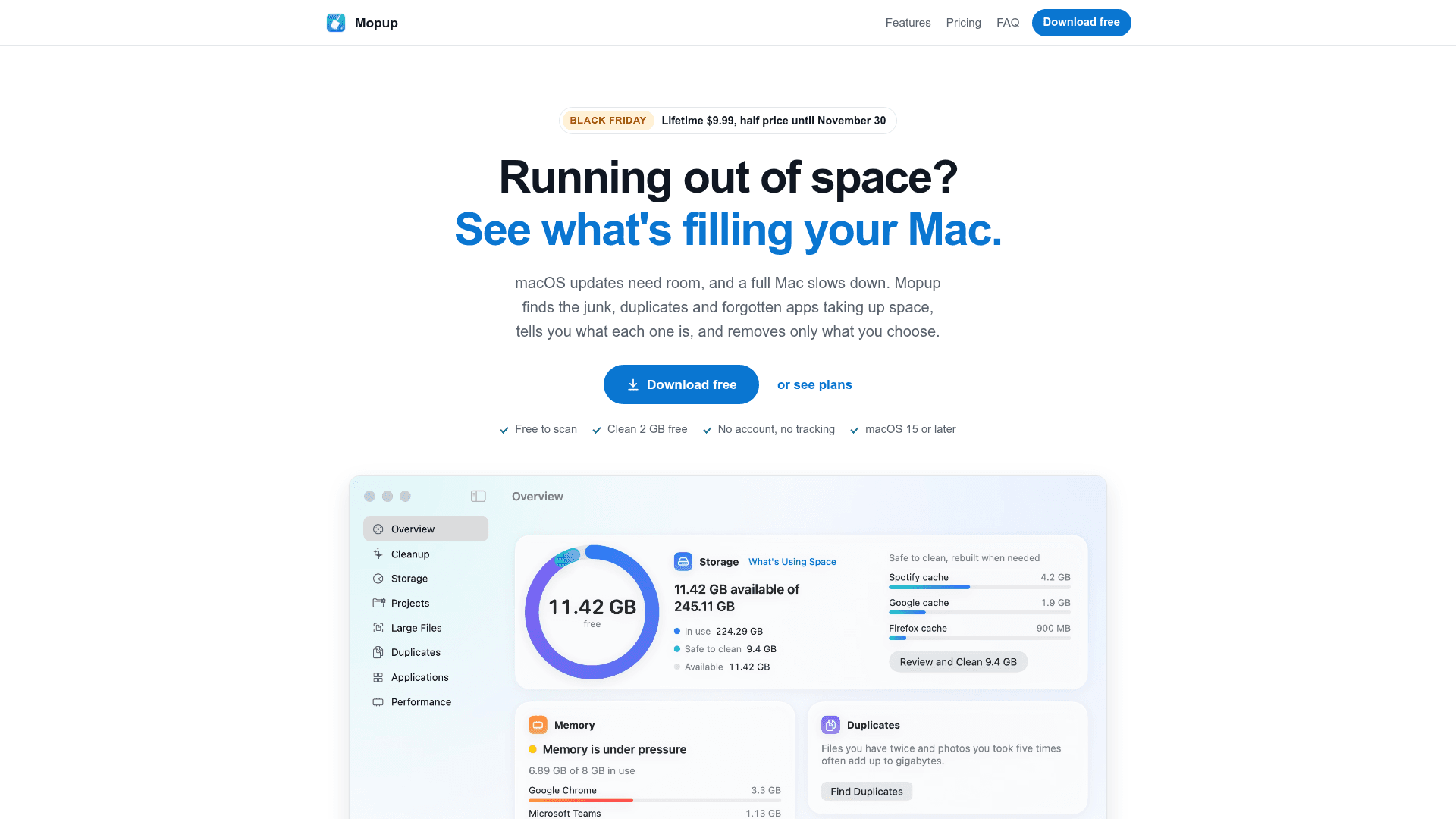
Mopup is a disk cleaner and Mac diagnostic tool. Scanning runs locally and is free. Items are sized and explained before removal, safe items are pre-ticked, and anything a user might want back is marked "Your call" and left unticked. Files and apps the user picks go to the Trash so they can be restored. Documents, the Photos library and code are never part of a cleanup, according to the site.
Developer Cleanup
For people who write code, Mopup looks for build caches, merged git worktrees, dev servers left running and what AI apps leave behind. The git worktree check asks GitHub which pull requests have merged. The maker's about page describes the origin: a MacBook filled with build caches, dozens of git worktrees (many created by coding agents) and an unstopped dev server holding memory. The site also publishes guides on cleaning Claude Code, Cursor and Codex worktrees, Xcode DerivedData, Docker disk space and node_modules. Stopping apps and dev servers is free.
Making Room and Finding Slowdowns
When a macOS update is waiting and space is short, Mopup aims for the room the update needs (about 30 GB for a new macOS version, per the site). It picks the biggest safe items to clear, including leftover installers and Time Machine snapshots. A storage map of the home folder shows what takes the most room, with System Data explained. A one-click diagnosis names what is slowing the Mac, such as an app hogging memory or a nearly full disk, and offers a fix that asks before quitting anything.
Everyday Monitoring and Privacy
A menu bar panel shows free space, memory and top memory-using apps. Alerts warn when the disk is nearly full or memory stays tight, and a weekly check can nudge or clean safe items automatically. A large files list and a cleaning history are included. The app has no account, analytics or tracking, scans stay on the Mac, and releases are signed and notarized by Apple.
Community Discussions
Be the first to start a conversation about Mopup
Share your experience with Mopup, ask questions, or help others learn from your insights.
Pricing
Free
Scanning is free and the first 2 GB of cleaning is free; further cleaning needs a plan.
- Free to scan
- Clean first 2 GB free
- No account, no tracking
- Stopping apps and dev servers stays free
Yearly
Clean as much as you like, with every update while subscribed, on every Mac you own.
- Clean as much as you like, while you're subscribed
- Every update while you're subscribed
- Every Mac you own
- If you cancel, scanning stays free
- 30-day refund
Lifetime
One-time payment, every update for good; Black Friday price $9.99 instead of $19.99 until November 30.
- Clean as much as you like
- Every update for good
- No subscription
- Every Mac you own
Team 5 people
Yearly team plan covering 5 people on every Mac they work on.
- 5 people
- Every Mac each person works on
Team 10 people
Yearly team plan covering 10 people on every Mac they work on.
- 10 people
- Every Mac each person works on
Capabilities
Key Features
- Junk, cache, log and old installer cleanup
- Storage map of the home folder with System Data explained
- Duplicate file and similar photo detection
- Complete app uninstaller including leftovers
- One-click diagnosis of why the Mac is slow
- Make-room mode for macOS updates
- Developer cleanup: build caches, merged git worktrees, running dev servers, AI app leftovers
- Menu bar panel with free space and memory
- Disk and memory alerts
- Weekly check with optional auto-clean of safe items
- Large files list
- Cleaning history
- Files go to the Trash for restore
- Local scanning with no account or analytics