
Open CoDesign
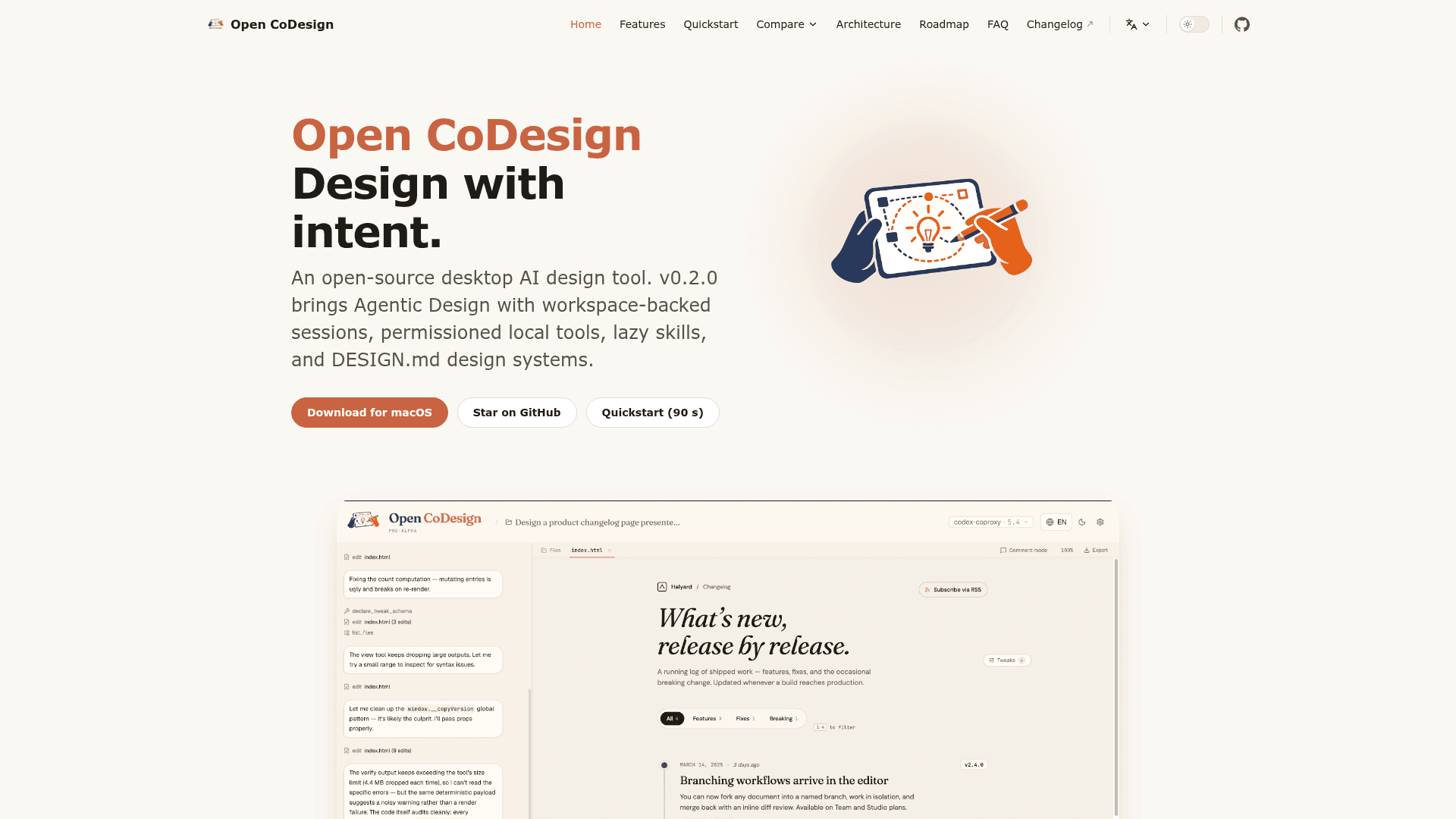
Open-source desktop AI design tool that turns prompts into prototypes, slide decks, and marketing assets using the model you choose.
At a Glance
Free MIT-licensed desktop app; users bring their own model/provider key or subscription, and no per-token charges are made by the tool.
Engagement
Available On
Listed Oct 2026
About Open CoDesign
Open CoDesign is an MIT-licensed Electron desktop app from OpenCoworkAI that turns prompts into interactive prototypes, slides, and other design artifacts. It is local-first and bring-your-own-model, so designs, prompts, and settings stay on disk. The latest GitHub release listed is v0.2.2; the v0.2 line introduced Agentic Design with workspace-backed sessions.
What It Is
Open CoDesign is a desktop AI design tool positioned by its maintainers as an open-source alternative to Claude Design, v0, Lovable, Bolt.new, and Figma AI. You describe a design, and an agent generates an HTML or JSX/React prototype that renders in a sandboxed preview next to the chat. Fifteen built-in demo briefs (landing page, dashboard, pitch slide, pricing page, mobile app, chat UI and more) and twelve design skill modules give starting points, and you can add your own SKILL.md files.
How the Agentic Workflow Works
Each design is a long-running session with a real workspace folder. The agent can read, edit, and run permissioned local tools, preview its work, and keep decisions in files. Tools include ask, scaffold, skill, preview, gen_image, tweaks, todos, and done. A live panel shows todos and tool calls and stays interruptible. Brand tokens and design-system decisions are stored in a DESIGN.md file rather than model memory. Sessions are stored as JSONL.
Refining and Exporting
- Comment mode: click an element, drop a pin, and the model rewrites only that region.
- AI-emitted tweak sliders for values such as color, spacing, and font.
- Phone, tablet, and desktop preview frames, plus fullscreen preview and a Files panel.
- Optional AI image generation and opt-in web research for slides.
- Decompose to UI Kit emits a ui_kits folder shaped for coding-agent handoff.
- Exports to HTML, PDF (via local Chrome), PPTX, ZIP, and Markdown, generated on-device.
Models and Setup
Providers include Anthropic, OpenAI, Gemini, DeepSeek, OpenRouter, SiliconFlow, Atlas Cloud, local Ollama, and any OpenAI-compatible endpoint, including keyless proxies. Existing Claude Code or Codex provider configs can be imported, and ChatGPT subscription sign-in is supported for Codex models. Installers exist for macOS, Windows, and Linux, with Homebrew and Scoop packaging. The README notes installers are not yet notarized or code-signed.
Community Discussions
Be the first to start a conversation about Open CoDesign
Share your experience with Open CoDesign, ask questions, or help others learn from your insights.
Pricing
Open Source (MIT)
Free MIT-licensed desktop app; users bring their own model/provider key or subscription, and no per-token charges are made by the tool.
- MIT License
- Bring your own model (Anthropic, OpenAI, Gemini, DeepSeek, OpenRouter, Ollama, any OpenAI-compatible endpoint)
- ChatGPT subscription sign-in
- Local-first, no mandatory account, no telemetry by default
- Exports: HTML, PDF, PPTX, ZIP, Markdown
Capabilities
Key Features
- Prompt to HTML or JSX/React prototype in a sandboxed preview
- Agentic design sessions with workspace-backed files and permissioned local tools
- DESIGN.md design systems as shared memory
- Comment mode for region-level rewrites
- AI-generated tweak sliders
- Fifteen built-in demos and twelve design skill modules
- Phone, tablet, and desktop preview frames
- Opt-in AI image generation
- Decompose to UI Kit for coding-agent handoff
- Export to HTML, PDF, PPTX, ZIP, and Markdown
- Bring-your-own-key multi-provider support including local Ollama
- One-click import of Claude Code and Codex provider configs
- Local-first storage of designs and settings
- Light and dark themes with English and Simplified Chinese UI