
Piebald
Cross-platform agentic AI development tool that lets developers orchestrate parallel agents with full control over context and configuration.
At a Glance
About Piebald
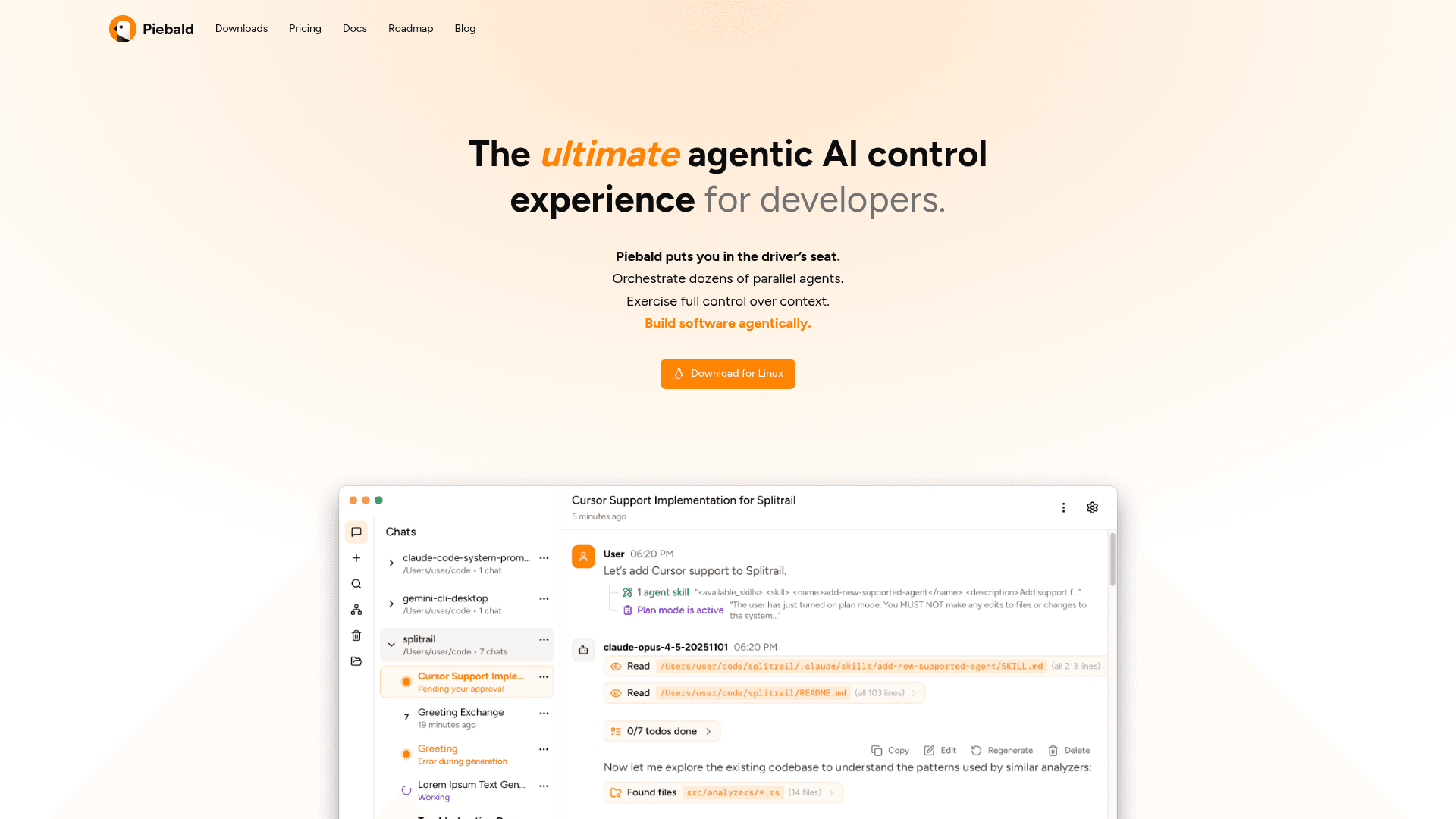
Piebald is a cross-platform agentic AI control application designed for developers who want full command over their AI-assisted development workflow. It enables users to orchestrate dozens of parallel agents, exercise complete control over context, and build software agentically without requiring WSL or Git Bash on Windows. The tool supports major AI providers including OpenAI, Anthropic, and Google, and allows users to import credentials from existing subscriptions like Claude Pro/Max, ChatGPT Pro/Plus, and Google AI Pro/Ultra.
-
Use Your Own Subscriptions - Connect directly to OpenAI, Anthropic, Google APIs, or any compatible API, and import credentials from Claude Code, Codex CLI, or Gemini CLI to leverage existing AI subscriptions.
-
Draft Prompt Preservation - Automatically saves all prompts as you type, allowing you to switch between chats without losing work and return to continue where you left off.
-
Session Persistence - All sessions are safely persisted across machine reboots, including pending tool calls waiting for approval, with clear status indicators in the sidebar.
-
Fine-Grained Configuration - Customize system prompts, inference hyperparameters like temperature and max tokens, stop sequences, and provider-specific fields with JSON override support.
-
Profiles - Create reusable collections of configuration and tools for different use cases, such as a "Chatting" profile with limited tools for general conversations.
-
HTTP Traffic Inspector - Pro feature that provides real-time visibility into all HTTP requests powering the agentic development experience, including headers, bodies, status codes, and SSE chunks.
-
MCP Tool Support - Full Model Context Protocol tool-calling support with the ability to enable/disable MCP servers and individual tools on a per-chat and per-profile basis.
-
Agent Skills & Plan Mode - Load agent skills to augment AI capabilities, use plan mode to have the model devise solutions awaiting approval, and manually or automatically compact chats to preserve context.
-
Chat Management - Features include chat continuation, automatic and manual tagging, relocation and duplication, clickable path references, and GitHub-style markdown admonitions.
To get started, download Piebald for your platform (Windows, macOS, or Linux), configure your AI provider credentials or import from existing CLI tools, and begin creating agentic development sessions with full control over your workflow.
Community Discussions
Be the first to start a conversation about Piebald
Share your experience with Piebald, ask questions, or help others learn from your insights.
Pricing
Basic
Free tier with core agentic development features
- MCP tool-calling support
- Plan mode
- Agent Skills
- Agent rules (AGENTS.md)
- File @-mentioning
Pro Free Trial
Try Pro features before purchasing
- Comprehensive, real-time HTTP traffic logging & inspection
- Enhanced chat status in the sidebar
- Chat continuation
- Copy plans to clipboard
- Automatic & manual chat tagging
Pro
Advanced features for professional agentic development
- Comprehensive, real-time HTTP traffic logging & inspection
- Enhanced chat status in the sidebar
- Chat continuation
- Copy plans to clipboard
- Automatic & manual chat tagging
- Chat relocation & duplication
- Clickable path references in AI responses
- GitHub-style callouts/admonitions in markdown
- Customizing the diffing viewing library
- Pausing the agentic loop
Capabilities
Key Features
- MCP tool-calling support
- Plan mode
- Agent Skills
- Agent rules (AGENTS.md)
- File @-mentioning
- Regenerating responses
- Rich text editor
- Support for OpenAI, Anthropic, and Google APIs
- Manual/auto chat compaction with custom instructions
- System prompt and hyperparameter customization
- Web searching/fetching
- Pending tool calls persisted across app restarts
- Draft prompts preserved per-chat
- Customizable shell for command execution
- Profiles for reusable configurations
- HTTP traffic logging and inspection
- Chat continuation
- Chat tagging
- Chat relocation and duplication
- Clickable path references in AI responses
- Pausing the agentic loop