
prismantis
A Claude Code mod that redraws replies with colored tables, highlighted code, mermaid diagrams and charts, themes and copy buttons.
At a Glance
prismantis core mod is MIT licensed and free to use, modify and distribute; installed via the Claude Code plugin marketplace.
Engagement
Available On
Alternatives
Listed Nov 2026
About prismantis
prismantis is an open-source Claude Code mod by Nahum Litvin that redraws Claude's replies in the terminal with colored tables, syntax-highlighted code and mermaid diagrams drawn as text art. It installs as a Claude Code plugin and can be turned off in /plugin, which brings back Claude Code's own renderer. The latest release listed is v0.47.0, and it requires Claude Code 2.1.287 or later.
What It Is
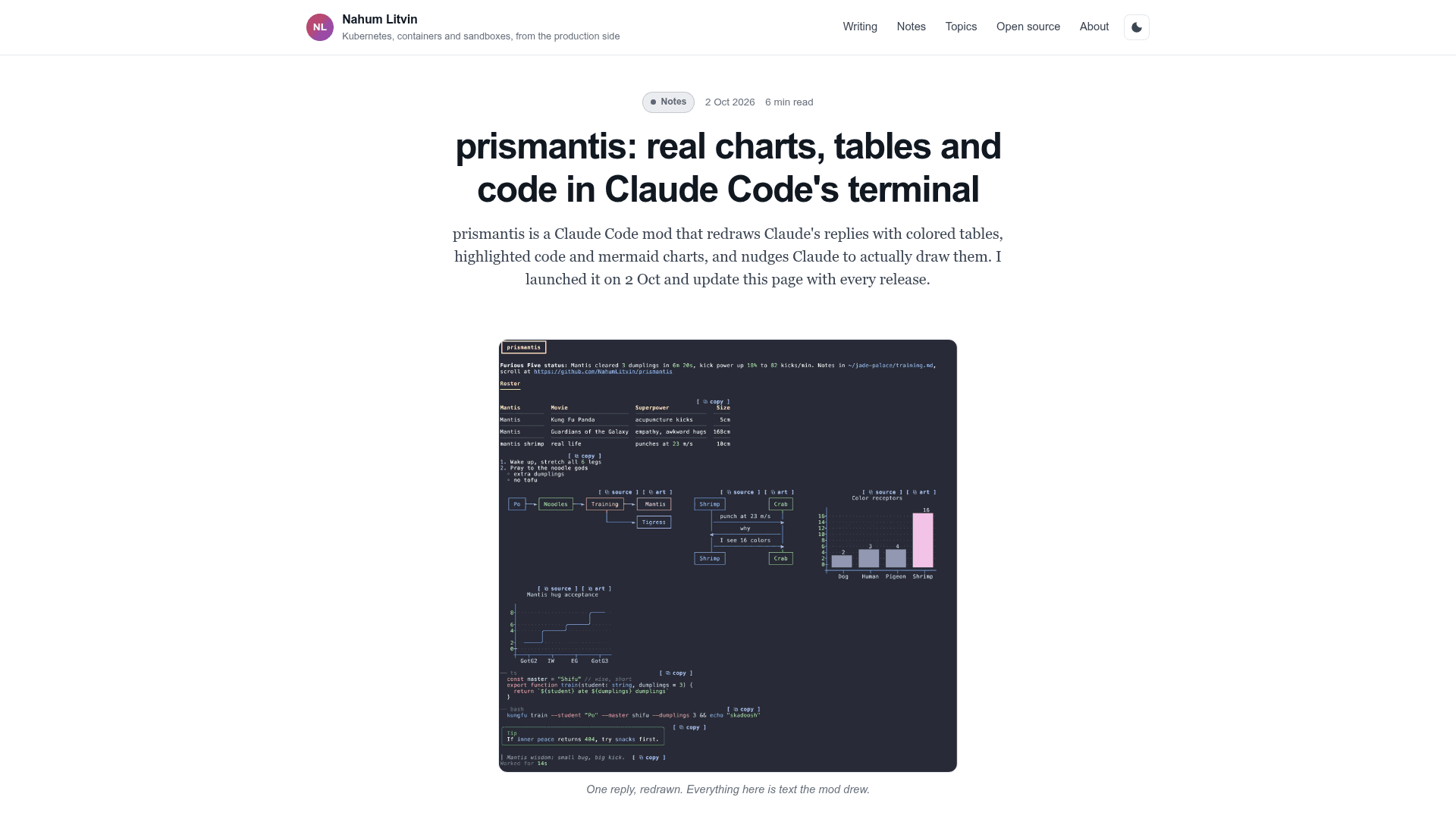
prismantis is a mod made of TypeScript hooks that run inside Claude Code. A ui.render hook receives each piece of the transcript before it is drawn and returns what to draw instead. Instead of pipes and dashes for tables and mermaid source for diagrams, it draws boxed tables, charts, flowcharts and highlighted code. The README says it makes no network calls and runs a program only for specific opt-in actions such as the clipboard helper or LaTeX rendering.
What It Draws
- Tables with colored headers, alignment, colored numbers and several layouts, plus opt-in coloring for status, test, benchmark, schema, API, config, comparison and grouped tables.
- Code with Prism highlighting in two dozen languages, shell lines colored like a prompt, and folding of long blocks.
- Mermaid flowchart, sequence, state, class and ER diagrams, bar, line and pie charts, gantt, quadrant, mind map, journey, kanban and git graph.
figureblocks, text pictures drawn as written in the theme's colors.- LaTeX math typeset as images in kitty and Ghostty when RaTeX's renderer is installed and
latexis enabled. - Chat-style prompt and reply bubbles, tool rows, diff cards, a turn footer, and right-to-left handling for Hebrew and Arabic.
Themes, Copy Buttons and Configuration
Themes switch with /prismantis theme <name>, covering Catppuccin, Dracula, Nord, Tokyo Night and others plus a mono option, with color overrides for each slot. In the Claude Code desktop app, desktopColors set to match themes the whole Code tab (Claude Code 2.1.324+). Copy buttons copy Markdown, drawn art, HTML for tables, or a PNG of tables, diagrams and figures. Options are set in /config or ~/.claude/settings.json.
Getting Claude to Draw
Claude does not know the terminal can draw charts, so with diagramHints on (default) each prompt carries a short model-only note, about 630 tokens according to the README, telling it that tables, mermaid diagrams and figures render. The README says this note is the one thing the mod sends the model.
Setup Path
Install with /plugin marketplace add NahumLitvin/prismantis and /plugin install prismantis@prismantis, then run /prismantis setup to pick a theme and styles and /prismantis demo for a tour. The README also documents Codex and OpenCode versions. Documented limits: the parser covers what Claude writes, not full CommonMark, so HTML draws as plain text, and some emoji widths may be off by one. It has been tested by hand in the macOS terminal.
Community Discussions
Be the first to start a conversation about prismantis
Share your experience with prismantis, ask questions, or help others learn from your insights.
Pricing
Open Source (MIT)
prismantis core mod is MIT licensed and free to use, modify and distribute; installed via the Claude Code plugin marketplace.
- MIT licensed
- Colored tables, highlighted code, mermaid diagrams and charts in Claude Code
- Themes with copy buttons
- No network calls
- Requires Claude Code 2.1.287 or later
Capabilities
Key Features
- Colored, aligned tables with multiple styles and layouts
- Prism syntax highlighting in 24 languages
- Mermaid diagrams and charts drawn as text art
- Figure blocks for text pictures
- LaTeX math rendering in kitty and Ghostty
- 19 themes with per-token color overrides
- Copy buttons for markdown, art, HTML and PNG
- Chat-style prompt and reply bubbles
- Tool rows and diff cards
- Right-to-left support for Hebrew and Arabic
- Diagram hints note that prompts Claude to draw charts
- Full desktop app theming