
Prompt Optimizer
An open-source tool that optimizes, tests, evaluates and saves AI prompts, available as a web app, desktop app, Chrome extension, Docker deployment and MCP server.
At a Glance
Self-hosted core product licensed under AGPL-3.0-only; commercial use allowed but source must be disclosed when distributing or offering network services.
Engagement
Available On
Alternatives
Listed Oct 2026
About Prompt Optimizer
Prompt Optimizer is an open-source prompt optimization tool published by linshenkx on GitHub. It helps users rewrite and improve system and user prompts, then test and compare the results against configured AI models. It is available as a web application, a desktop application, a Chrome extension and a Docker deployment, and the latest listed release is v2.11.11.
What It Is
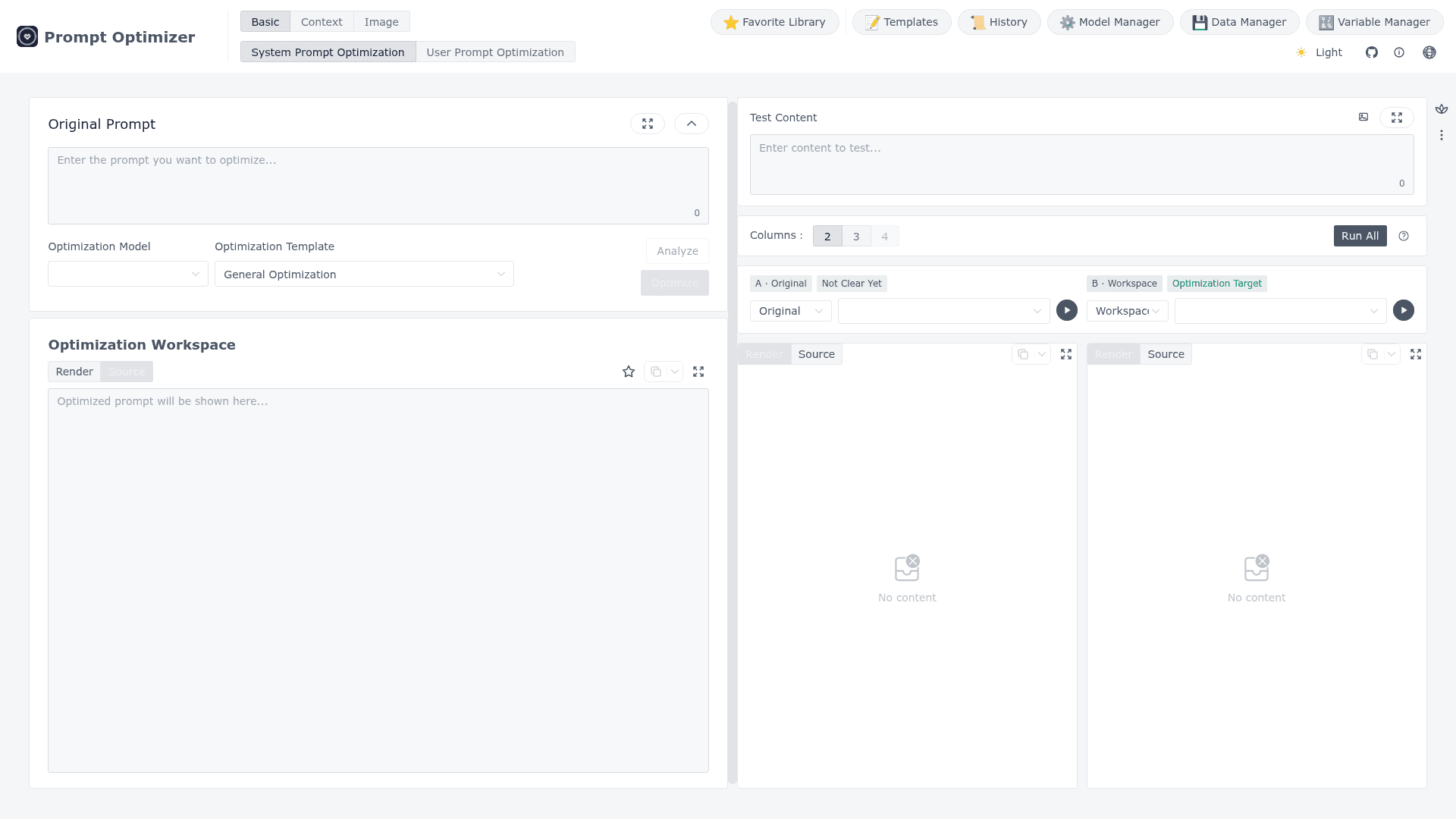
Prompt Optimizer takes an original prompt, applies a chosen optimization template and a chosen model, and shows the optimized result in a workspace. Prompts can start from manual writing, templates, local imports or Prompt Garden import codes. The workspace has modes for text (system and user prompts) and image prompts, plus a favorites library, templates, history, a model manager, a data manager and a variable manager.
Optimization, Testing and Evaluation
The README describes one-click optimization with multi-round iterative improvement. It also covers analysis, single-result evaluation and compare evaluation of several results to judge whether a prompt actually improved. The advanced testing mode supports context variables with batch replacement, multi-turn conversation testing and Function Calling with OpenAI and Gemini tool calling. Image modes cover text-to-image, image-to-image and multi-image generation with models such as Gemini, Seedream and Grok.
Models and Privacy Architecture
Users connect their own model providers, including OpenAI, Gemini, DeepSeek, Grok, Zhipu AI, SiliconFlow and MiniMax, plus OpenAI-compatible custom endpoints such as Ollama. The README says processing is client-side and requests go directly to the configured provider. Because the web versions are pure frontend apps, browser CORS restrictions can block some APIs. The desktop app avoids these restrictions.
Deployment and MCP Support
Besides the hosted online version, the project can be deployed to Vercel or Cloudflare, or run with Docker or Docker Compose. Docker deployments can enable password protection through environment variables. The Docker image also starts an MCP server at the /mcp path, exposing optimize-user-prompt, optimize-system-prompt and iterate-prompt tools for MCP-compatible clients such as Claude Desktop. The project is licensed under AGPL-3.0.
Community Discussions
Be the first to start a conversation about Prompt Optimizer
Share your experience with Prompt Optimizer, ask questions, or help others learn from your insights.
Pricing
Open Source (AGPL-3.0)
Self-hosted core product licensed under AGPL-3.0-only; commercial use allowed but source must be disclosed when distributing or offering network services.
- Licensed under GNU Affero General Public License v3.0 only
- Web app, desktop app, Chrome extension, and Docker deployment
- Personal use, internal company use, and commercial modification permitted
- Source disclosure required when distributing software or offering network services
- Own LLM/API provider costs are external
Capabilities
Key Features
- One-click prompt optimization with multi-round iteration
- System prompt and user prompt optimization
- Analysis, evaluation and compare evaluation
- Text-to-image, image-to-image and multi-image prompt modes
- Context variable management and multi-turn conversation testing
- Function Calling support for OpenAI and Gemini
- Favorites library with version history and source binding
- Templates, history, model manager and data manager
- Backup export and import of favorites
- Password protection for deployments
- MCP server with prompt optimization tools
- Web, desktop, Chrome extension and Docker deployment