
Rebyte
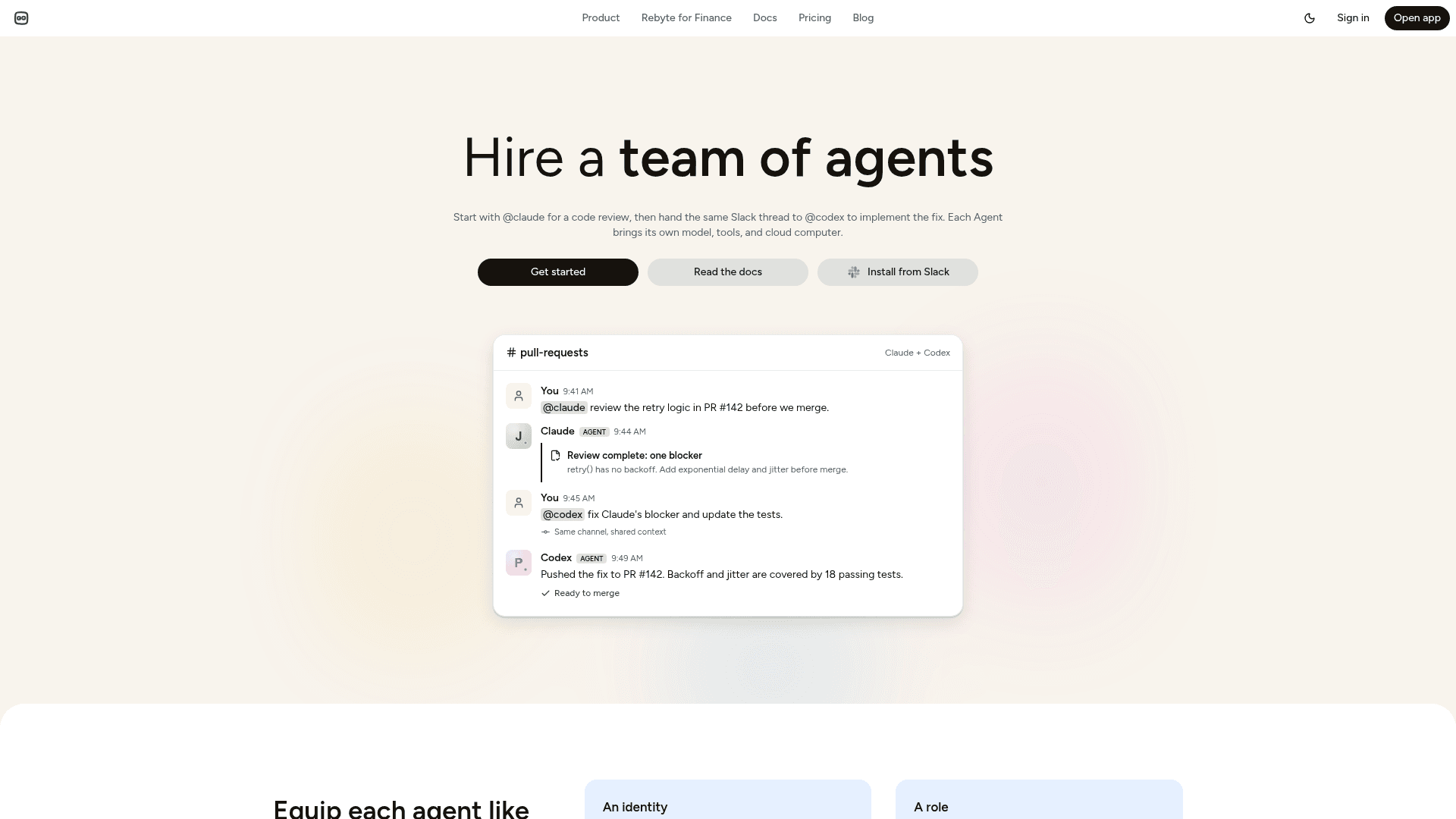
Rebyte lets you hire a team of AI agents — each with its own identity, role, cloud computer, and tools — that work alongside your team in Slack and other apps.
At a Glance
About Rebyte
Rebyte is a multi-agent platform built by ReByte, Inc. that lets teams deploy AI agents as named, scoped digital employees — each with its own cloud computer, role, and access controls. Rather than a single chatbot, Rebyte lets you assemble a team of specialized agents (researcher, engineer, analyst, on-call SRE) that run independently and in parallel, coordinated through natural conversation in Slack or via API.
What It Is
Rebyte positions itself in the "agentic workforce" category: instead of a chat interface or autocomplete tool, it provisions persistent cloud VMs for each agent, giving them a real file system, shell, browser, and network. Agents are set up the way you'd onboard a human hire — with an identity (username/password or private key), a role defined in plain language, a computer, tools, and access permissions granted exactly as they would be for a teammate.
How the Agent Model Works
Each agent on Rebyte is a first-class security principal that can be authenticated, audited, and revoked. The core building blocks are:
- Agent Computer: A persistent long-lived VM that retains state across tasks — file system, installed packages, and context all carry over.
- Agent Harness: The runtime that connects the model to the computer and tools.
- Skills: Capabilities like web search, coding agents (Claude Code, Codex), image/video generation, and connector integrations.
- Agent Context: A data layer that connects agents to structured sources — Snowflake, PostgreSQL, MySQL, S3, GCS, Azure Blob, Databricks — with support for CSV, JSON/JSONL, and Parquet formats.
- Agent Shield: Security controls including access control and prompt-level guardrails.
Integrations and Connectors
Rebyte connects agents to the tools teams already use. The connector library includes Slack, Gmail, Google Drive, Google Sheets, Google Calendar, Notion, Jira, Confluence, Salesforce, HubSpot, Zendesk, Microsoft Teams, Outlook, Excel, SharePoint, Snowflake, Monday.com, Gong, Salesloft, Productboard, Ashby, Freshservice, Statuspage, Vanta, Slab, Luma, Fathom, and UKG — with hundreds more listed as available.
Use Cases Across the Org
Rebyte targets cross-functional deployment rather than a single team. The platform highlights use cases including:
- Engineering: Picking up Linear/Jira tickets, writing fixes, opening PRs, getting builds green
- Customer support: Working the support inbox — answering, troubleshooting, refunding, escalating
- On-call/SRE: Watching logs, triaging alerts, opening incidents, paging humans when needed
- Sales: Enriching inbound leads, drafting outbound, prepping reps before calls
- Finance: Reconciling transactions, chasing invoices, flagging anomalies
- Recruiting: Screening applicants, scheduling interviews, drafting follow-ups
- Content/marketing: Drafting posts, SEO pages, decks, and newsletters
Transparency and Billing Model
Rebyte's pricing page emphasizes per-task receipts over rate cards. Every completed task shows an itemized bill: compute hours (billed at $0.10/hr while active, $0 when idle), individual model calls with token counts, proprietary skill calls (image/video generation, etc.), and a total in credits and dollars. The platform supports three model spend paths: bring your own API key (Anthropic, OpenAI, Google — Rebyte takes no margin), bring your own subscription (Claude Max or Gemini), or use Rebyte-hosted models billed in credits at at-cost rates.
API and Developer Access
Rebyte exposes a REST API for programmatic agent management. Developers can create Agent Computers, list and inspect them, run tasks against persistent workspaces, and wire up inbound and outbound webhooks. The API uses API key authentication and returns structured JSON. Three lines of curl are sufficient to spin up an agent, per the docs.
Community Discussions
Be the first to start a conversation about Rebyte
Share your experience with Rebyte, ask questions, or help others learn from your insights.
Pricing
Personal
Daily free usage with pay-as-you-go credits. No credit card required.
- Daily free usage on every agent
- Pay-as-you-go credits
- Unlimited agent computers
- Per-task itemized receipts
Pro
Bring your own key, private skills, and full task history.
- Bring your own API key
- Private skills
- Full task history
- Unlimited agent computers
- Per-task itemized receipts
Team
Governance, shared workspaces, team collaboration, and Agent Context.
- Governance controls
- Shared workspaces
- Team collaboration
- Agent Context
- Unlimited agent computers
- Per-task itemized receipts
Enterprise
SSO, SCIM, dedicated VPC, on-prem models, and custom SLAs.
- SSO
- SCIM
- Dedicated VPC
- On-prem models
- Custom SLAs
- Unlimited agent computers
- Per-task itemized receipts
Capabilities
Key Features
- Persistent cloud VMs (Agent Computers) per agent
- Multi-agent team management with parallel execution
- Slack-native agent interaction
- Bring your own API key (Anthropic, OpenAI, Google)
- Bring your own subscription (Claude Max, Gemini)
- Per-task itemized receipts with compute, model, and skill costs
- Agent identity with authentication, audit, and revocation
- Role-based access control for agents
- Agent Context data layer (Snowflake, PostgreSQL, S3, GCS, Azure, Databricks)
- Skills: web search, coding agents (Claude Code, Codex), image/video generation
- Inbound and outbound webhooks
- REST API for agent and task management
- Agent Shield security controls
- Hundreds of connectors (Slack, Gmail, Jira, Salesforce, HubSpot, Zendesk, etc.)
- Shared workspaces and team collaboration (Team plan)
- SSO and SCIM (Enterprise)
- Dedicated VPC and on-prem models (Enterprise)