Synopsule
On-device conversation recorder and transcriber for Mac and iPhone that keeps all audio local, labels every speaker, and exports clean transcripts to any format.
At a Glance
About Synopsule
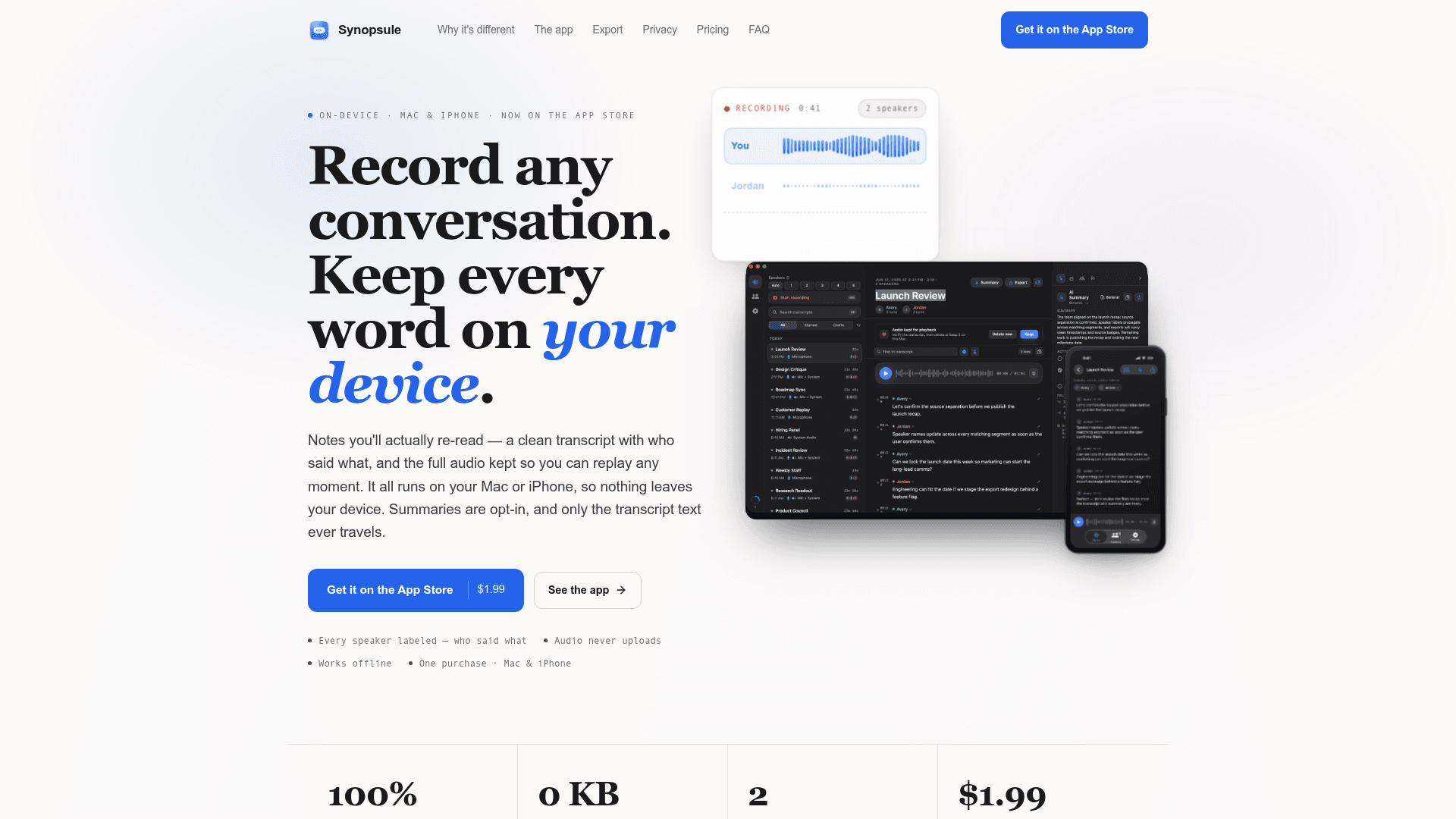
Synopsule is a universal Mac and iPhone app that records conversations, transcribes them locally using OpenAI's Whisper model, and labels every speaker — all without uploading audio anywhere. Built by Sunny Nagra, it is available as a one-time purchase on the App Store and works offline from the first launch. AI summaries are strictly opt-in, and only transcript text — never audio — can ever leave the device.
What It Is
Synopsule sits in the category of conversation recording and transcription tools, but its defining architectural choice is that all processing happens on the device. Where cloud-based meeting notetakers upload audio to remote servers, Synopsule runs a bundled Whisper model locally on Apple silicon, performs speaker diarization and voice recognition on-device, and stores the full audio for synchronized playback. The result is a searchable, labeled transcript with no account required and no audio upload, ever.
On-Device Architecture and Privacy Model
The privacy story is structural, not just a policy claim. The data path the product describes works as follows: audio is captured to a temporary file, Whisper transcribes it locally, speaker diarization runs on-device, and the raw capture is deleted after finalization. A playback-ready copy stays on the device until the user deletes it. The only data that can leave is transcript text, and only when the user explicitly presses Summarize. Even then, users can route summaries through their own OpenAI, Anthropic, or Gemini API key (so Synopsule never sees the text), through a local Ollama model on Mac, or through Apple Intelligence on eligible hardware — meaning a fully air-gapped summary path exists. No account or sign-in is required for any core function.
Capture and Transcription Capabilities
On Mac, Synopsule uses Apple's Core Audio process taps to record the microphone and system audio in separate lanes simultaneously — capturing both sides of a Zoom, Google Meet, or Teams call without a bot joining the meeting and without a virtual audio driver. On iPhone, it records the room through the microphone, suited for interviews, lectures, and in-person conversations. Key transcription details:
- A Whisper model ships inside the app, so transcription works immediately with no download
- Additional model sizes up to 1.5 GB can be downloaded for higher accuracy
- Multiple model sizes can be kept on-device and switched instantly
- Requires macOS 15 Sequoia or later, or iOS 17 or later; optimized for Apple silicon
Speaker Recognition and Labeling
After a recording finalizes, on-device diarization separates voices and a bundled neural voice model builds voiceprints stored only on the device. When a known speaker appears in a later recording, Synopsule labels them automatically with a "Recognized" chip. Renaming a speaker propagates the change across the transcript, search index, and all exports. Users can correct wrong guesses mid-recording, and the correction survives finalization. Voiceprints never leave the device.
Export Formats and AI Integration
Synopsule exports to Word (.docx), Markdown, plain text, interactive HTML, SRT, VTT, and PDF (Mac only). One-tap export directly into Obsidian or Apple Notes is supported on both platforms. Exports carry speaker labels and timestamps intact. On Mac, a built-in MCP (Model Context Protocol) server lets Claude Desktop, Codex, Claude Code, and ChatGPT read the transcript library directly — listing recordings, running full-text search, and pulling full transcripts or summaries on demand. The MCP server is the Synopsule app itself launched with --mcp; nothing extra needs to be installed, and the connection is local-only and read-only.
Summary Templates and Workflow
Opt-in AI summaries support multiple structured templates: general, one-on-one, standup, sales call, interview, lecture, clinical SOAP, legal, and user research. Each template produces a speaker-aware recap with action items, owners, and open questions. Time-anchored notes and flags dropped during recording or playback fuse into the summary as authoritative context. Tapping any transcript line or note seeks the audio to that exact moment.
Community Discussions
Be the first to start a conversation about Synopsule
Share your experience with Synopsule, ask questions, or help others learn from your insights.
Pricing
Synopsule
Full app with on-device transcription, speaker labeling, playback, exports, and search on both Mac and iPhone. One-time App Store purchase.
- On-device Whisper transcription
- Mic + system audio on Mac
- Live recording on iPhone
- Speaker labeling & rename
- Synced playback
- Global search
- Every export format
- Mac and iPhone, one app
Synopsule Pro
One-tap AI summaries with no API key setup required, routing through Synopsule to OpenAI. One subscription covers both Mac and iPhone.
- One-tap AI summaries with no key setup
- Works on both Mac and iPhone
- Templated, speaker-aware summaries
Capabilities
Key Features
- On-device Whisper transcription (no upload)
- Separate mic and system audio lanes on Mac (no bot)
- On-device speaker diarization and voice recognition
- Returning speaker auto-labeling with on-device voiceprints
- Synced audio playback — tap any line to seek
- Time-anchored notes and flags during recording
- Full-text search across all transcripts with speaker: filters
- Export to Word, Markdown, HTML, SRT, VTT, PDF (Mac)
- One-tap export to Obsidian and Apple Notes
- Built-in MCP server for Claude, Codex, and ChatGPT (Mac)
- Opt-in AI summaries with multiple templates
- BYO API key (OpenAI, Anthropic, Gemini) or on-device via Ollama/Apple Intelligence
- Works fully offline from first launch
- No account or sign-in required
- Universal app — one purchase covers Mac and iPhone