Terminal Graph
A native macOS infinite canvas app where terminals, browsers, editors, and file watchers are nodes you can wire together to build visual developer workflows.
At a Glance
About Terminal Graph
Terminal Graph is a native macOS desktop application built by Caidan Williams at Internet Development Studio Company (INTDEV). It replaces the scattered window-juggling of modern development with an infinite canvas where every tool — terminals, browsers, code editors, markdown notes, file watchers — becomes a node you can arrange and connect. The app is currently in public beta, available as a signed and notarized DMG with no account required.
What It Is
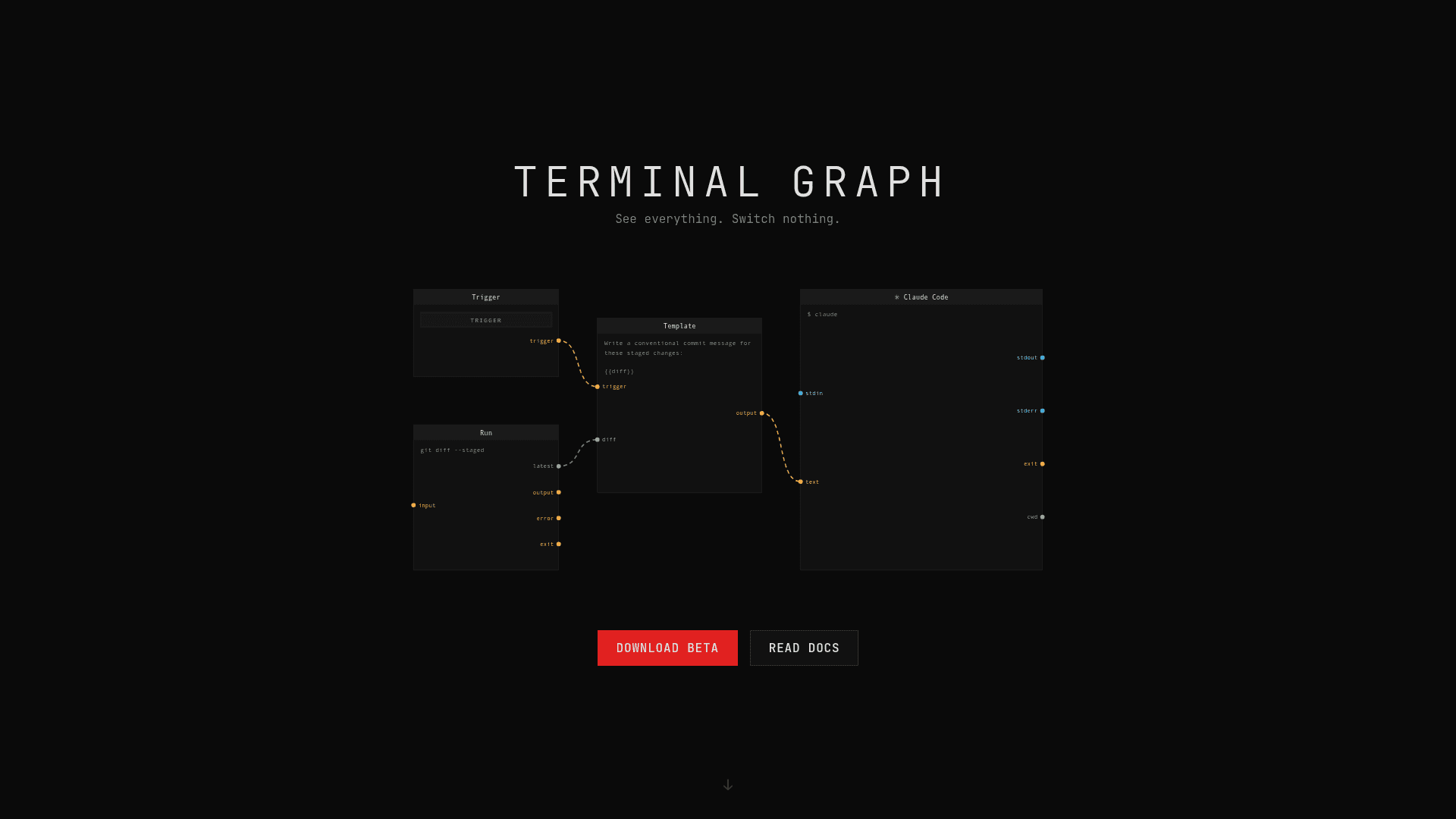
Terminal Graph is a visual dataflow environment for developers. Instead of cycling through tmux panes, browser tabs, and separate editor windows, you place nodes on a canvas and wire their outputs to other nodes' inputs. A terminal's stdout can feed directly into a code editor; a file watcher can trigger a shell command; a template node can compose a prompt from live command output and send it to a terminal running Claude Code. The result is a spatial, connected workspace where data moves between tools automatically rather than through manual copy-paste.
Node Types and Dataflow Architecture
The app ships with a rich set of node types, each exposing typed ports (stream, state, or signal):
- Terminal — a full interactive shell backed by libghostty, with stdin/stdout/stderr ports
- Browser — an embedded WKWebView with URL, DOM, and navigation ports
- Editor — a Monaco-powered file editor with content and path ports
- Note — a freeform Markdown editor with write and append ports
- Image — displays files or raw binary data, auto-reloads on change
- File Watcher — emits a signal when files matching a glob pattern change
- Run — executes a non-interactive shell command per input signal
- Template — renders text from placeholder values wired from other nodes
- Webhook — turns localhost HTTP requests into signal payloads
- Utility nodes — Trigger, Collect, Gate, Switch, Delay for flow control
Port compatibility is validated before wiring; incompatible types are rejected. Streams must pass through a Collect node before connecting to signal-based nodes.
Workspace Organization: Groups, Blueprints, and Worktrees
Groups bundle nodes into movable containers with two layout strategies: freeform (drag anywhere inside) or split-tree (tiled panes like a terminal multiplexer). Groups can be bound to git worktrees, so every terminal spawned inside the group inherits an isolated branch checkout as its working directory — enabling multiple agents or feature branches to run side by side on the same canvas.
Blueprints are saved snapshots of node selections or entire groups. They capture node config, runtime state (terminal CWD, browser URL, editor file path), and inter-node connections. Blueprint files are plain JSON and can be shared across machines. Worktree-bound group blueprints prompt for a new worktree binding on insertion.
MCP Server and Agent Integration
Terminal Graph includes a localhost MCP (Model Context Protocol) server, disabled by default and configurable in Settings. When enabled, it exposes 25 tools covering node lifecycle, port wiring, group management, blueprint operations, canvas screenshots, terminal execution, and composite workflows. Agents can target specific open windows by ID or project path, and the settings panel provides copyable host config snippets for Claude Desktop, Claude Code, and Codex. The built-in tg CLI is automatically injected into every terminal node shell, providing tg run, tg send, tg recv, tg notify, and batch-processing flags for orchestrating agent pipelines without manual PATH setup.
Update: Version 0.5.8 Beta
The current downloadable release is version 0.5.8-beta, distributed as a signed Apple Developer ID DMG with Sparkle-based auto-updates. The app is described on its own site as still in beta with an expectation that things will break. Feedback and bug reports go directly to the developer at caidan@internet.dev. The changelog is linked from the homepage footer.
Community Discussions
Be the first to start a conversation about Terminal Graph
Share your experience with Terminal Graph, ask questions, or help others learn from your insights.
Pricing
Beta
Full app access during public beta. No account required.
- All node types (Terminal, Browser, Editor, Note, Image, File Watcher, Run, Template, Webhook, and utility nodes)
- Infinite canvas with freeform and split-tree groups
- Git worktree binding per group
- Blueprints for saving and restoring workflows
- Built-in tg CLI injected into terminal shells
Capabilities
Key Features
- Infinite canvas for arranging developer tool nodes
- Terminal nodes powered by libghostty with full stdio streams
- Embedded browser nodes backed by WKWebView
- Monaco-powered code editor and markdown note nodes
- File watcher nodes with glob pattern matching
- Run nodes for non-interactive shell commands
- Template nodes for composing prompts from live data
- Webhook nodes for localhost HTTP-to-signal routing
- Utility nodes: Trigger, Collect, Gate, Switch, Delay
- Typed port system (stream, state, signal) with compatibility validation
- Freeform and split-tree group layouts
- Git worktree binding per group for isolated branch environments
- Blueprints for saving and restoring node configurations
- Built-in tg/terminalgraph CLI injected into terminal shells
- MCP server with 25 tools for AI agent canvas control
- Canvas screenshots via MCP capture_canvas tool
- 14 bundled themes plus custom TOML theme support
- Hooks system for post-worktree-create automation
- Bezier wire routing with waypoints in Wiring Mode
- Auto-save canvas state with crash recovery
- Sparkle-based automatic app updates
- Drag-and-drop file and image support onto canvas