
VocalVia
VocalVia transforms documents into editable podcast episodes with AI-generated outlines, scripts, and natural voices — letting you review and edit before audio generation.
At a Glance
For testing the document-to-podcast workflow.
Engagement
Available On
Alternatives
Listed Jul 2026
About VocalVia
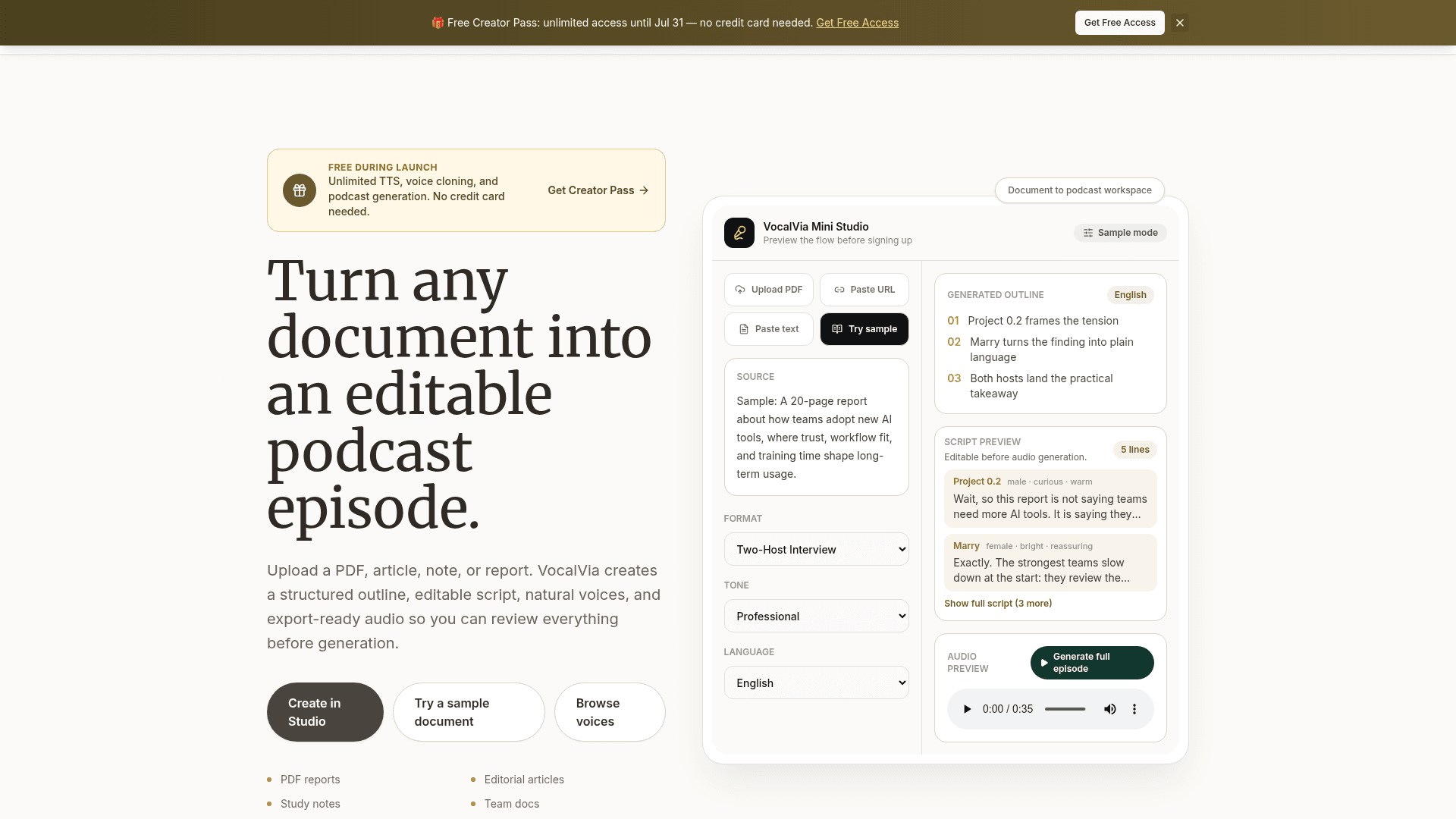
VocalVia is an AI-powered document-to-podcast workspace that converts PDFs, articles, notes, and reports into structured, editable podcast episodes. It generates an outline and script first — letting creators review and edit before any audio is synthesized — then exports polished MP3 audio. The platform is available as a web app with a free Creator Pass offering unlimited access during its launch period.
What It Is
VocalVia sits at the intersection of text-to-speech and podcast production tooling. Unlike basic TTS tools that simply read text aloud, VocalVia takes a source document and produces a format-aware podcast draft — complete with roles, pacing cues, and an editable script — before any voice synthesis occurs. Supported script formats include Single Narrator, Two-Host Interview, Study Tutor, Business Briefing, and Research Breakdown, giving creators meaningful control over how content is shaped for audio.
How the Workflow Works
The production flow is structured around four stages:
- Upload a source — PDFs, DOCX, TXT, Markdown, pasted text, or URLs are accepted.
- Choose a script style — Select a format and optionally add custom instructions.
- Edit the script — Adjust narration, tone, and pacing before committing to audio generation.
- Generate and export — Choose voices, generate audio, then post-process speed, volume, and loudness before downloading an MP3.
The studio shows a credit estimate before generation begins, so users know the cost before spending credits. Catalog voices use approximately 1,000 credits per 1,000 characters; cloned voices use approximately 1,500 credits per 1,000 characters.
Voice Library and Cloning
VocalVia provides a browsable voice catalog filterable by language, gender, age, and speaking style — accessible without signing in. The library includes English and Chinese voices, with the platform supporting 8+ languages across the voice catalog. Voice cloning is available on the dashboard: users upload or record a sample and apply their cloned voice consistently across projects for podcast branding.
Use Cases and Target Audience
The platform targets creators, educators, and business teams who regularly work with dense source material:
- PDF to podcast — Research papers, white papers, and reports converted to structured audio episodes.
- Article to podcast — Blog posts and editorial content repurposed as listenable channels.
- Study notes to audio — Course notes and lecture summaries turned into review sessions.
- Multilingual podcast — One script adapted into supported languages and voice styles for different audiences.
The docs note that English and Chinese are currently supported for script generation, with more languages being added.
Privacy and Editorial Control
VocalVia emphasizes a review-first, privacy-conscious design. Uploaded documents are used only to generate the user's podcast and are never used for model training. Users can delete source documents, drafts, generated audio, and project history at any time from within the studio. The platform's expression tag system — using role markers like [Host A], [Expert], and emotion tags like [curious] or [calm] — lets creators direct the episode like a producer before audio generation begins.
Current Status
VocalVia launched with a "Creator Pass" promotion offering unlimited TTS, voice cloning, and podcast generation at no cost through July 31, with no credit card required. The platform is actively live with a web studio, public voice library, documentation, API key access, and a blog. Script generation currently supports English and Chinese, and the voice catalog spans 8+ languages with ongoing additions.
Community Discussions
Be the first to start a conversation about VocalVia
Share your experience with VocalVia, ask questions, or help others learn from your insights.
Pricing
Free
For testing the document-to-podcast workflow.
- Explore document upload and script editing
- Use starter credits when available
- Basic voice selection
- Audio export for completed generations
- Email support
Standard
For creators and educators publishing regularly.
- All core audio workflows included
- Document upload and editable scripts
- Voice library and custom voices
- Generation history
- Email and chat support
- About 13 hours of finished audio per year
Pro
For creators who need more power and customization.
- Higher audio generation capacity
- Everything in Standard
- More room for long-form episodes
- Priority support
- Best for frequent publishing
- About 50 hours of finished audio per year
Enterprise
For organizations with compliance and volume needs.
- Custom volume and SLAs
- Private cloud options
- Dedicated account manager
- Advanced security review
Capabilities
Key Features
- Document-to-podcast conversion
- AI-generated outlines and editable scripts
- Multiple script formats: Single Narrator, Two-Host Interview, Study Tutor, Business Briefing, Research Breakdown
- Voice library with catalog voices filterable by language, gender, age, and style
- Voice cloning from uploaded or recorded samples
- Expression and role tags for producer-level script control
- MP3 export with post-processing for speed, volume, and loudness
- Multilingual support (English, Chinese, 8+ languages in voice catalog)
- Generation history and project management
- Credit estimate shown before audio generation
- Private source workflow — documents never used for model training
- PDF, DOCX, TXT, Markdown, URL, and pasted text input
- Mini Studio preview without sign-in