
EveryDev.ai
Sign inSubscribe
Home
Tools

1,248+ AI tools

  • Trending
  • New
  • Featured
Categories
  • Coding669
  • Agents557
  • Infrastructure277
  • Marketing268
  • Analytics206
  • Design203
  • Research195
  • Projects184
  • Integration145
  • Testing116
  • Data115
  • Learning104
  • Security98
  • MCP95
  • Extensions83
  • Prompts71
  • Commerce67
  • Communication62
  • Voice59
  • Web59
  • DevOps45
  • Finance11
Sign In
  1. Home
  2. Tools
  3. Agentation
Agentation icon

Agentation

AI Coding Assistants

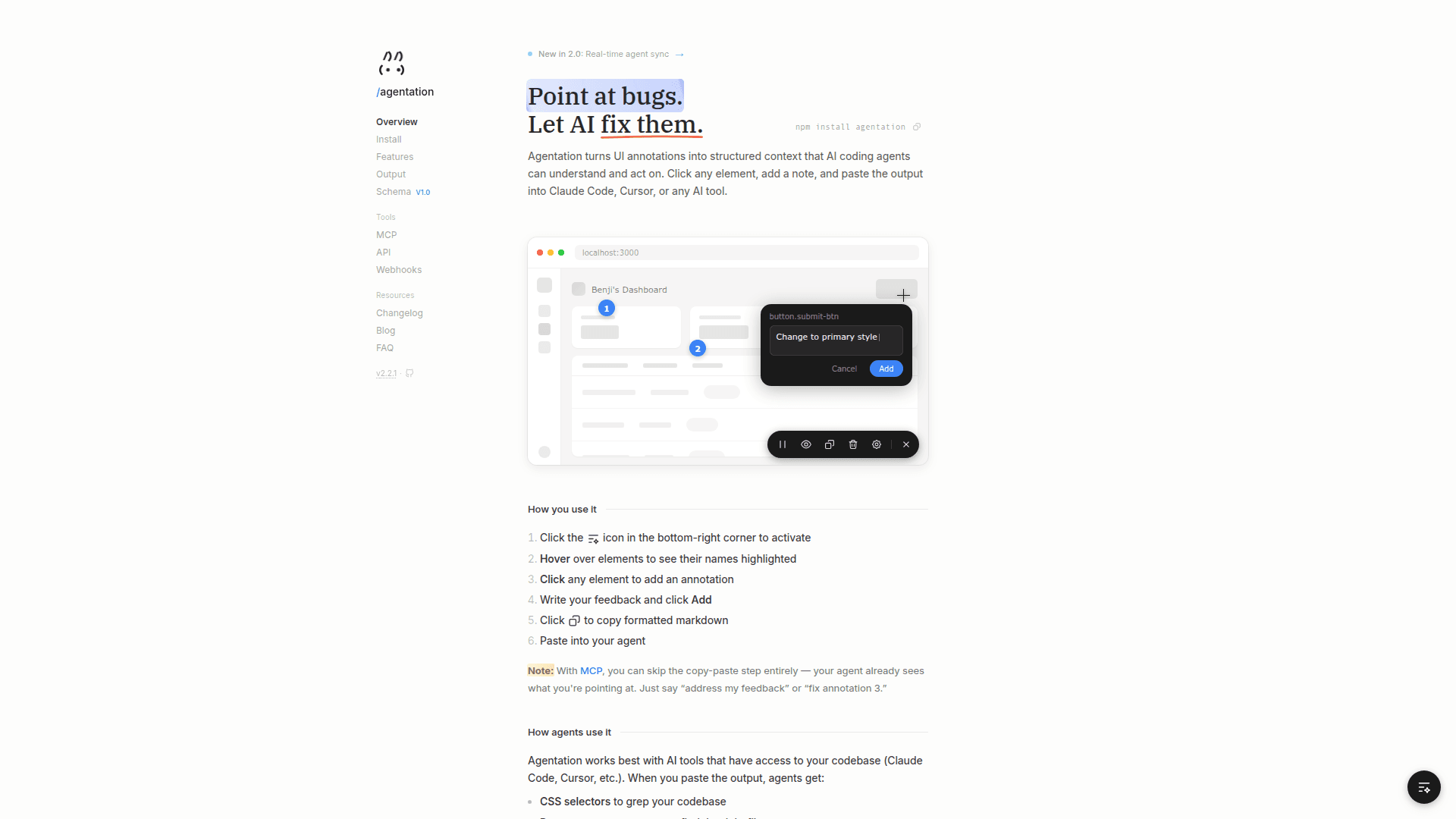
Agentation turns UI annotations into structured context that AI coding agents can understand and act on, letting you click any element, add a note, and paste the output into Claude Code, Cursor, or any AI tool.

Visit Website

At a Glance

Pricing

Open Source

Free for individuals and companies for internal use. Annotate your own projects, debug your own apps, or streamline feedback within your team.

Engagement

Available On

macOS
Web
API

Resources

WebsiteDocsGitHubllms.txt

Topics

AI Coding AssistantsMCP ToolsBrowser Automation

About Agentation

Agentation is a desktop tool that bridges the gap between UI feedback and AI-powered code fixes. It lets you click any element on your running app, annotate it with feedback, and instantly generate structured markdown output that AI coding agents like Claude Code or Cursor can parse and act on. With MCP integration, agents can read your annotations in real time — no copy-paste required. The tool also supports webhooks and a REST API for custom integrations.

  • UI Annotation — Activate the toolbar, hover over any element, click to annotate, and write your feedback. The tool captures CSS selectors, React component names, computed styles, and your note.
  • Structured Output — Copies formatted markdown with element paths, selectors, and feedback so AI agents can grep your codebase directly instead of guessing.
  • MCP Integration — Connect agents via the Model Context Protocol so they receive live annotation updates and can respond, ask for clarification, or mark issues as resolved.
  • Webhooks — Push annotation data to external services automatically as annotations are created or updated.
  • REST API — Build custom integrations on top of Agentation's annotation data using the provided API.
  • Animation Pause — Freeze animations at a specific frame to annotate a precise visual state.
  • React Component Detection — Automatically identifies React component names alongside CSS selectors to help agents find the right file.
  • Real-time Agent Sync — Introduced in v2.0, agents can list, respond to, and clear annotations interactively as a two-way conversation.
  • Annotation Schema — A versioned schema (v1.0) defines the annotation format so any compatible tool can consume the output.
  • Free for Internal Use — No cost for individuals and teams annotating their own projects; commercial redistribution requires a license.
Agentation - 1

Community Discussions

Be the first to start a conversation about Agentation

Share your experience with Agentation, ask questions, or help others learn from your insights.

Pricing

OPEN SOURCE

Open Source

Free for individuals and companies for internal use. Annotate your own projects, debug your own apps, or streamline feedback within your team.

  • UI element annotation
  • CSS selector capture
  • React component detection
  • Structured markdown output
  • MCP integration
View official pricing

Capabilities

Key Features

  • UI element annotation via click
  • CSS selector capture
  • React component name detection
  • Computed style extraction
  • Structured markdown output
  • MCP integration for real-time agent sync
  • Webhooks for external service push
  • REST API for custom integrations
  • Animation pause for frame-specific annotation
  • Text selection annotation for content issues
  • Two-way agent conversation via MCP
  • Versioned annotation schema

Integrations

Claude Code
Cursor
MCP (Model Context Protocol)
Webhooks
npm
API Available
View Docs

Reviews & Ratings

No ratings yet

Be the first to rate Agentation and help others make informed decisions.

Developer

Benji Taylor

Benji Taylor is a London-born, Los Angeles-based designer and engineer. He founded Los Feliz Engineering, a consumer software company that created Honk and Family, and co-founded Dip, which publishes tools for interface excellence, including cmdk. Taylor currently serves as Head of Design at Base (Coinbase).

Read more about Benji Taylor
WebsiteGitHubX / Twitter
2 tools in directory

Similar Tools

cloudrouter icon

cloudrouter

CLI skill for Claude Code and Codex to spin up cloud VMs and GPUs with browser automation capabilities.

SessionCast icon

SessionCast

Monitor and control your AI CLI terminal sessions from your mobile device with real-time streaming and bidirectional input.

Basehub Forums icon

Basehub Forums

AI-powered Q&A platform that lets you ask questions about any GitHub repository and get source-backed answers from frontier LLMs.

Browse all tools

Related Topics

AI Coding Assistants

AI tools that help write, edit, and understand code with intelligent suggestions.

262 tools

MCP Tools

Tools built with the Model Context Protocol for specific tasks.

22 tools

Browser Automation

AI-powered agents that autonomously navigate and interact with web applications to automate repetitive tasks, extract data, fill forms, and perform web-based workflows using intelligent understanding of page structure and content.

23 tools
Browse all topics
Back to all tools
Explore AI Tools
  • AI Coding Assistants
  • Agent Frameworks
  • MCP Servers
  • AI Prompt Tools
  • Vibe Coding Tools
  • AI Design Tools
  • AI Database Tools
  • AI Website Builders
  • AI Testing Tools
  • LLM Evaluations
Follow Us
  • X / Twitter
  • LinkedIn
  • Reddit
  • Discord
  • Threads
  • Bluesky
  • Mastodon
  • YouTube
  • GitHub
  • Instagram
Get Started
  • About
  • Editorial Standards
  • Corrections & Disclosures
  • Community Guidelines
  • Advertise
  • Contact Us
  • Newsletter
  • Submit a Tool
  • Start a Discussion
  • Write A Blog
  • Share A Build
  • Terms of Service
  • Privacy Policy
Explore with AI
  • ChatGPT
  • Gemini
  • Claude
  • Grok
  • Perplexity
Agent Experience
  • llms.txt
Theme
With AI, Everyone is a Dev. EveryDev.ai © 2026
Main Menu
  • Tools
  • Developers
  • Topics
  • Discussions
  • News
  • Blogs
  • Builds
  • Contests
Create
Sign In
    Sign in
    0views
    0upvotes
    0discussions