
Alan
Alan orchestrates Claude Code, Codex, Cursor and other coding agents in parallel sessions with shared team context, sandboxes, checks and approval checkpoints.
At a Glance
About Alan
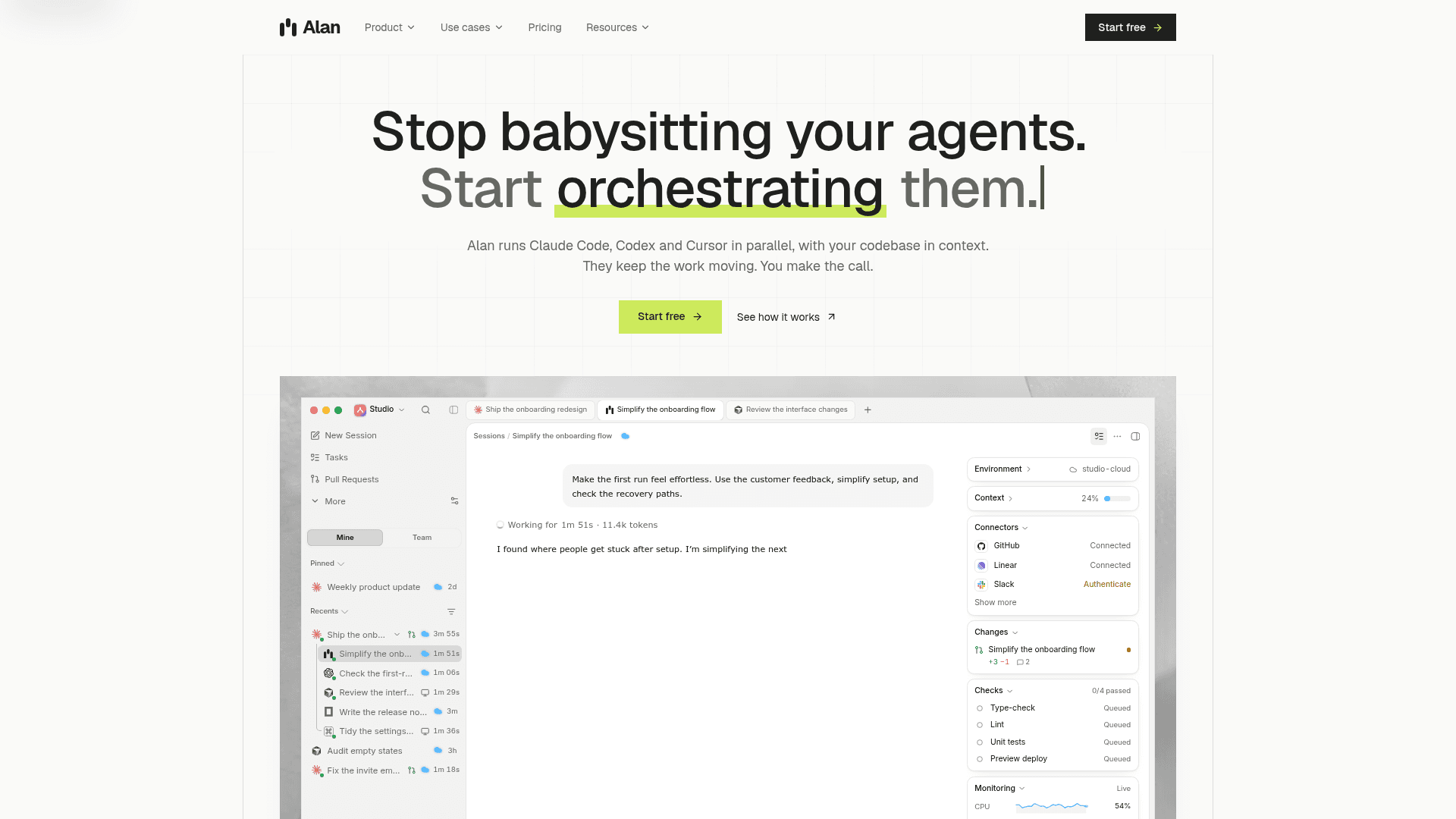
Alan, from Supatest AI Inc, is an agent orchestration workspace that runs coding agents such as Claude Code, Codex and Cursor in parallel against a team's codebase and context. Users describe a goal, Alan splits it into sessions, and the results come back as diffs, check reports and pull requests for review. It is available as a Mac app with local sessions, and as cloud sandboxes on paid plans; the download page lists macOS, Windows and Linux apps.
What It Is
Alan is a layer above individual coding agents. Instead of supervising one agent in one terminal, a user hands off an outcome, and Alan assigns each session to the agent they choose, keeps shared state between sessions, and tracks progress on a board of epics, tasks and subtasks that both people and agents can own. The site lists support for Claude Code, Codex, Cursor, opencode, Gemini, Copilot and Alan's own agent, on the user's existing subscriptions.
How the Workflow Runs
- Context: repositories, tracker, docs, Slack, pull requests and past agent runs feed a context graph that each new session reads, and results are written back for later runs.
- Sandboxes: sessions run on the user's Mac or in cloud sandboxes bound to a task, repository, branch and agent, so parallel runs do not share branches or secrets.
- Verification: agents run tests, type checks, review and browser checks when asked or as a workflow step, and reports attach to the task next to the diff.
- Checkpoints: users choose steps such as merges, deploys or migrations that pause for human approval; decisions are recorded in task history.
- Observability: each session records prompts, tool calls, file changes and state transitions.
Team and Integrations
Shared sessions let teammates join, answer agent questions and approve pull requests. Runs can start from Slack, GitHub, Linear or a schedule, and results return as PRs, checks, comments or Slack messages. Use-case pages cover code review, ticket-to-PR, incident triage, test coverage, migrations, security fixes, onboarding and recurring automations.
Where Code Goes
Local sessions run in the user's own checkout, with the agent talking to its own model provider. Cloud sessions run in sandboxes on paid plans, and merges go through the normal pull request review.
Community Discussions
Be the first to start a conversation about Alan
Share your experience with Alan, ask questions, or help others learn from your insights.
Pricing
Free
Run local agent sessions with the agent subscriptions you already have.
- Local agent sessions
- Personal skills
- Connect your integrations
- 1 seat
- Local sessions with your own agent subscriptions
Individual
Cloud runs, the code index and memory for one engineer.
- Everything in Free
- Cloud sessions and sandboxes
- Code index, context graph and memory
- Personal workflows
- 1 seat
- Usage credit per usage plan: $10, $50 or $100 a month
- Usage plans: Pro $10/mo ($100/yr), Pro+ $50/mo ($500/yr), Max $100/mo ($1,000/yr)
- No automatic overage charges; add cloud credits in $10, $25, $50, $100 packs
Team
Shared sessions, docs, workflows and tasks for a team that ships together.
- Everything in Individual
- Invite members and create teams
- Share and collaborate on sessions, docs, workflows and integrations
- Analytics dashboards and private networks
- Unlimited seats
- Each seat's usage plan credit: $10, $50 or $100 a month
- Usage plans per seat: Pro $10/mo ($100/yr), Pro+ $50/mo ($500/yr), Max $100/mo ($1,000/yr)
Enterprise
Everything in Team on a contract, with workspace documents and a sales-led rollout.
- Everything in Team
- Workspace documents and whiteboards
- Contract billing and procurement
- Sales-led rollout
Capabilities
Key Features
- Parallel multi-agent sessions
- Context graph across code, specs, tickets and past runs
- Local and cloud sandbox sessions
- Resumable sessions after crash or disconnect
- Tests and browser checks with verification reports
- Human approval checkpoints
- Shared team sessions
- Unified board for tasks, with agents and people as owners
- Triggers from Slack, GitHub, Linear or schedule
- Session records of prompts, tool calls and file changes
- Mobile answers to agent questions