Capto
A dead-man's switch monitoring tool for cron jobs, workers, and containers that alerts you when a job goes quiet and shows the last breadcrumb context it left behind.
At a Glance
Enough to watch a real side project, not a trial.
Engagement
Available On
Listed Aug 2026
About Capto
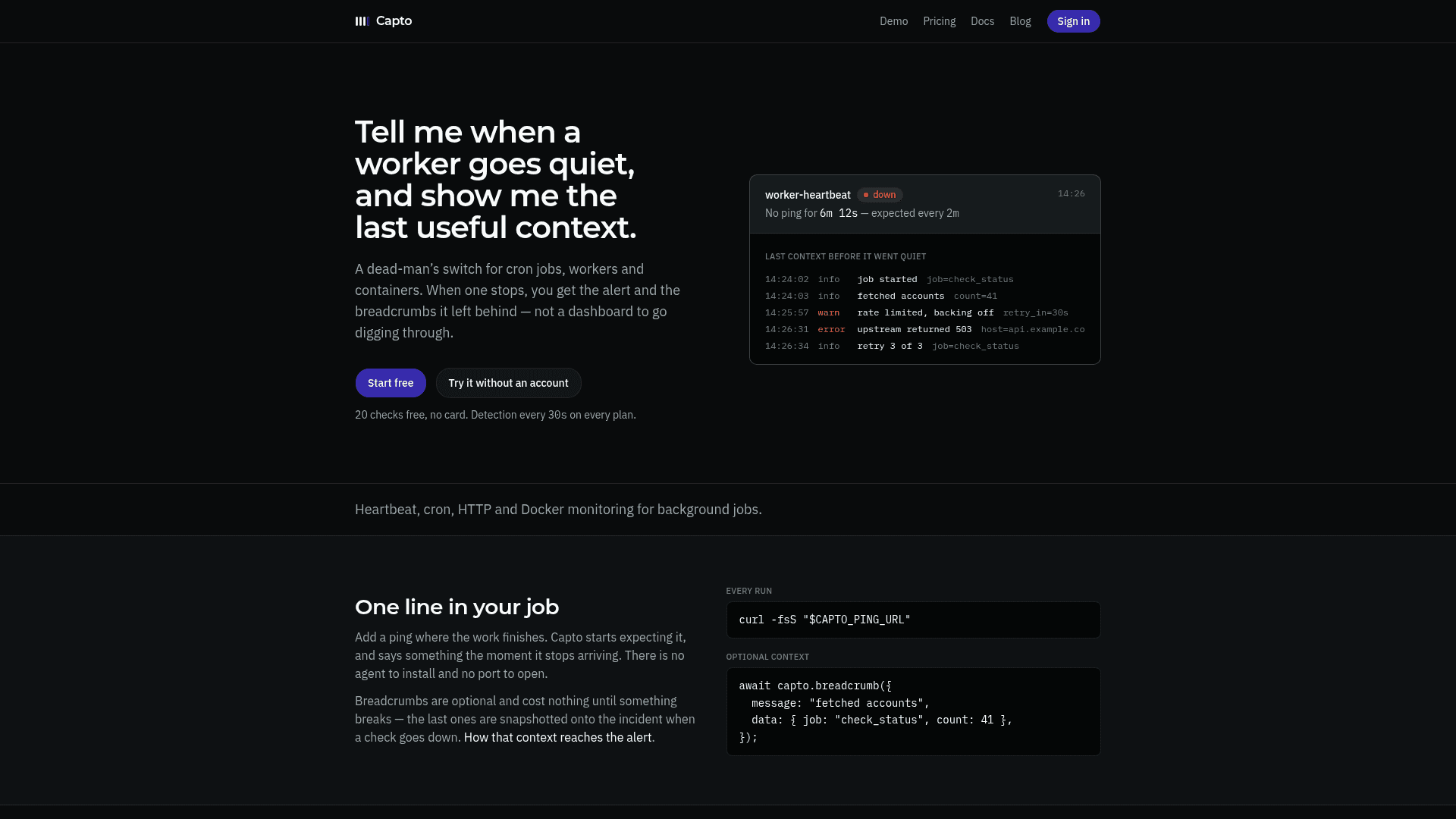
Capto is a background job monitoring service that acts as a dead-man's switch for cron jobs, workers, and containers. When a monitored job stops pinging, Capto fires an alert and surfaces the last structured breadcrumbs the job left behind — so you get context alongside the notification, not a dashboard to dig through. It requires no agent installation and no open ports.
What It Is
Capto watches background jobs through three check types: heartbeat (a worker pings a URL on each healthy run), cron (a schedule and timezone define when a ping is expected), and HTTP (Capto polls an endpoint and requires consecutive failures before alerting). The core design principle is that the alert arrives with the last useful context — structured breadcrumb lines the job posted while it was alive — frozen onto the incident at the moment the check goes down.
How the Breadcrumb Model Works
While a job is running, it can post short structured log lines ("breadcrumbs") to Capto via a simple API call. These are held in a ring buffer and cost nothing until something breaks. When a check goes down, the most recent breadcrumbs are snapshotted onto the incident and travel with the alert to ntfy, Telegram, email, or a webhook. A /fail ping can also carry the job's full output (up to 10 kB), so the traceback arrives with the page rather than requiring a separate lookup.
Detection and Reliability Guarantees
Capto makes several explicit reliability commitments:
- Detection is independent of notification — muting or quiet hours suppress the alert, never the evaluation. A silenced check that goes down still reads as down.
- Alerts are queued before sending — each notification is a durable row per channel, retried with exponential backoff. A downstream outage (e.g., ntfy or Telegram) delays the alert rather than dropping it.
- One open incident per check — enforced by a unique database index, not a read-then-write, so repeated failures cannot open duplicates or go silent after the first alert.
- Cron checks understand schedules — the last ping is compared against the previous scheduled fire, so weekly and monthly jobs behave correctly. Timezone is validated at save time, not at 3am.
- Every check is evaluated every 30 seconds on every plan, because the evaluator runs a single loop over all active checks.
Integration and Setup Path
The minimal integration is one curl call at the end of a job. Capto also supports /start and /fail URL suffixes to distinguish jobs that hung from jobs that never started. For fleets of short-lived workers, an ingest key allows checks to self-provision on the first ping — no dashboard setup required. Docker, Podman, and systemd recipes use a sidecar or host cron to ping while the container is healthy; Capto never needs access to the Docker socket. A TypeScript client snippet is provided in the docs, with an npm package noted as forthcoming.
What It Deliberately Is Not
The About page explicitly declines several common monitoring features on purpose: Capto is not a log platform (breadcrumbs are a short ring buffer, not a searchable history), not an APM or metrics product (no traces, no dashboards, no query language), and not an on-call scheduling tool (no rotations or escalation policies). The stated design philosophy is that scope is a feature.
Current Status
Capto is actively available with a free tier (20 checks, no credit card required) and a paid Pro plan. The product blog documents ongoing decisions about detection, pricing philosophy, and feature scope. The About page includes a shutdown commitment: at least 90 days' notice by email, API access maintained through that window, and no billing past the announcement date.
Community Discussions
Be the first to start a conversation about Capto
Share your experience with Capto, ask questions, or help others learn from your insights.
Pricing
Free
Enough to watch a real side project, not a trial.
- 20 checks
- 5 alert channels
- ntfy, Telegram, webhook, email channel types
- 1 email address, 20 alerts/day
- 3 days history
Pro
For when something you get paid for depends on it.
- 100 checks
- 20 alert channels
- ntfy, Telegram, webhook, email channel types
- Unlimited email alerts
- 90 days history
- HTTP probe interval from 30s
- Detection every 30s
Enterprise
Seats, shared checks, longer history, SSO, API tokens — contact for custom needs.
- Custom check limits
- Shared checks
- Longer history
- SSO
- API tokens
Capabilities
Key Features
- Heartbeat monitoring for workers and daemons
- Cron job monitoring with schedule and timezone support
- HTTP endpoint polling with consecutive-failure threshold
- Breadcrumb context snapshotted onto incidents at alert time
- /start and /fail ping URL suffixes for run lifecycle tracking
- Auto-provisioning checks via ingest key for worker fleets
- Durable alert outbox with exponential backoff retry
- One open incident per check enforced by unique index
- Mute, quiet hours, and pause controls with independent evaluation
- Alerts via ntfy, Telegram, email, and webhook
- Detection every 30 seconds on all plans
- No agent to install, no port to open
- Docker, Podman, and systemd heartbeat recipes
- TypeScript client snippet included in docs
- Export all data via API with your own token