
Clauge
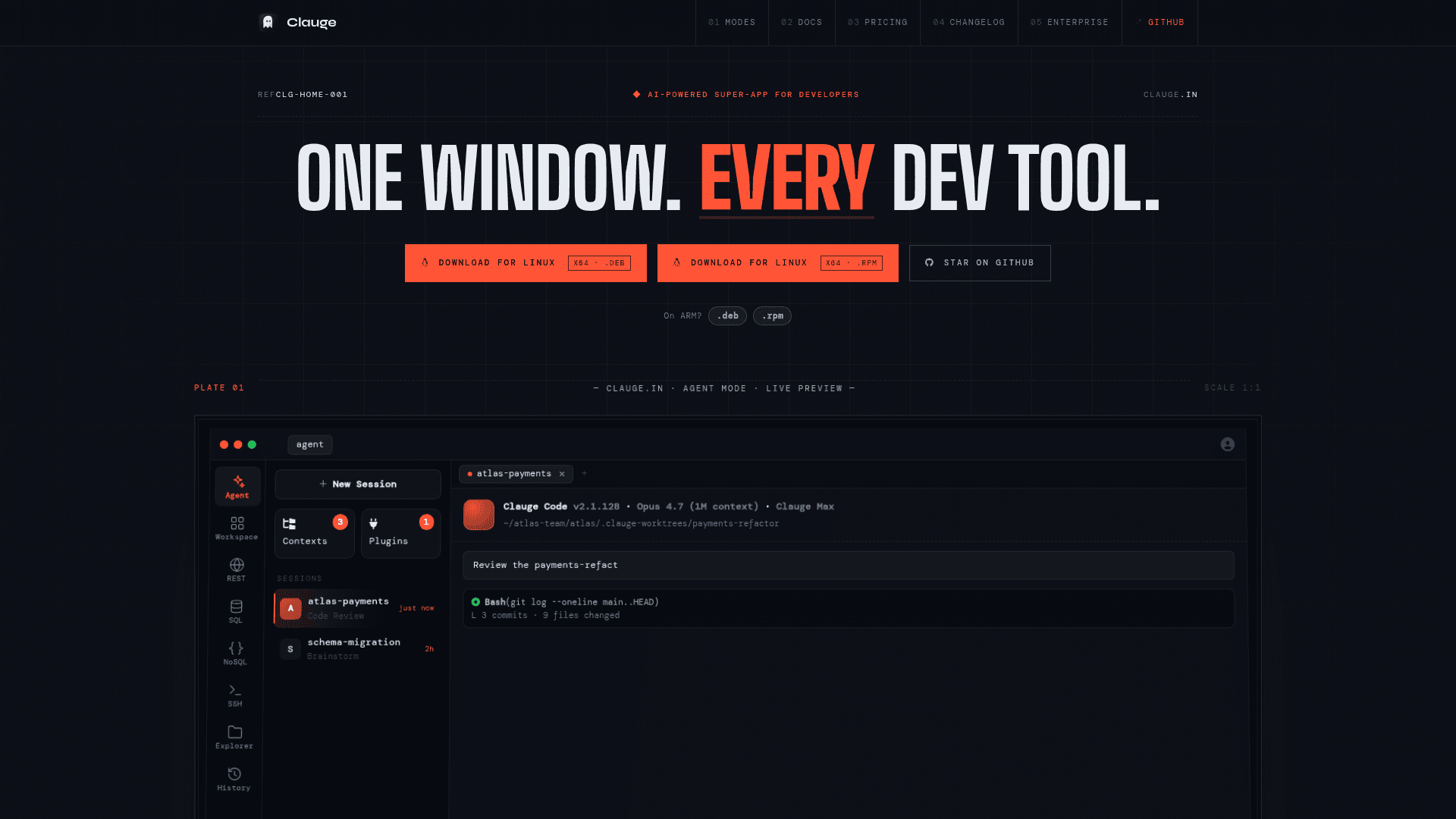
An all-in-one desktop developer super-app that combines coding agents, REST client, SQL/NoSQL editors, SSH terminal, file explorer, and project workspace in a single native window.
At a Glance
Free for personal use, hobbyists, students, and noncommercial projects.
Engagement
Available On
Alternatives
Listed May 2026
About Clauge
Clauge is a native desktop application built with Rust and Tauri that consolidates the most common developer tools — coding agents, API client, SQL and NoSQL editors, SSH terminal, file explorer, and a Kanban workspace — into a single window. Created by ansxuman and currently in alpha at v3.0.1, it ships a built-in MCP server with 45+ tools and targets developers who want to stop context-switching between multiple apps.
What It Is
Clauge is a developer super-app that runs seven distinct modes — Agent, Workspace, REST, SQL, NoSQL, SSH, and Explorer — each with its own AI tuned for that workflow. Rather than a generic AI chatbot bolted onto a tool, each mode's AI understands its context: the SQL AI is schema-aware, the SSH AI gates destructive commands, and the Workspace AI can move cards and raise pull requests. The app is built on SvelteKit + Svelte 5 for the frontend and Tauri v2 (Rust) for the native shell, producing a binary of approximately 25 MB with sub-second cold starts.
Seven Modes in One Shell
Each mode is reachable with a single keystroke (⌘1–⌘8):
- Agent — spawn parallel coding agent sessions (Claude, Codex, Gemini, OpenCode), each with its own git worktree, purpose pin, context manager, and usage analytics
- Workspace — Kanban boards with two-way GitHub/GitLab issue sync, Notion-style markdown notes, and named AI coworkers (Tech Lead, Brainstormer, Developer, Reviewer, QA)
- REST — HTTP collections client with AI batch runner, Postman v2/v2.1 import, and MCP exposure so external agents can create and edit requests
- SQL — multi-engine editor supporting PostgreSQL, MySQL, ClickHouse, SQLite, and Cloudflare D1 with natural-language-to-SQL and cross-dialect translation
- NoSQL — MongoDB and Redis client with aggregation pipeline builder and interactive Redis console
- SSH — persistent terminal with permission-gated and auto AI modes, multi-tab per host, and port forwarding shared across modes
- Explorer — unified file browser for Local FS, Amazon S3 (and S3-compatibles), Azure Blob, SFTP, and FTP with drag-and-drop transfers
Built-in MCP Server
Clauge ships an MCP server that auto-starts on launch with no configuration required. The server exposes 45+ tools covering board operations, card lifecycle, notes, REST collections, and coworker coordination — including a cards_call_coworker tool so a terminal agent can @-mention a workspace coworker without leaving the shell. It supports both stdio and HTTP (localhost:7421/mcp) transports, making it compatible with Claude Desktop, Cursor, Cline, Continue, and any other MCP-speaking client.
Local-First Architecture
All sessions, notes, queries, and credentials are stored locally in SQLite. Cloud sync is opt-in and encrypted, covering agent context, coworker profiles, REST collections, and SQL/NoSQL/SSH profiles. Sessions and credentials never leave the device unless sync is explicitly enabled per feature. The PolyForm Noncommercial License governs the project; commercial use by or within a for-profit organization requires a separate enterprise license.
Update: v3.0.1
The latest release is Clauge v3.0.1, published on 2026-05-26. The GitHub repository shows active development with the last push on the same date. The project launched in March 2026 and has accumulated over 400 stars on GitHub. The homepage describes the current state as "ALPHA on all platforms," with downloads available for macOS (Intel and ARM), Windows (x64 and ARM64), and Linux (x64 and ARM64 in .deb and .rpm formats).
Community Discussions
Be the first to start a conversation about Clauge
Share your experience with Clauge, ask questions, or help others learn from your insights.
Pricing
Personal
Free for personal use, hobbyists, students, and noncommercial projects.
- Agent mode
- Workspace + AI Co-Workers
- REST client
- SQL client
- NoSQL client
Pro
Managed AI, unlimited workspaces, and premium themes for individual developers.
- Everything in Free
- Clauge AI — managed AI assistance, no API key setup
- 1,000 credits each month
- Unlimited coworkers in workspaces (free is capped at 3)
- Premium themes
- All future premium features included
- Cancel anytime
Pro Lifetime
One-time purchase for lifetime Pro access with a one-time credit grant.
- Everything in Free
- Clauge AI — managed AI assistance, no API key setup
- 20,000 credits — one-time grant
- Unlimited coworkers in workspaces
- Premium themes
- All future premium features included
- No recurring charges ever
Enterprise
Commercial license for organizations with compliance constraints and team deployment.
- Commercial license
- All Pro features
- Priority support
- Private sync backend
- Volume / SLA terms
Capabilities
Key Features
- Parallel coding agent sessions (Claude, Codex, Gemini, OpenCode)
- Per-session git worktrees and purpose pinning
- Context Manager for pinning files, folders, and MCP servers
- Kanban workspace with Backlog → Done pipeline
- Two-way GitHub and GitLab issue sync
- Named AI coworkers with single-owner card locking
- Notion-style WYSIWYG markdown notes
- Built-in MCP server with 45+ tools (auto-starts on launch)
- REST client with AI batch runner and Postman v2/v2.1 import
- Multi-engine SQL editor (PostgreSQL, MySQL, ClickHouse, SQLite, Cloudflare D1)
- Natural language to schema-aware SQL
- Cross-dialect SQL translation
- MongoDB aggregation pipeline builder with stage previews
- Redis console with keys, TTL, streams, and pub-sub
- SSH with permission-gated and auto AI modes
- Multi-tab SSH per host with port forwarding
- Unified file explorer for Local FS, S3, Azure Blob, SFTP, FTP
- Drag-and-drop file transfers with live progress panel
- Cross-mode shared SSH tunnels
- Usage analytics per agent session (tokens, cost, cache hit, model mix)
- Local-first storage with opt-in encrypted cloud sync
- ~25 MB native binary built with Rust + Tauri
- BYOK (Anthropic, OpenAI, Google, OpenCode) or Clauge AI managed credits