designmd.sh
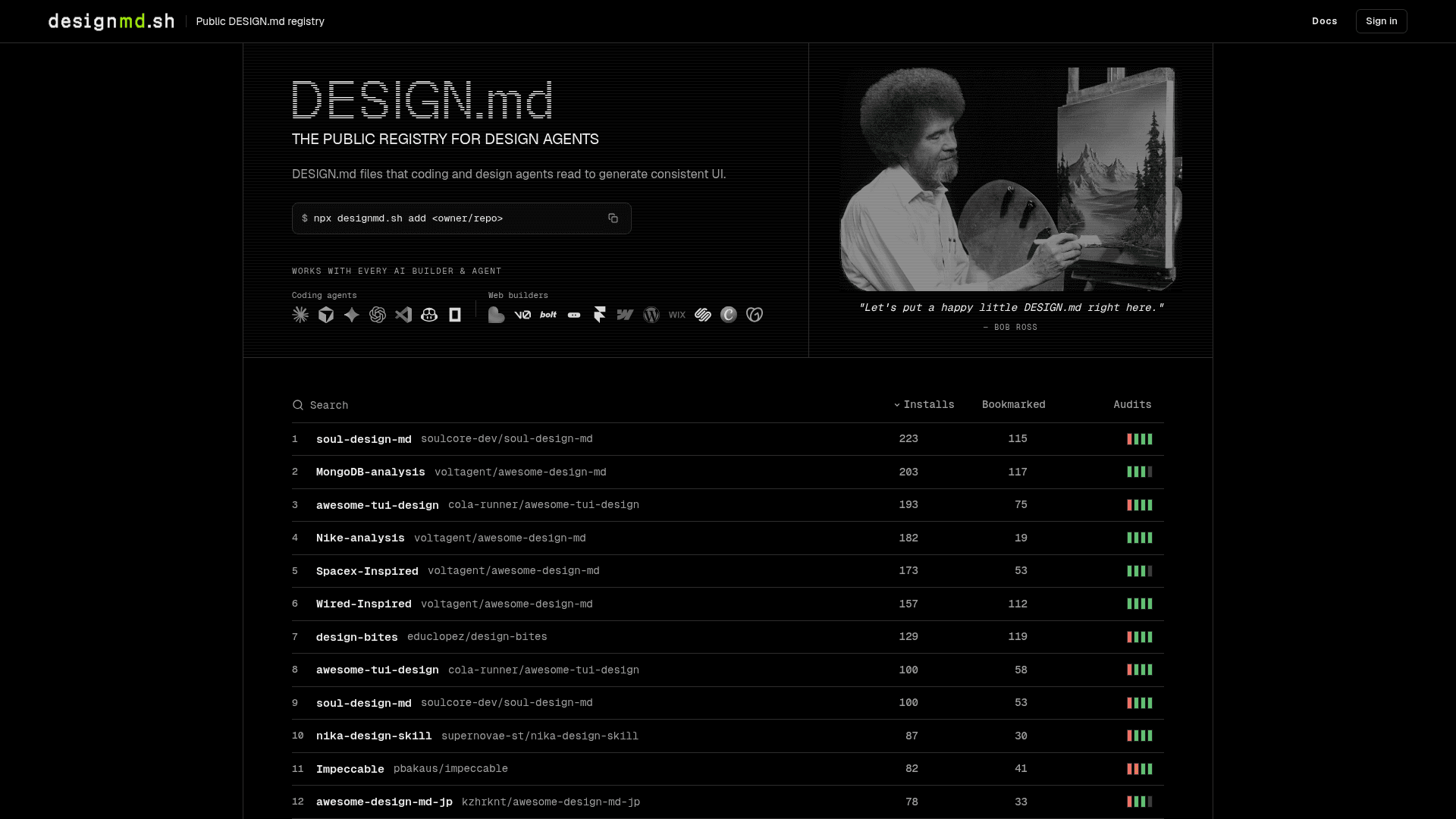
A public registry of DESIGN.md files that AI coding and design agents read to generate consistent, on-brand UI across any builder or agent.
At a Glance
About designmd.sh
designmd.sh is the public registry for DESIGN.md files — structured markdown documents that describe design patterns such as colors, typography, spacing, elevation, and component behavior in a format AI coding agents can consume before generating UI. Maintained by the VoltAgent team, the registry is community-driven and indexes DESIGN.md files sourced from public GitHub repositories. The CLI downloads files directly from their source repositories to your local machine; designmd.sh itself does not host the files.
What It Is
DESIGN.md is a convention for capturing a project's visual design language in a plain-text markdown file. When an AI coding agent or web builder reads a DESIGN.md before generating UI, it can produce output that matches the intended look and feel rather than defaulting to generic styles. designmd.sh acts as the searchable, community-curated index of these files, making it easy to discover, install, and share DESIGN.md files for a wide range of design systems — from brand analyses of well-known companies to original community-created design systems.
How the Registry Works
The registry is organized around public GitHub repositories. Anyone can submit a DESIGN.md file by publishing it to a public repo; the registry indexes it and makes it discoverable. Users install a file via the CLI:
npx designmd.sh add <owner/repo>fetches the DESIGN.md directly from the source repository- The registry tracks installs, bookmarks, and audits per file, surfacing the most-used entries
- Files are community-contributed reference material and are explicitly not official design files unless published by the company itself
Supported Agents and Builders
The registry homepage lists compatibility with a broad set of AI coding agents and web builders, including:
- Coding agents: Claude, Cursor, Gemini, ChatGPT, VS Code, GitHub Copilot
- Web builders: Lovable, v0, Bolt, Google Stitch, Framer, Webflow, WordPress, Wix, Squarespace, Canva, GoDaddy
CLI Setup Path
Installation requires no global setup. Running npx designmd.sh add <owner/repo> in a project directory is the primary entry point. The documentation at designmd.sh/docs covers CLI usage, the DESIGN.md format specification, and the submission process for listing new files in the registry.
Update: Maintained by VoltAgent
designmd.sh is maintained by the VoltAgent team, the same organization behind the open-source VoltAgent AI Agent Engineering Platform (MIT-licensed, TypeScript). The registry itself is a standalone web service at designmd.sh, separate from the VoltAgent framework, but shares the same team and GitHub organization. Contact for the project is available at necati@voltagent.dev.
Community Discussions
Be the first to start a conversation about designmd.sh
Share your experience with designmd.sh, ask questions, or help others learn from your insights.
Pricing
Free
Open registry — free to browse, install, and submit DESIGN.md files via the CLI.
- Browse and search the public DESIGN.md registry
- Install DESIGN.md files via npx CLI
- Submit DESIGN.md files from public GitHub repositories
- Track installs, bookmarks, and audits
Capabilities
Key Features
- Public registry of community-contributed DESIGN.md files
- CLI installer: npx designmd.sh add <owner/repo>
- Downloads files directly from source GitHub repositories
- Tracks installs, bookmarks, and audits per file
- Compatible with major AI coding agents and web builders
- Community-driven submissions from public repositories
- Searchable index of design systems and brand analyses
- DESIGN.md format spec documentation
Integrations
Demo Video