
devbar
A drop-in browser toolbar that annotates any website element and captures selectors, computed styles, React component trees, and screenshots as agent-ready prompts.
At a Glance
MIT licensed, self-hostable, free forever. Full feature set including local agent, MCP server, Chrome extension, and all export formats.
Engagement
Available On
Alternatives
Listed Sep 2026
About devbar
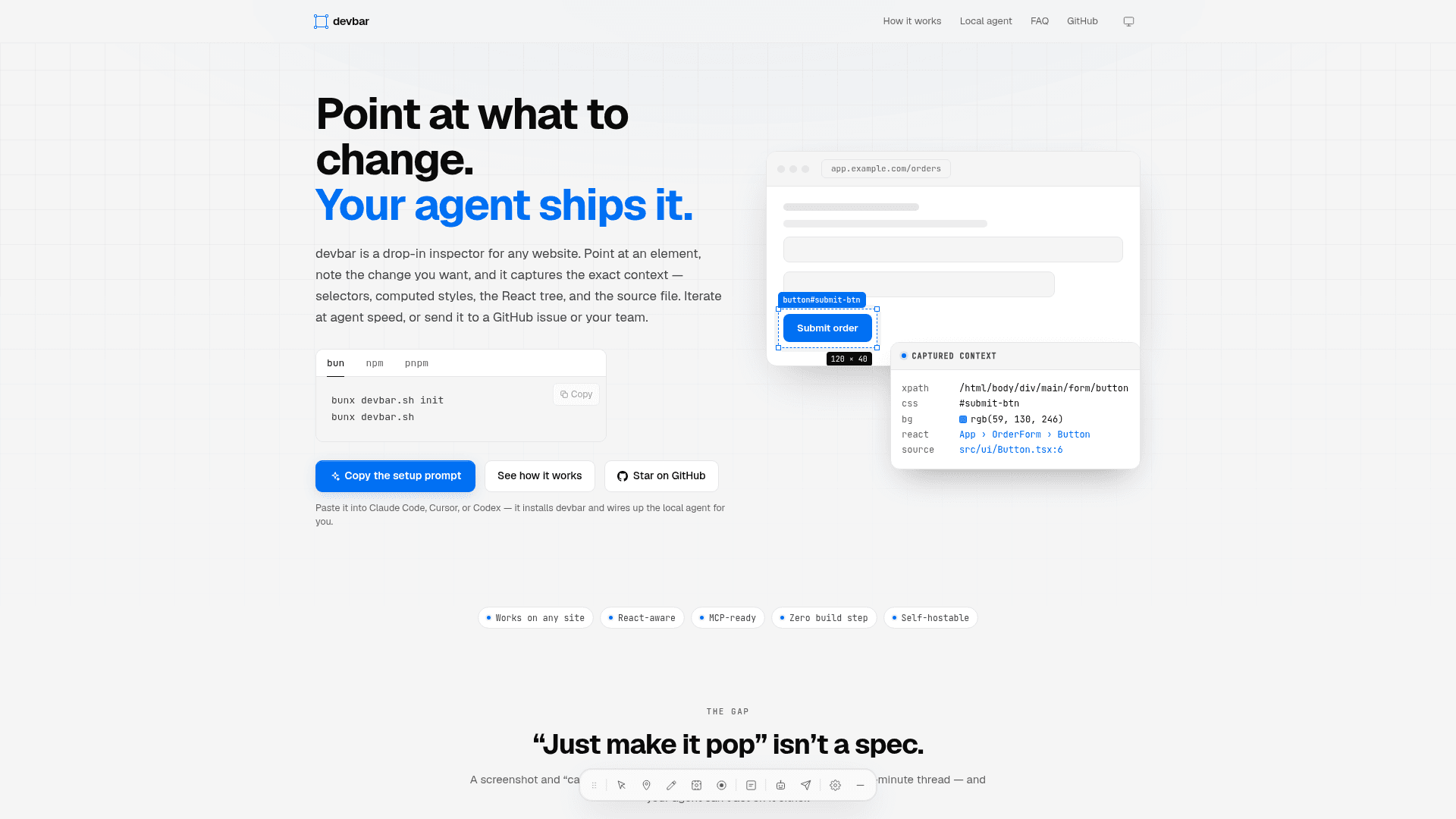
devbar is an open-source, MIT-licensed drop-in toolbar for any website, built by Tim Mikeladze. It lets developers, designers, and QA engineers point at any UI element, annotate it, and instantly capture the full technical fingerprint — CSS selectors, XPaths, computed styles, React component trees, and source file locations — as a structured prompt an AI agent can act on. The project is self-hostable, free forever, and available on GitHub under the MIT license.
What It Is
devbar sits in the gap between a vague design comment ("can we make this feel less cramped?") and the precise context an AI coding agent needs to make the right change. Instead of a screenshot and a Slack thread, devbar captures the exact element — its selector, bounding rect, React component path, and source file — and routes that payload to Claude Code, Cursor, Codex, a GitHub issue, a webhook, or any endpoint. It works on any HTML page and gains React-specific context automatically when a fiber tree is detected.
How the Annotation-to-Agent Workflow Works
The workflow has three stages:
- Annotate — Use the Select, Marker, Draw, Capture, or Record tools to mark up the live page. No DevTools knowledge required; keyboard shortcuts (
Alt+S,Alt+M, etc.) switch tools instantly. - Capture — devbar reads the DOM and React fiber tree, collecting XPaths, CSS selectors, computed styles, component hierarchy with props, source file paths, and bounding rectangles.
- Route — The payload is dispatched to an agent CLI (claude, codex, opencode) running in the project directory, pulled by an agent session over MCP, posted to a webhook, or exported as Markdown, JSON, HTML, or PDF.
Screenshots are written to disk as real files next to the prompt, so agents can read them directly rather than parsing base64 strings.
Local Agent and MCP Architecture
Running bunx devbar.sh in a project starts a local server on 127.0.0.1:3100. The toolbar probes that port on localhost pages and wires itself up automatically — no server, token, or project props needed. Reports flow two ways:
- Push — the report is handed to an agent CLI running in the repo directory, with per-CLI model, permission, budget, timeout, and concurrency flags.
- Pull —
devbar mcpis a stateless stdio MCP server; multiple agent sessions share one queue, and restarting an agent loses nothing.
The MCP server exposes queue tools (list_reports, get_report, claim_report, resolve_report, dispatch_report) and live page tools (inspect_element, screenshot_page, get_console_errors, highlight_element, wait_for_reload). The server binds only to loopback, authorizes requests by origin, and defaults to permission: "plan" with auto-dispatch off, so nothing runs in the repo until explicitly requested.
Deployment and Integration Options
devbar ships as a React component, a CDN script tag, and a CLI binary:
- React component —
import { Devbar } from "devbar.sh"mounts the toolbar in any React tree, including Next.js root layouts, Remix roots, and Astro islands. It renders nothing on the server. - CDN script tag —
devbar.sh/cdnis a self-contained IIFE bundle with styles inlined; zero build step required. - Chrome extension — a Manifest V3 extension in the repo toggles the toolbar on any tab without code changes to the site. It injects into the page's MAIN world so React fiber data remains accessible.
- Programmatic —
onSubmitcallback routes each annotation payload to any agent pipeline, webhook, Slack, Jira, or Linear.
Export Formats and Collaboration
Every captured batch can be exported as .md (the prompt an agent reads), .json (the full payload), .html (a self-contained report with embedded images for tickets or email), or .pdf (via the browser's print dialog). A task field at the top of the Annotations panel lets users state intent separately from evidence; when set, it leads the exported prompt as a ## Task section. History archives every export and allows re-export, restore, submit, or dispatch at any time.
Current Status
The repository was created in March 2026 and last pushed in September 2026, with active development ongoing. The project has 26 stars and 4 forks on GitHub. It is MIT licensed, self-hostable, and described by the author as "free forever."
Community Discussions
Be the first to start a conversation about devbar
Share your experience with devbar, ask questions, or help others learn from your insights.
Pricing
Open Source
MIT licensed, self-hostable, free forever. Full feature set including local agent, MCP server, Chrome extension, and all export formats.
- Drop-in toolbar for any website
- Element inspector with selectors, styles, and React tree
- Local agent CLI dispatch (claude, codex, opencode)
- Stateless stdio MCP server
- Live page tools (inspect, screenshot, highlight)
Capabilities
Key Features
- Drop-in toolbar for any website — React component, CDN script tag, or Chrome extension
- Element inspector capturing XPath, CSS selector, computed styles, bounding rect, and HTML
- React fiber tree context: component hierarchy, props, and source file locations
- Freehand drawing, numbered markers, and region screenshots with annotations
- Local agent CLI integration (claude, codex, opencode) with push dispatch
- Stateless stdio MCP server for pull-based agent workflows
- Live page tools: inspect_element, screenshot_page, highlight_element, get_console_errors, wait_for_reload
- Export as Markdown, JSON, HTML, or PDF
- GitHub issue, webhook, Slack, Jira, and Linear routing
- Keyboard shortcuts for all tools
- History panel with restore, re-export, and re-dispatch
- Task field for separating intent from annotation evidence
- Report preview before sending
- Self-hostable, MIT licensed, free forever
- Works on any HTML page without React
- Zero background overhead — isolated DOM container