EveryDev.ai
Subscribe
Home
Tools

4,162+ AI tools

  • New
  • Trending
  • Featured
  • Rate tools
  • Compare
  • Arena
Categories
  • Agents2782
  • Coding1973
  • Infrastructure825
  • Projects603
  • Marketing598
  • Research520
  • Analytics468
  • Design462
  • MCP419
  • Testing346
  • Security323
  • Data305
  • Integration224
  • Prompts220
  • Communication210
  • Extensions196
  • Learning179
  • Voice175
  • Commerce160
  • DevOps135
  • Web95
  • Finance31
AI Tools by Topic
  • AI Coding Assistants
  • Agent Frameworks
  • MCP Servers
  • AI Prompt Tools
  • Vibe Coding Tools
  • AI Design Tools
  • AI Database Tools
  • AI Website Builders
  • AI Testing Tools
  • LLM Evaluations
Follow Us
  • X / Twitter
  • LinkedIn
  • Reddit
  • Discord
  • Threads
  • Bluesky
  • Mastodon
  • YouTube
  • GitHub
  • Instagram
Get Started
  • Users
  • Rate Tools
  • About
  • Editorial Standards
  • Corrections & Disclosures
  • Community Guidelines
  • Advertise
  • Contact Us
  • Newsletter
  • Submit a Tool
  • Start a Discussion
  • Write A Blog
  • Share A Build
  • Terms of Service
  • Privacy Policy
Explore with AI
  • ChatGPT
  • Gemini
  • Claude
  • Grok
  • Perplexity
Agent Experience
  • llms.txt
Theme
With AI, Everyone is a Dev. EveryDev.ai © 2026
    1. Home
    2. Tools
    3. Enjoy
    Enjoy icon

    Enjoy

    AI Coding Assistants
    Featured

    A desktop workspace for building software with AI coding agents like Claude Code, Codex, Grok Build, Antigravity, and OpenCode.

    Visit Website

    At a Glance

    Pricing
    Paid
    Unlimited: $15/mo

    Engagement

    Available On

    Windows
    macOS
    Linux
    Android
    iOS

    Resources

    WebsiteDocsllms.txt

    Topics

    AI Coding AssistantsVibe CodingAgent Harness

    Alternatives

    Spec KitAdaLWaku
    Developer
    Mo BitarMo Bitar is a software developer building Enjoy, a desktop w…

    Listed Oct 2026

    About Enjoy

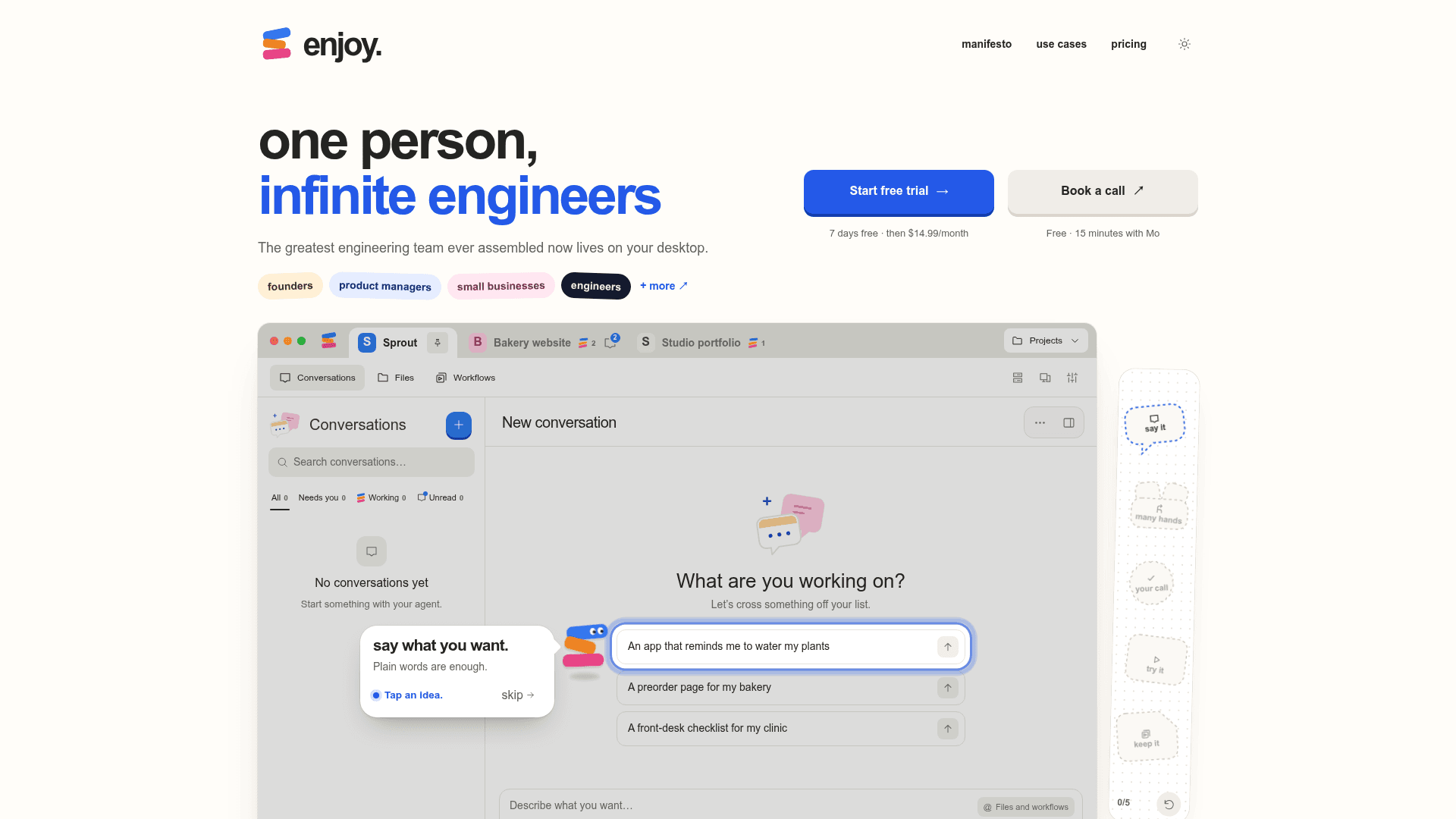
    Enjoy is a desktop workspace from Mo Bitar that puts AI coding agents in one app, aimed at people who want to build software without writing code themselves. The founder, who signs as Mo, says Enjoy gives access to the latest AI for writing software in an app people can use and grow with. It runs on Mac, Windows, or Linux computers, and phones and browsers can connect to it.

    What It Is

    According to the site, Enjoy is a desktop workspace for building with Claude Code, Codex, Grok Build, Antigravity, and more. Projects, conversations, documents, workflows, and local tools come together in one place. The user describes what they want in plain language and the agents do the technical work. Enjoy is the workspace around those agents; the site states that subscriptions and usage charges for Claude Code and Codex are separate from Enjoy.

    Working with multiple agents

    The homepage lists support for Claude Code, Codex, Grok Build, Antigravity, and OpenCode. The use-cases page says users can switch to another agent when one reaches its limit and keep the same project and files. It also describes running many conversations at once, with a view of which ones need the user, which are working, and which are done.

    Files, workflows, and self-checking

    The site says conversations, docs, and workflows are stored as plain Markdown in the project. Workflows can run scheduled work, such as summarizing unread mail every morning. The homepage also claims agents click through an app and fill in forms to check that it works, with a live preview beside the conversation.

    Local-first model

    Enjoy states that project files live on the user's disk and that it does not put work in a proprietary cloud box. The use-cases page says Enjoy works on the user's own network, VPN, and firewall, using accounts already signed in on that computer. The help page says device connections are end-to-end encrypted, and that AI providers process the context sent to them under their own policies. Phones and teammates connect while the host computer is awake, online, and running Enjoy.

    Who it targets

    The use-cases page lists founders, product managers, small businesses, knowledge workers, engineers, prototypers, note-takers, designers, freelancers, learners, analysts, and maintainers. Examples include a family clinic building a desktop app for front-desk tasks. Team use lets members be invited to the host computer, with choice of which projects each person can use.

    Setup path

    The help page says to download Enjoy, sign in, connect an AI agent, then open a project folder or start a new project. Import guides cover moving work from Lovable, Replit, Claude Code, and Codex, and any folder can be opened with Import existing work. Support is by email and a Slack community.
    Enjoy - 1

    Community Discussions

    Be the first to start a conversation about Enjoy

    Share your experience with Enjoy, ask questions, or help others learn from your insights.

    Pricing

    Unlimited

    $14.99 per person per month with a 7-day free trial; includes one computer, and each extra computer is $19.99/month.

    $15
    per month
    • one computer included
    • phones & browsers, free
    • end-to-end encrypted device messages
    • invite team members to your computer
    • one Claude or Codex plan for the whole team
    • choose which projects each person can use
    • everyone works from their own account
    • Each extra computer is $19.99/month
    View official pricing

    Capabilities

    Key Features

    • Multi-agent support (Claude Code, Codex, Grok Build, Antigravity, OpenCode)
    • Switch agents when one hits its limit
    • Parallel conversations with status tracking
    • Agents test their own work
    • Conversations, docs, and workflows stored as Markdown files
    • Scheduled workflows
    • Import projects from Lovable, Replit, Claude Code, and Codex
    • Phone and browser access to the host computer
    • Team invites with per-project access
    • End-to-end encrypted device messages
    • Live preview beside conversation

    Integrations

    Claude Code
    Codex
    Grok Build
    Antigravity
    OpenCode
    Slack
    Mail
    Discord
    Signal
    GitHub
    Lovable
    Replit
    API Available
    View Docs

    Ratings & Reviews

    No ratings yet

    Be the first to rate Enjoy and help others make informed decisions.

    Rate other tools you’ve used

    Developer

    Mo Bitar

    Mo Bitar is a software developer building Enjoy, a desktop workspace for AI coding agents. He previously built Standard Notes and is the founder of Shape, a team workspace. He writes and makes videos about AI, software development, and building products.

    Read more about Mo Bitar
    WebsiteGitHubX / Twitter
    1 tool in directory

    Similar Tools

    Spec Kit icon

    Spec Kit

    An open-source toolkit for spec-driven development that structures how AI coding agents build software through specifications, plans, and task breakdowns.

    AdaL icon

    AdaL

    AdaL is an agentic engineering harness that unifies deep research, coding, browser use, and code review into one continuous session with multi-model support.

    Waku icon

    Waku

    A fast, native desktop app built in Rust that unifies multiple coding agent CLIs (Claude Code, Codex, Cursor, Amp, and more) into one GPU-accelerated window with sessions, transcripts, and Git-backed checkpoints.

    Browse all tools

    Related Topics

    AI Coding Assistants

    AI tools that help write, edit, and understand code with intelligent suggestions.

    915 tools

    Vibe Coding

    Vibe code using low code AI tools that let you build applications with natural language prompts with minimal code.

    217 tools

    Agent Harness

    Infrastructure, orchestrators, and task runners that wrap around LLM coding agents — covering session management, context delivery, worktree isolation, architecture enforcement, and issue-to-PR pipelines.

    195 tools
    Browse all topics
    Back to all toolsSuggest an edit
    ratings
    discussions
    1upvote