
Gradio
An open-source Python library for building and sharing machine learning web apps and demos in minutes, with no JavaScript or frontend experience required.
At a Glance
Fully free and open-source under Apache License 2.0. Install via pip and deploy anywhere.
Engagement
Available On
Listed Oct 2026
About Gradio
Gradio is an open-source Python package that lets developers quickly build interactive web interfaces for machine learning models, APIs, or any Python function. Licensed under Apache 2.0 and hosted on GitHub with over 43,000 stars, it requires Python 3.10 or higher and can be installed with a single pip install gradio command. The project is actively maintained by the gradio-app organization and integrates tightly with Hugging Face Spaces for free, always-online hosting.
What It Is
Gradio is a Python-first UI framework for machine learning. Developers wrap any Python function — a model inference call, a data transformation, a chatbot backend — with a few lines of code and get a fully functional web app with inputs, outputs, and interactive components. The library handles all frontend rendering, so no JavaScript, CSS, or web hosting knowledge is needed. Apps can be shared instantly via a public URL generated by demo.launch(share=True), or deployed permanently to Hugging Face Spaces.
Core Building Blocks
Gradio exposes three main abstractions:
gr.Interface— a high-level class for wrapping functions with one or more inputs and outputs. Accepts component names as strings or class instances.gr.Blocks— a lower-level API for custom layouts, multi-step data flows, conditional visibility, and complex interactions. The popular Automatic1111 Stable Diffusion Web UI is built on Blocks, according to the project README.gr.ChatInterface— a purpose-built class for creating chatbot UIs with streaming support, requiring only a Python function.
Component Library and Data Types
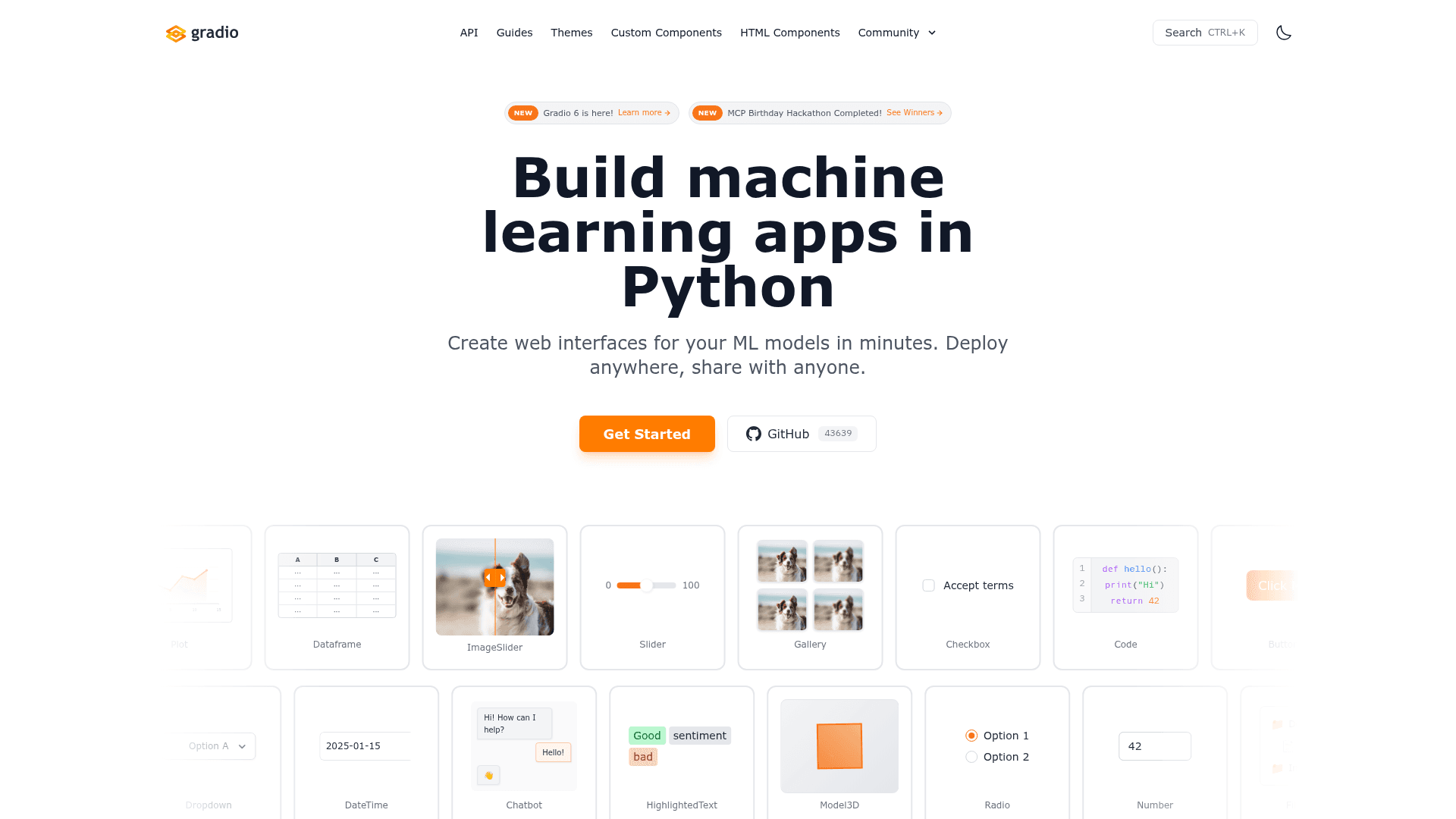
Gradio ships with 40+ built-in components covering a wide range of data types:
- Text, Number, Slider, Checkbox, Radio, Dropdown, DateTime
- Image, Video, Audio, Model3D, Gallery, AnnotatedImage, ImageSlider
- Dataframe, Plot, Code, FileExplorer, HighlightedText, Chatbot
Components can be used as both inputs and outputs, and custom components can be created and shared via the Custom Components system.
Ecosystem and Client Libraries
Beyond the core Python library, Gradio ships a broader ecosystem:
- Gradio Python Client (
gradio_client) — programmatically query any Gradio app from Python, useful for pipelines and automation. - Gradio JavaScript Client (
@gradio/client) — connect to Gradio apps from JavaScript or TypeScript, in the browser or Node.js. - Third-party clients — community-built clients for Rust, Go, Ruby, and other languages.
- Server mode (
gradio.Server) — build a custom frontend backed by Gradio's queue, streaming, MCP, ZeroGPU, and Spaces hosting infrastructure. - AI Coding Skills — a
gradio skills addcommand installs Gradio-specific knowledge into AI coding assistants like Cursor, Claude Code, and Codex.
Update: Gradio 6.28.0
The latest release is gradio@6.28.0, published on September 18, 2026, according to the GitHub repository metadata. The homepage announces "Gradio 6 is here!" as a current milestone. The project also recently ran an MCP Birthday Hackathon, signaling active investment in MCP (Model Context Protocol) integration as a product direction. The repository shows continuous push activity as recently as late September 2026, with 102 open issues and a healthy fork count of 3,615.
Open-Source Deployment Model
Gradio is released under the Apache License 2.0, making it free to use, modify, and distribute. The core platform source code is publicly available at github.com/gradio-app/gradio. It is built on top of open-source libraries including FastAPI, Svelte, Vite, Tailwind CSS, and Storybook. Hosting options range from local development (hot reload mode, vibe mode with --vibe flag) to Hugging Face Spaces for permanent public deployment.
Community Discussions
Be the first to start a conversation about Gradio
Share your experience with Gradio, ask questions, or help others learn from your insights.
Pricing
Open Source
Fully free and open-source under Apache License 2.0. Install via pip and deploy anywhere.
- Full access to all Gradio components
- Local deployment
- Public URL sharing
- Hugging Face Spaces hosting
- Python and JavaScript client libraries
Capabilities
Key Features
- 40+ built-in UI components
- gr.Interface for quick ML demos
- gr.Blocks for custom layouts and data flows
- gr.ChatInterface for chatbot UIs
- Instant public URL sharing via share=True
- Hugging Face Spaces deployment
- Python Client (gradio_client)
- JavaScript Client (@gradio/client)
- Third-party clients (Rust, Go, Ruby)
- Custom component creation and sharing
- Hot reload mode for local development
- Vibe mode for AI-assisted app editing
- Server mode with queue and streaming
- MCP integration support
- AI coding assistant skills (Cursor, Claude Code, Codex)
- Supports images, audio, video, 3D, dataframes, plots, and more
- No JavaScript or CSS required