
JET Pilot
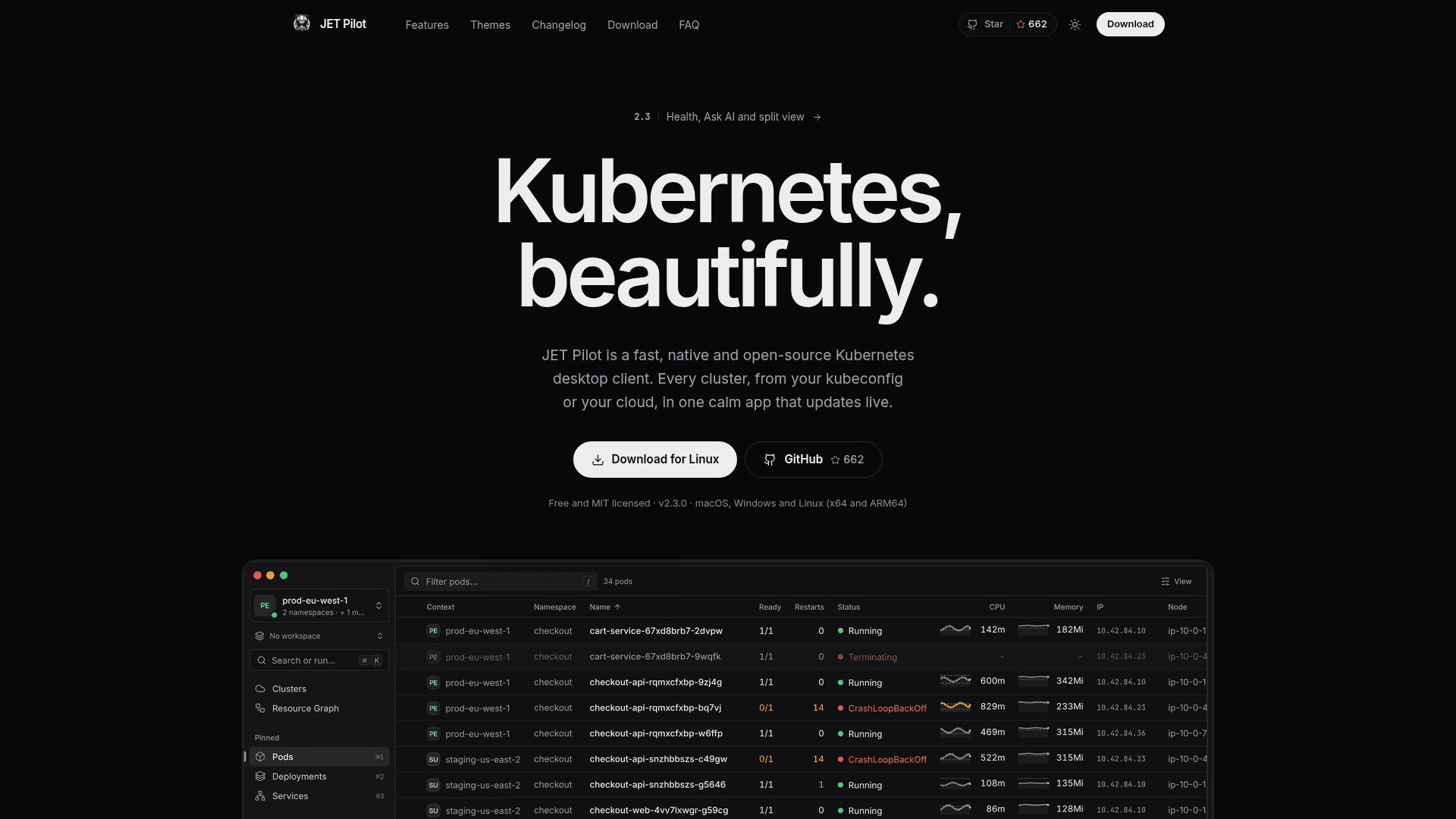
A native, open-source Kubernetes desktop client that brings every cluster and cloud account into one app.
At a Glance
Free, MIT-licensed open-source Kubernetes desktop client with no paid tier, no feature gates, no trial and no account required.
Engagement
Available On
Alternatives
Listed Nov 2026
About JET Pilot
JET Pilot is an open-source Kubernetes desktop client developed on GitHub by unxsist and contributors. It runs on macOS, Windows and Linux and reads existing kubeconfig files or connects cloud accounts to list clusters in one place. The latest release shown is v2.3.0, dated October 31, 2026.
What It Is
JET Pilot is a Kubernetes IDE-style desktop app built with Rust and Tauri 2 on the backend and Vue 3 with TypeScript in the interface. It combines a keyboard-first workflow with a mouse-friendly UI. It uses your kubeconfig and kubectl, and the project states it has no account, analytics or telemetry. Cloud accounts it can connect are AWS, Google Cloud, Azure, DigitalOcean, Akamai, Civo, Scaleway, Vultr and Exoscale.
Troubleshooting and day-to-day operations
The Health page lists what is broken across clusters in plain words, with the likely cause, evidence and fixes shown behind a dry-run diff. A Changes timeline shows image bumps, config edits, scaling and releases. Upgrade readiness covers support dates, deprecated APIs and add-ons. Tables stream live from the API server, and logs from every pod of a workload can be followed together, with JSON parsed into fields and a volume chart for picking time ranges. Other tools include a resource graph, a built-in terminal, container shells, port forwards that follow pods, Helm releases, Flux and Argo CD views, and access review.
Ask AI and safety features
Ask AI starts an agent you already have installed, such as Claude Code, Codex or Gemini CLI, in a terminal tab with kubectl pinned to one cluster. JET Pilot stores no keys and sends nothing itself. Production guardrails require typing a cluster name before destructive actions, and clusters can be made read-only. Credentials are kept in the system keychain.
Installation
Downloads are provided as macOS .dmg, Windows .exe and .msi, and Linux .deb, .rpm and AppImage packages, plus a Homebrew tap. The app is not notarized by Apple and Windows installers are not code-signed, so first launch may need a manual step. It has a built-in updater.
Community Discussions
Be the first to start a conversation about JET Pilot
Share your experience with JET Pilot, ask questions, or help others learn from your insights.
Pricing
Free
Free, MIT-licensed open-source Kubernetes desktop client with no paid tier, no feature gates, no trial and no account required.
- MIT licensed
- macOS, Windows and Linux (x64 and ARM64)
- No paid tier, no feature gates, no account wall
- Multi-cluster and multi-namespace views
- Clusters hub, GitOps, Health, Helm, built-in terminal, log viewer
Capabilities
Key Features
- Clusters hub across kubeconfigs and nine cloud providers
- Health page with likely causes and dry-run fixes
- Changes timeline
- Upgrade readiness checks
- Ask AI via your own agent with kubectl pinned to a cluster
- Multi-cluster and multi-namespace tables
- Live streaming resource tables
- Structured multi-pod log viewer
- Resource graph
- Flux and Argo CD GitOps view
- Built-in Helm support
- Access review
- Operator and CRD views
- Built-in terminal and container shells
- Port forwards that follow pods
- Custom YAML actions
- Command palette
- Production guardrails and read-only clusters
- Workspaces and split view
- Custom themes and editor theme import