
mcptoon
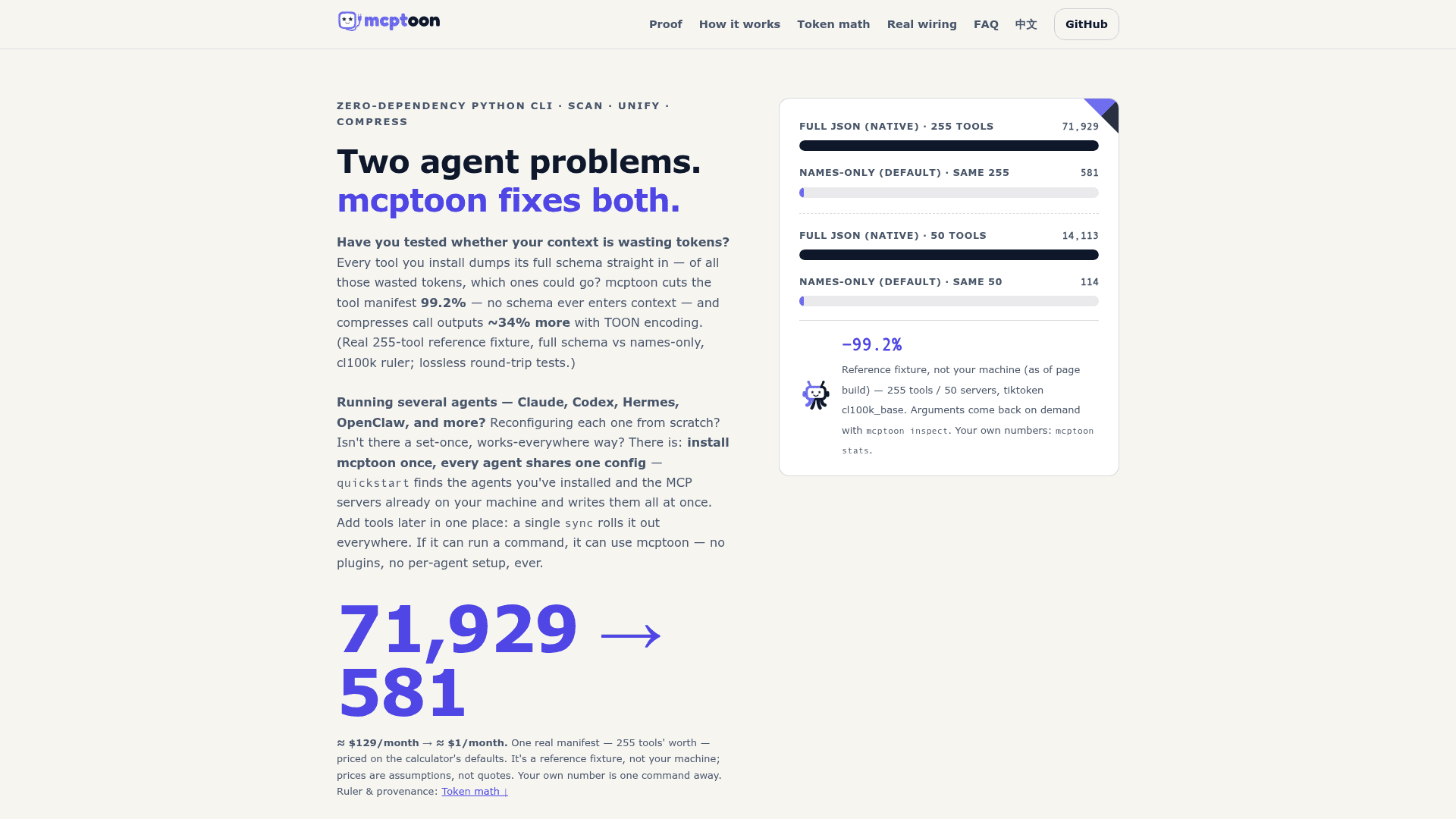
Zero-dependency CLI that manages MCP tools and agent skills for every local agent. Tool discovery drops from 71,929 to 581 tokens across 255 tools (−99.2%, per the project's benchmark).
At a Glance
Fully free and open-source under Apache 2.0. Install via pip, zero dependencies.
Engagement
Available On
Alternatives
Updated Sep 2026
About mcptoon
mcptoon is an open-source, zero-dependency CLI that manages MCP tools and agent skills in one place and keeps their full descriptions out of an agent's context window. Published on PyPI under Apache 2.0, it shares one configuration across every local agent, so a tool or skill added once is available to all of them without editing per-agent config files.
What It Is
mcptoon is a command-line tool written in pure Python (standard library only, Python 3.10+) that sits between AI agents and MCP servers. Instead of loading every tool schema and every SKILL.md file into context on each turn, agents run mcptoon commands and receive a compact view, fetching full detail only when they need it. It supports stdio and HTTP MCP servers, runs on Windows, macOS, and Linux, and can also run as a single MCP endpoint (mcptoon serve) for clients that expect a server rather than a shell command.
How the Token Savings Work
The project separates its savings into three independent areas:
- Tool discovery:
mcptoon manifestreturns a name index by default, andmcptoon inspectfetches one tool's full schema only when it is about to be called.--slimadds parameter types. - Skills: a single short pointer stays in context, and
mcptoon skills resolvereturns the most relevant skills for a task using an offline BM25 search. - Call results:
--toonre-encodes results in the open TOON format, and asmartcompression mode trims redundant result content while keeping the original retrievable throughmcptoon_retrieve.
Measured Benchmarks
According to the project's published benchmark (a synthetic sample of 255 tools across 50 servers, measured with tiktoken cl100k_base), tool discovery drops from 71,929 to 581 tokens (−99.2%). On the same sample, the slim format measures 8,282 tokens (−88.5%) and TOON measures 47,438 tokens (about 34% smaller than JSON). For skills, the maintainers report 926,232 tokens of SKILL.md text on their own machine reduced to a 39-token resident pointer plus about 501 tokens per lookup. The project notes the sample is not a user's catalog; mcptoon bench and mcptoon status measure savings on the local machine.
Tools, Skills, and Agents
mcptoon ships no tools and bundles no catalog. mcptoon install --search queries Smithery and the official MCP Registry live (the project cites more than 17,000 Smithery entries), and mcptoon skills search queries the open skills.sh index. Four built-in starter packs (essentials, web-research, code-review, docs) set up a working toolset in one command. mcptoon quickstart discovers existing MCP servers and registers mcptoon in each detected agent; the project documents support for Claude Desktop, Claude Code, Codex, Cursor, Windsurf, Cline, VS Code Copilot, and any agent that can run shell commands.
Safety and Reversibility
Three guards run on tool results by default: a destructive-action block that requires --destructive, a prompt-injection scan, and credential-leak detection that blocks results carrying API keys or tokens. The project states it sends no telemetry, stores no credentials, and runs no background process. Setup changes are reversible: mcptoon restore puts servers back where they were, mcptoon off removes only the gateway entry, and mcptoon uninstall --dry previews full removal before anything is deleted.
Update: v0.8.3
Version 0.8.3 was published to PyPI on September 28, 2026. The 0.8.x releases make the gateway withhold upstream tool lists by default, add sync --takeover and mcptoon restore, turn on smart result compression by default, and fix packaging of mcptoon's own skill so agent hosts load it. The project moved from 0.3.0 in mid-August to 0.8.3 through frequent releases over about six weeks.
Community Discussions
Be the first to start a conversation about mcptoon
Share your experience with mcptoon, ask questions, or help others learn from your insights.
Pricing
Open Source
Fully free and open-source under Apache 2.0. Install via pip, zero dependencies.
- Token-efficient MCP CLI client
- TOON, SLIM, and compact output formats
- 23 security-audited MCP server profiles
- Credential leak detection
- Prompt injection guard
Capabilities
Key Features
- Tool discovery name index cuts 71929 to 581 tokens on a 255-tool benchmark (−99.2%)
- Schema on demand via mcptoon inspect fetches one tool's full schema only when needed
- SLIM format with names and parameter types (88.5% smaller than full schemas)
- TOON encoding for call results (~34% smaller than JSON and round-trip safe)
- Smart result compression on by default with originals retrievable via mcptoon_retrieve
- Per-tool compression policy (raw/toon/slim/smart)
- Skills catalog with one resident pointer plus on-demand lookup instead of loading every SKILL.md
- Offline BM25 skill search (skills resolve)
- Live MCP server search across Smithery and the official MCP Registry
- Skill search via the skills.sh index
- Four built-in starter packs (essentials/web-research/code-review/docs)
- One-command setup that discovers existing servers and registers every detected agent (quickstart)
- One config shared across all agents (~/.mcptoon/config.json)
- Agent self-service lets agents add MCP servers mid-task via CLI
- Gateway mode (mcptoon serve) puts all servers behind one MCP endpoint over stdio or HTTP
- Takeover mode that routes existing servers through the gateway
- Fully reversible setup (restore/off/uninstall --dry)
- Credential leak detection blocks results carrying API keys or tokens
- Prompt injection guard scans tool results for injection patterns
- Destructive-action blocking requires --destructive flag
- Local savings measurement (bench/status/stats/report)
- Doctor and health commands for diagnostics
- Enable or disable individual tools (toggle)
- Export to standard MCP JSON (--format mcp)
- Shell completion for bash/zsh/fish/PowerShell
- stdio and HTTP MCP transport support
- Claude Code plugin install
- Zero third-party dependencies using pure Python stdlib
- No telemetry or stored credentials and no background process