
MXterm Pro
A native multi-pane terminal workspace for running AI coding agent CLIs alongside SSH/SFTP, with a Control Room and Token Meter.
At a Glance
Free plan with no pane limit; no account and no card required.
Engagement
Available On
Alternatives
Listed Nov 2026
About MXterm Pro
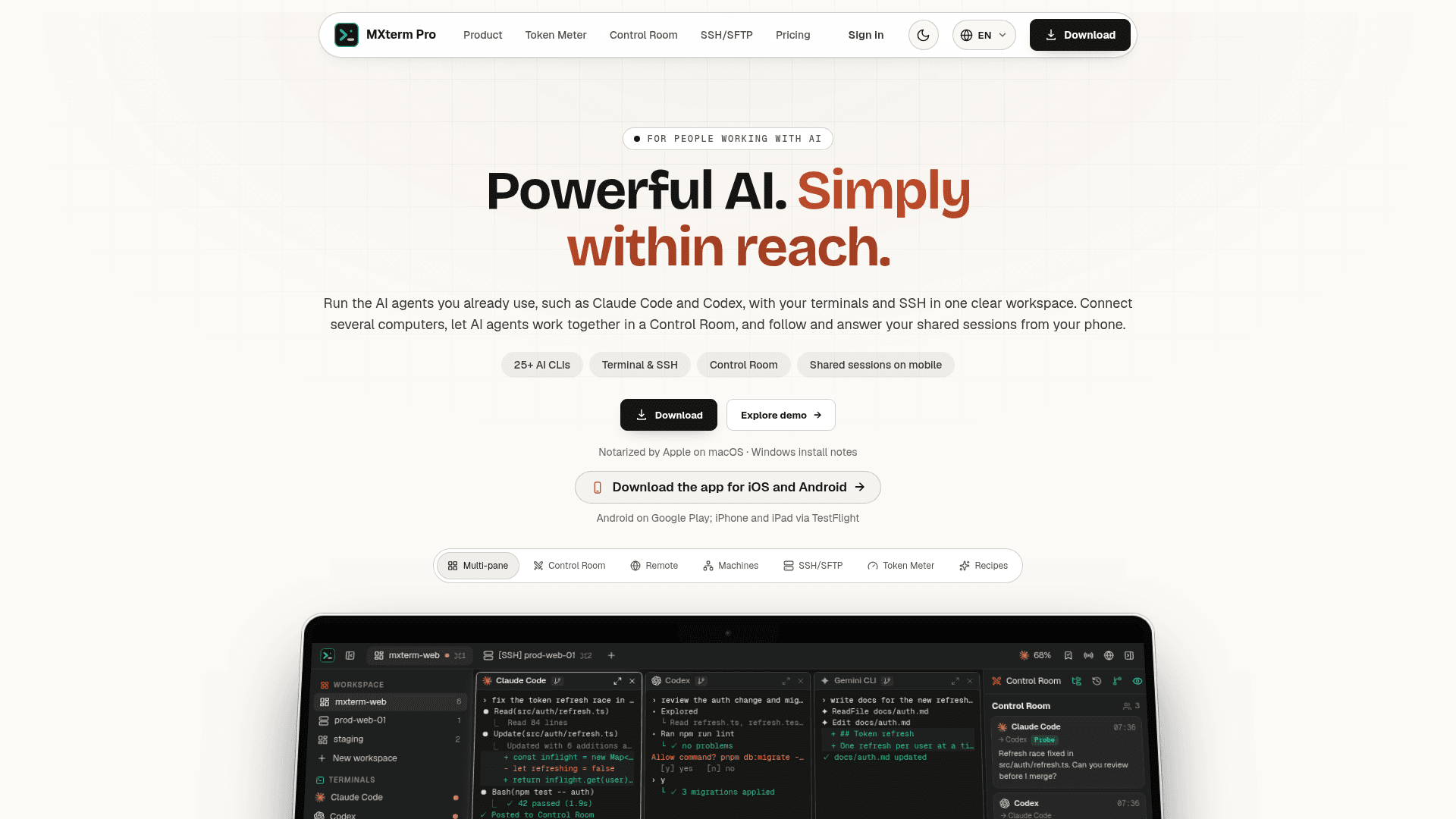
MXterm Pro is a desktop terminal app from BrickAI that runs AI coding agent CLIs such as Claude Code, Codex and Gemini CLI in real terminal panes beside SSH sessions and a remote file browser. It adds a Control Room where agents can message each other, a Token Meter for usage, and remote control of shared panes from a phone or browser. The app is closed-source; the GitHub repository hosts its docs and community support.
What It Is
MXterm Pro is a native workspace for developers who run several AI coding agents and manage remote servers. Each agent's own CLI runs in a real PTY pane; the app does not install the CLIs, so they must already be on the machine. Panes can be split, moved between tabs and windows, and maximized.
Agents and Control Room
Agents in separate panes can join a shared Control Room, where members post, @mention each other, Probe or Execute, and pick a coordinator. Discussions can be exported as Markdown. An opt-in setting gives each agent pane its own git worktree and branch, and the app tracks live agent status with notifications. Chat view presents an agent session as a conversation; for some agents the app notes that chat is unverified or partial.
SSH, SFTP and Token Meter
Saved SSH hosts open in terminal tabs with an SFTP panel beside them: remote folder browsing, search, a built-in editor, background transfers, port forwards and a chmod tool. It is a single remote browser rather than a folder-sync tool. The Token Meter reads token counts that agents already write to disk and shows usage and plan limits; Claude plan limits are opt-in and macOS only. Command Recipes (Cmd+J) insert fixed Linux commands by keyword match, not AI-generated shell.
Remote Control and Mobile
A host machine can share chosen panes, view-only or with control on a timer, to another MXterm Pro install or any browser, paired by a 6-character code or QR over Tailscale or a local network. Android is on Google Play, and iPhone and iPad are available through TestFlight. The vendor states it is not a fleet manager or remote orchestration platform.
Community Discussions
Be the first to start a conversation about MXterm Pro
Share your experience with MXterm Pro, ask questions, or help others learn from your insights.
Pricing
Free forever
Free plan with no pane limit; no account and no card required.
- Unlimited terminal panes across all tabs and windows
- SSH and SFTP: up to 5 SSH servers
- Control Room: one room running 2 AI agents
- Git worktree per agent, live agent status and notifications
- Remote control from unlimited phones, iPads and browsers
MXterm Pro
One-time lifetime licence (3 devices); launch price, afterwards from $8.9/mo. Larger device tiers: 10 devices $69, 30 devices $99.
- Unlimited Control Rooms and members
- Unlimited hosts and connected computers
- Pair every computer and share every pane, tab and computer, with no limit
- My computers: open your other signed-in Macs, no code or password
- Standing access password, or Temporary up to 7 days
- Early access to exclusive future features
- 14-day refund
- Launch licences: free lifetime updates, including future major versions
- 10 Devices $69 and 30 Devices $99 tiers; MXterm Pro Max 100 devices for $199
Enterprise
More than 100 devices, an invoice or a custom agreement.
Capabilities
Key Features
- Real PTY terminal panes with splits, tabs and maximize
- Control Room for agent-to-agent messaging
- Git worktree per agent
- Works with 25+ agent CLIs
- SSH host manager and SFTP browser with built-in editor
- Token Meter for agent usage and plan limits
- Command Recipes on Cmd+J
- Remote control of shared panes via code or QR
- Mobile app to follow and answer agents
- Chat view for agent sessions