
EveryDev.ai
Sign inSubscribe
Explore AI Tools
  • AI Coding Assistants
  • Agent Frameworks
  • MCP Servers
  • AI Prompt Tools
  • Vibe Coding Tools
  • AI Design Tools
  • AI Database Tools
  • AI Website Builders
  • AI Testing Tools
  • LLM Evaluations
Follow Us
  • X / Twitter
  • LinkedIn
  • Reddit
  • Discord
  • Threads
  • Bluesky
  • Mastodon
  • YouTube
  • GitHub
  • Instagram
Get Started
  • About
  • Editorial Standards
  • Corrections & Disclosures
  • Community Guidelines
  • Advertise
  • Contact Us
  • Newsletter
  • Submit a Tool
  • Start a Discussion
  • Write A Blog
  • Share A Build
  • Terms of Service
  • Privacy Policy
Explore with AI
  • ChatGPT
  • Gemini
  • Claude
  • Grok
  • Perplexity
Agent Experience
  • llms.txt
Theme
With AI, Everyone is a Dev. EveryDev.ai © 2026
Main Menu
  • Tools
  • Developers
  • Topics
  • Discussions
  • Communities
  • News
  • Podcasts
  • Blogs
  • Builds
  • Contests
  • Compare
  • Arena
Create
    Home
    Tools

    2,490+ AI tools

    • New
    • Trending
    • Featured
    • Compare
    • Arena
    Categories
    • Agents1659
    • Coding1210
    • Infrastructure537
    • Marketing449
    • Design434
    • Projects392
    • Research369
    • Analytics338
    • Testing232
    • MCP226
    • Data211
    • Security200
    • Integration169
    • Learning155
    • Communication148
    • Prompts144
    • Extensions137
    • Commerce125
    • Voice122
    • DevOps99
    • Web78
    • Finance21
    1. Home
    2. Tools
    3. Nushell
    Nushell icon

    Nushell

    Command Line Assistants

    A cross-platform shell that treats all data as structured, enabling safe filtering, sorting, and transformation through typed pipelines.

    Visit Website

    At a Glance

    Pricing
    Open Source

    Fully free and open-source under the MIT license. No cost to use, modify, or distribute.

    Engagement

    Available On

    Windows
    macOS
    Linux
    API
    CLI

    Resources

    WebsiteDocsGitHubllms.txt

    Topics

    Command Line AssistantsDevelopment EnvironmentsData Processing

    Alternatives

    Ghosttysmuguv
    Developer
    NushellRemote / DecentralizedEst. 2019

    Listed May 2026

    About Nushell

    Nushell (Nu) is an open-source shell written in Rust that reimagines how command-line pipelines work by treating every piece of data as structured rather than raw text. It runs on Linux, macOS, BSD, and Windows, and is available via Homebrew, winget, Nix, and many other package managers. The project reached a minimum-viable-product milestone and is actively used as a daily driver by many users, though the README notes that some commands may still be unstable and the design continues to mature.

    What It Is

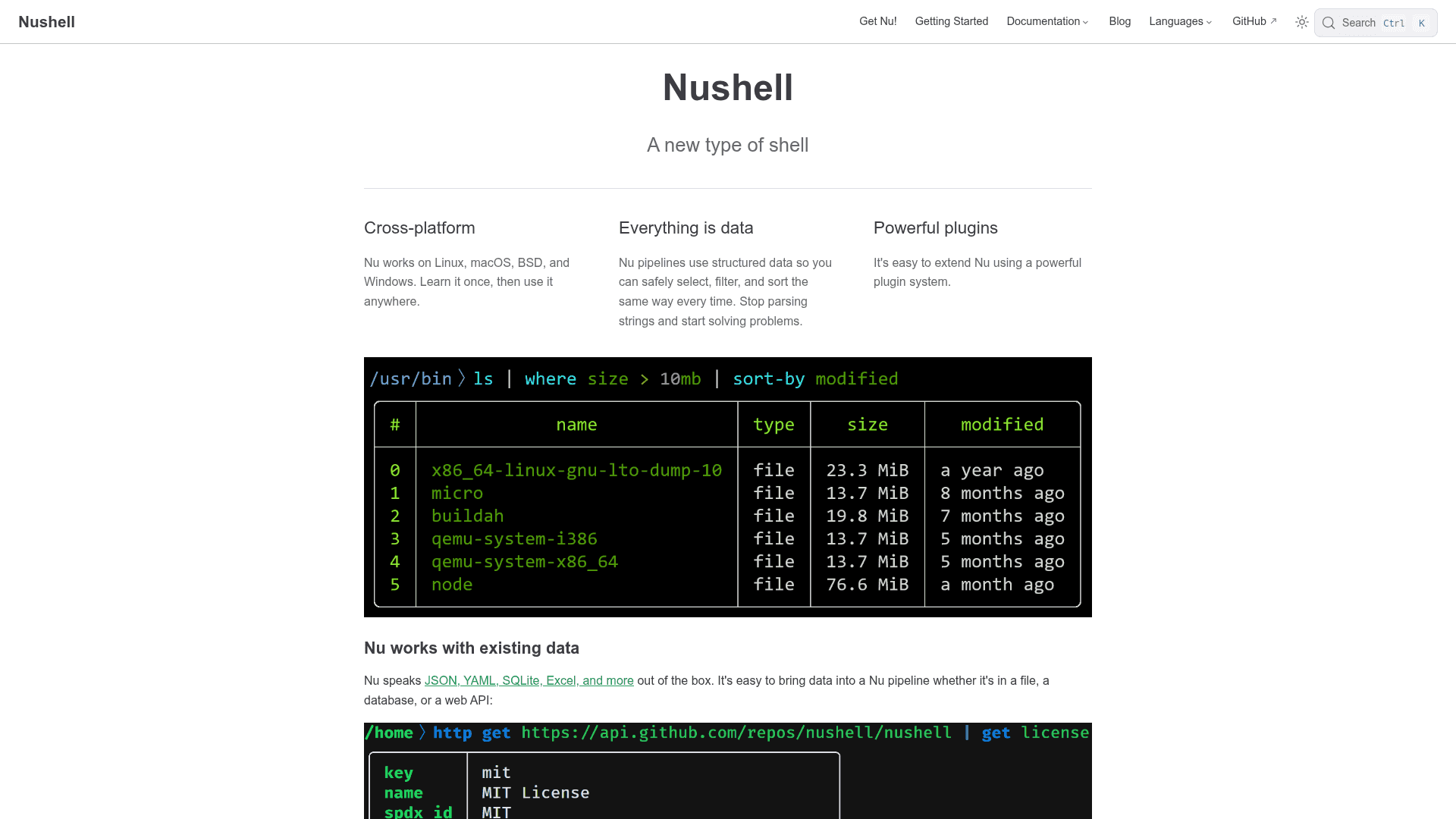
    Nushell is a modern, cross-platform shell that draws inspiration from PowerShell, functional programming languages, and contemporary CLI tooling. Instead of passing raw text streams between commands, Nu passes structured data — tables, records, and lists — through pipelines. This means commands like ls, ps, and open return typed tables that can be filtered, sorted, and transformed with consistent syntax, rather than requiring fragile string parsing.

    How Pipelines Work

    Nu's pipeline model extends the Unix philosophy of composable commands while adding a structured data layer. Commands fall into three categories: producers (e.g., ls), filters (e.g., where type == "dir"), and consumers (e.g., table). The pipe symbol (|) chains them left to right. Because data is typed, Nu catches type errors at the shell level and provides precise error messages showing exactly where and why something broke — a capability that text-based shells cannot offer.

    Data Format Support and File Handling

    Nu speaks JSON, YAML, SQLite, Excel, TOML, and more out of the box. The open command loads files as structured data when the format is recognized, allowing users to navigate nested fields directly in the pipeline (e.g., open Cargo.toml | get package.version). Web APIs can also be fetched and piped through the same structured commands, making Nu useful for data exploration beyond traditional shell scripting.

    Plugin Architecture

    Nu supports a plugin system that extends the shell with additional commands while following the same structured data model as built-ins. Plugins are standalone binaries named with a nu_plugin_* convention and communicate with Nu via a JSON-RPC protocol. Filter plugins receive data one element at a time and can stream results back; sink plugins receive the full data vector. The awesome-nu repository on GitHub lists a variety of community-built plugins.

    Ecosystem and Official Support

    The README lists several projects that officially support Nushell, including zoxide, starship, oh-my-posh, virtualenv, atuin, clap, Direnv, and Windmill, among others. Nu can also be used in GitHub Actions via the setup-nu action available in the GitHub Marketplace.

    Update: Version 0.112.2

    The latest release is version 0.112.2, published on April 15, 2026, according to the GitHub repository. The project shows active development with monthly commit activity and contributions from a large number of contributors. The repository was created in May 2019 and has accumulated over 39,000 stars on GitHub as of the last recorded update.
    Nushell - 1

    Community Discussions

    Be the first to start a conversation about Nushell

    Share your experience with Nushell, ask questions, or help others learn from your insights.

    Pricing

    OPEN SOURCE

    Open Source

    Fully free and open-source under the MIT license. No cost to use, modify, or distribute.

    • Full shell functionality
    • Cross-platform support
    • Plugin system
    • Structured data pipelines
    • Community support via Discord

    Capabilities

    Key Features

    • Structured data pipelines
    • Cross-platform support (Linux, macOS, BSD, Windows)
    • Built-in support for JSON, YAML, SQLite, Excel, TOML
    • Typed data with descriptive error messages
    • Plugin system via JSON-RPC protocol
    • Interactive autocomplete
    • Open and query files as structured data
    • Built-in commands: ls, ps, open, where, get, and more
    • GitHub Actions integration via setup-nu
    • Functional, immutable pipeline design

    Integrations

    Homebrew
    winget
    Nix
    zoxide
    starship
    oh-my-posh
    virtualenv
    atuin
    clap
    Direnv
    Windmill
    GitHub Actions
    Couchbase Shell
    x-cmd
    vfox
    API Available
    View Docs

    Reviews & Ratings

    No ratings yet

    Be the first to rate Nushell and help others make informed decisions.

    Developer

    Nushell Team

    Nushell is an open-source project that builds a new type of cross-platform shell written in Rust. The project treats all pipeline data as structured rather than raw text, enabling safer and more expressive command-line workflows. It is maintained by a community of contributors and is available under the MIT license. The team actively develops the shell with monthly releases and maintains documentation, a cookbook, and a Discord community.

    Founded 2019
    Remote / Decentralized
    0

    Used by

    GitHub
    Microsoft
    Mozilla (as users/contributors)
    Read more about Nushell Team
    WebsiteGitHub
    1 tool in directory

    Similar Tools

    Ghostty icon

    Ghostty

    Ghostty is a fast, feature-rich, and cross-platform terminal emulator that uses platform-native UI and GPU acceleration.

    smug icon

    smug

    smug is a terminal multiplexer session manager for tmux that lets you define and start pre-configured tmux sessions from YAML configuration files.

    uv icon

    uv

    An extremely fast Python package and project manager written in Rust, replacing pip, pip-tools, pipx, poetry, pyenv, and virtualenv in a single tool.

    Browse all tools

    Related Topics

    Command Line Assistants

    AI-powered command-line assistants that help developers navigate, search, and execute terminal commands with intelligent suggestions and context awareness.

    138 tools

    Development Environments

    AI-enhanced code editors and IDEs that improve the coding experience.

    119 tools

    Data Processing

    AI-enhanced ETL (Extract, Transform, Load) tools and data pipelines that automate the processing, cleaning, and transformation of large datasets with intelligent optimizations.

    100 tools
    Browse all topics
    Back to all tools
    Discussions