
Open-source, keyboard-first desktop app that runs Claude Code, Codex, Cursor or any CLI coding agent in parallel, each in its own git worktree.
At a Glance
Free and open source desktop agent manager under AGPL-3.0 with no seat limit, usage cap, trial period or feature gating. Users pay their own AI provider separately.
Engagement
Available On
Alternatives
Listed Nov 2026
About Pane
RunPane by Dcouple is Pane, an open-source, terminal-first agent manager for running AI coding agents in parallel on Windows, macOS and Linux. Each task gets its own git worktree, branch and port range, and any agent that runs in a terminal works without plugins or an SDK. Pane is released under AGPL-3.0 and built by Dcouple Inc.
What It Is
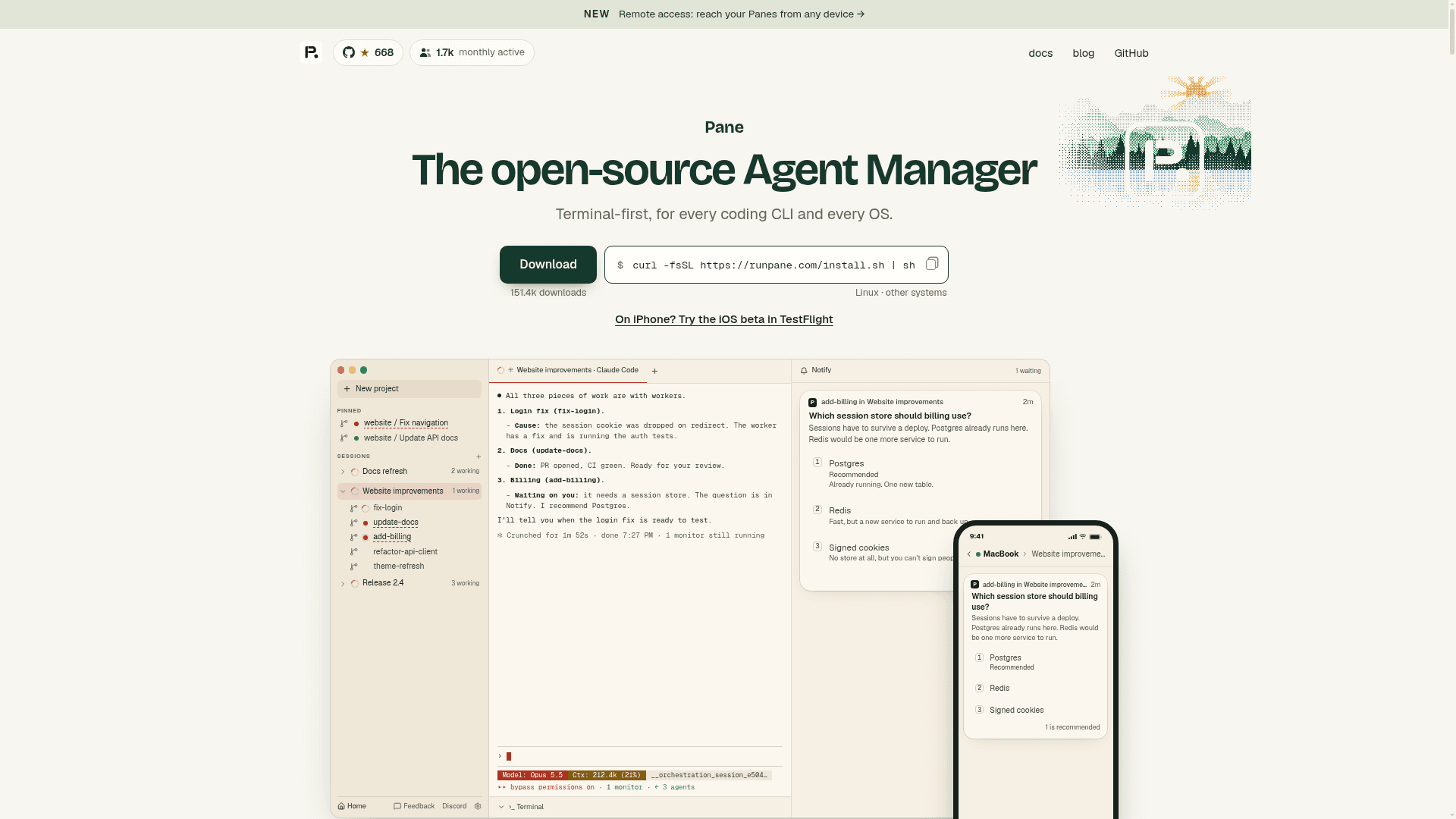
Pane is a desktop app for managing coding agents rather than replacing them. It uses two primitives, panes and tabs: one pane per feature with one worktree, and inside it agents, terminals, a browser, file diffs and Git history live as tabs. Claude Code, Codex and Cursor are built in with their own shortcuts, status tracking and conversation resume, while Aider, Goose, OpenCode, Gemini or a custom CLI run as terminal commands.
Worktrees, Git and Terminal Workflow
Creating a pane makes its worktree, and deleting it cleans up. Gitignored files such as .env are copied into new worktrees, setup scripts from pane.json or conductor.json run, and each pane gets its own block of ports via $PANE_PORT. A built-in syntax-highlighted diff viewer and keyboard shortcuts cover commit, push, pull, rebase, squash and merge. The terminal is based on xterm.js with patches for agent CLIs, an @ mention that pulls output from another terminal, and a command palette.
Sessions, CLI and MCP
Sessions are chats with Claude Code, Codex or Cursor that split work into panes, watch them and report back. Agents can also operate Pane through the runpane CLI and a registered MCP server, creating panes, reading terminal output and sending input. Loops run an agent or command on a schedule, and a Notify card lets agents ask the user questions.
Remote Pane and Phone Access
The Pane UI can stay on a laptop while agents run on a VM, WSL box, Mac mini or other machine. A phone or another computer pairs by QR code over Pane's encrypted relays, direct connection, Tailscale or SSH. The iPhone app is a public beta in TestFlight, and a browser app is also available. Workspaces let an agent read files and run commands on other linked machines, and runpane handoff passes a task with a note to another machine.
Community Discussions
Be the first to start a conversation about Pane
Share your experience with Pane, ask questions, or help others learn from your insights.
Pricing
Pane (Desktop)
Free and open source desktop agent manager under AGPL-3.0 with no seat limit, usage cap, trial period or feature gating. Users pay their own AI provider separately.
- Licensed under AGPL-3.0 (with additional attribution terms under Section 7(b))
- No subscription, no per-seat fee, no usage cap
- No feature gating; everything in the desktop app included
- Runs on macOS, Windows and Linux with no account
- Self-hostable Remote Pane
Capabilities
Key Features
- Isolated git worktree per pane with automatic creation and cleanup
- Agent-agnostic: Claude Code, Codex, Cursor built in, any CLI agent supported
- Sessions that coordinate multiple agent panes
- runpane CLI and MCP server operable by agents
- Built-in syntax-highlighted diff viewer and keyboard-driven Git workflow
- Per-pane isolated ports and automatic secrets (.env) sync
- Split panes and in-app browser tabs
- Cross-terminal @ context sharing
- Notify cards for agent questions and approvals
- Scheduled Loops for recurring agent runs
- Remote Pane with QR pairing, relays, Tailscale and SSH
- Pane Workspaces and task handoff across machines
- WSL support and Windows x64/ARM64, macOS, Linux builds
- Usage and limits tracking for Claude Code and Codex