PI-Desktop
A local-first desktop workspace for AI coding agents that lets you bring your own model, open any local project, and run agents while staying in control.
At a Glance
Fully free and open-source under LGPL-3.0. Download and use PI-Desktop at no cost.
Engagement
Available On
Alternatives
Listed Sep 2026
About PI-Desktop
PI-Desktop is a local-first, open-source desktop application for running AI coding agents across macOS, Windows, and Linux. Built by the AIUO.NET team and licensed under LGPL-3.0, it gives coding agents a dedicated workspace separate from any editor or terminal, with a Rust host core handling permissions and privileged operations. The project is currently in Early Preview under active development, with the 0.14.x line already usable for real coding workflows.
What It Is
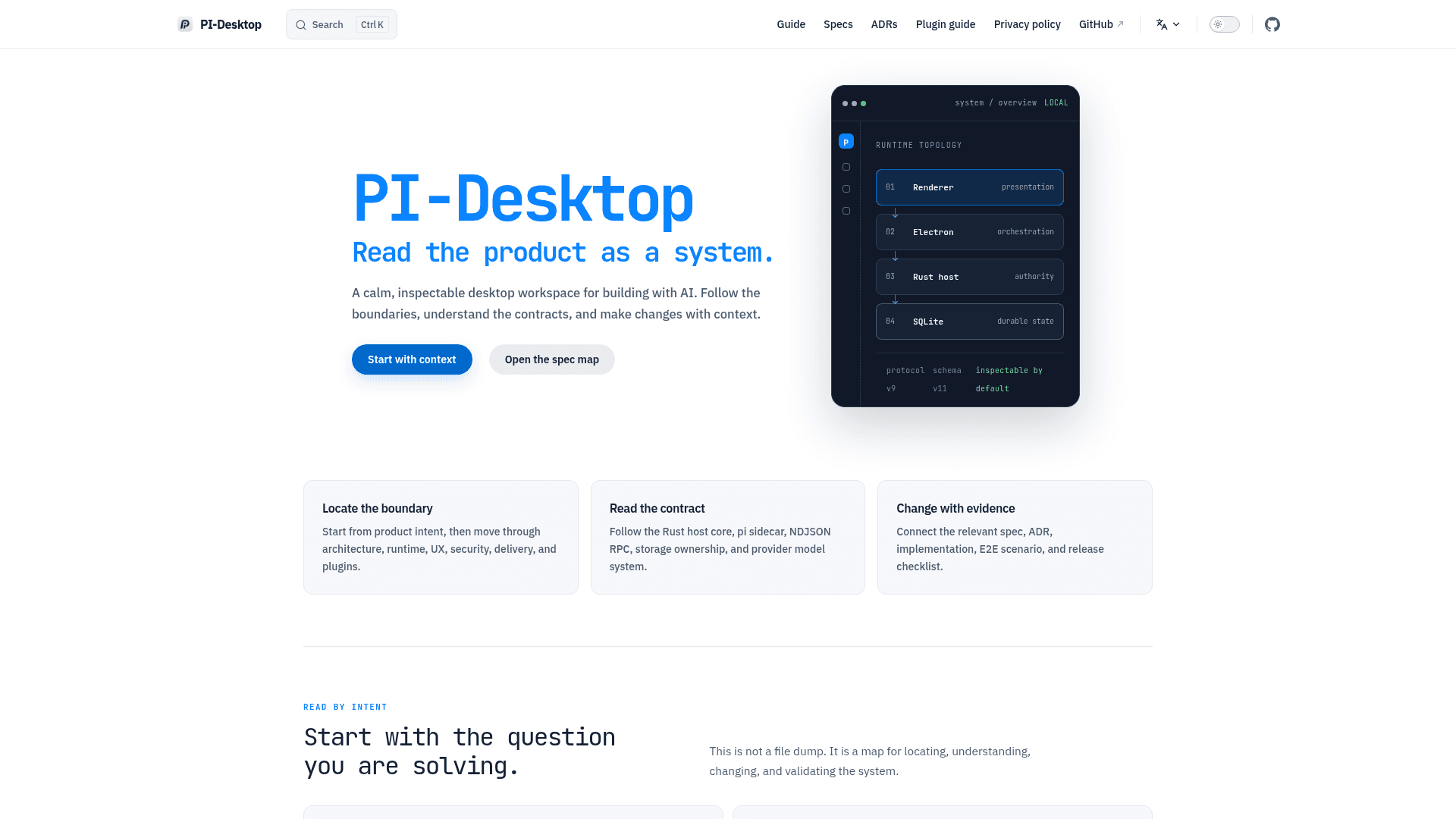
PI-Desktop is a standalone desktop workspace that hosts AI coding agents alongside your local projects, conversations, file reviews, and extensions — all in one application. Unlike editor extensions or hosted services, it runs entirely on your machine with no required account and no mandatory relay between you and your model provider. The architecture separates the React renderer, Electron orchestration layer, Rust host core, and a pi agent sidecar, so privileged operations like filesystem access and command execution pass through a permission layer rather than running unchecked.
Architecture and Runtime
The application is built on four distinct boundaries:
- Renderer — React-based UI for chat, projects, reviews, and settings; no Node integration
- Electron Main — desktop orchestration, lifecycle, and platform capabilities
- Rust Host Core — owns permissions, filesystem access, SQLite persistence, secrets, and RPC
- pi Agent Sidecar — owns the agent loop, model interaction, and streaming
Conversations are stored locally as JSONL with a SQLite index. API credentials go into the OS keychain. The README states there is no PI-Desktop telemetry, and model requests go directly to the provider or endpoint you configure.
Agent Workflow Modes
PI-Desktop offers three distinct operating modes for the same underlying agent:
- Agent — the default loop; reads, edits, runs commands, and iterates without extra approval gates
- Plan — the agent researches the codebase and produces a frozen implementation plan that you must approve before execution begins
- Goal — you define the outcome and acceptance criteria; the agent picks the path and works until the goal is met
Privileged tools pass through the permission layer in every mode. Large tasks can be delegated to background Subagents, each running in its own context and reporting results back to the parent agent.
Extension and Plugin System
PI-Desktop supports several layers of extensibility:
- Skills — reusable instructions and workflows, installable globally or per project
- MCP servers — connect external tools via Model Context Protocol without modifying the desktop app; the app can also be controlled by an external MCP agent via a loopback endpoint
- Subagents — specialized agents with their own instructions, tools, and model choices
- pi extensions — extensions written for the pi CLI run inside PI-Desktop's agent unchanged
- Plugins — installable
.piplugpackages that can contribute tools, commands, panels, themes, services, skills, MCP servers, Subagents, and resident services
Model Flexibility
PI-Desktop does not lock the agent runtime to a fixed model list. Supported providers include OpenAI, Anthropic, OpenAI-compatible APIs, hosted model gateways, and local gateways such as Ollama and LM Studio. Multiple providers and models can be configured simultaneously, and users can switch models directly from the Composer without recreating a session. Model configuration supports context windows, output limits, reasoning controls, and temperature settings.
Update: v0.14.6
The latest release is v0.14.6, published on September 10, 2026. The 0.14.x line includes the desktop shell, streaming agent runtime, Agent/Plan/Goal workflows, permission-aware workspace tools, session imports from Claude Code, Codex, OpenCode, and Pi, local MCP control, MCP/Skills/Subagents, background delegation, multi-provider model configuration, plugins and marketplace support, context checkpoints, notifications, release notes, and cross-platform packaging. Active priorities per the README include macOS tagged-release qualification, installer upgrade and rollback hardening, stronger plugin sandboxing, and broader end-to-end UI coverage.
Community Discussions
Be the first to start a conversation about PI-Desktop
Share your experience with PI-Desktop, ask questions, or help others learn from your insights.
Pricing
Open Source
Fully free and open-source under LGPL-3.0. Download and use PI-Desktop at no cost.
- Full desktop workspace for AI coding agents
- Bring your own model (any provider)
- Agent, Plan, and Goal workflow modes
- Plugin marketplace
- MCP server integration
Capabilities
Key Features
- Local-first desktop workspace for AI coding agents
- Bring your own model (OpenAI, Anthropic, Ollama, LM Studio, OpenAI-compatible APIs)
- Agent, Plan, and Goal workflow modes
- Permission-aware Rust host core for privileged operations
- Background Subagent delegation
- Plugin marketplace with .piplug package format
- MCP server integration and external MCP control
- Skills system for reusable agent instructions
- Session import from Claude Code, Codex, OpenCode, and Pi
- Multi-provider and multi-model configuration
- Context checkpoints for session recovery
- Inspectable diffs and command output review
- Cross-platform: macOS, Windows, Linux
- No required account or mandatory relay
- Local JSONL + SQLite conversation storage
- OS keychain for API credential storage
- pi extension compatibility
- Internationalization (English and Simplified Chinese)