
pinakea
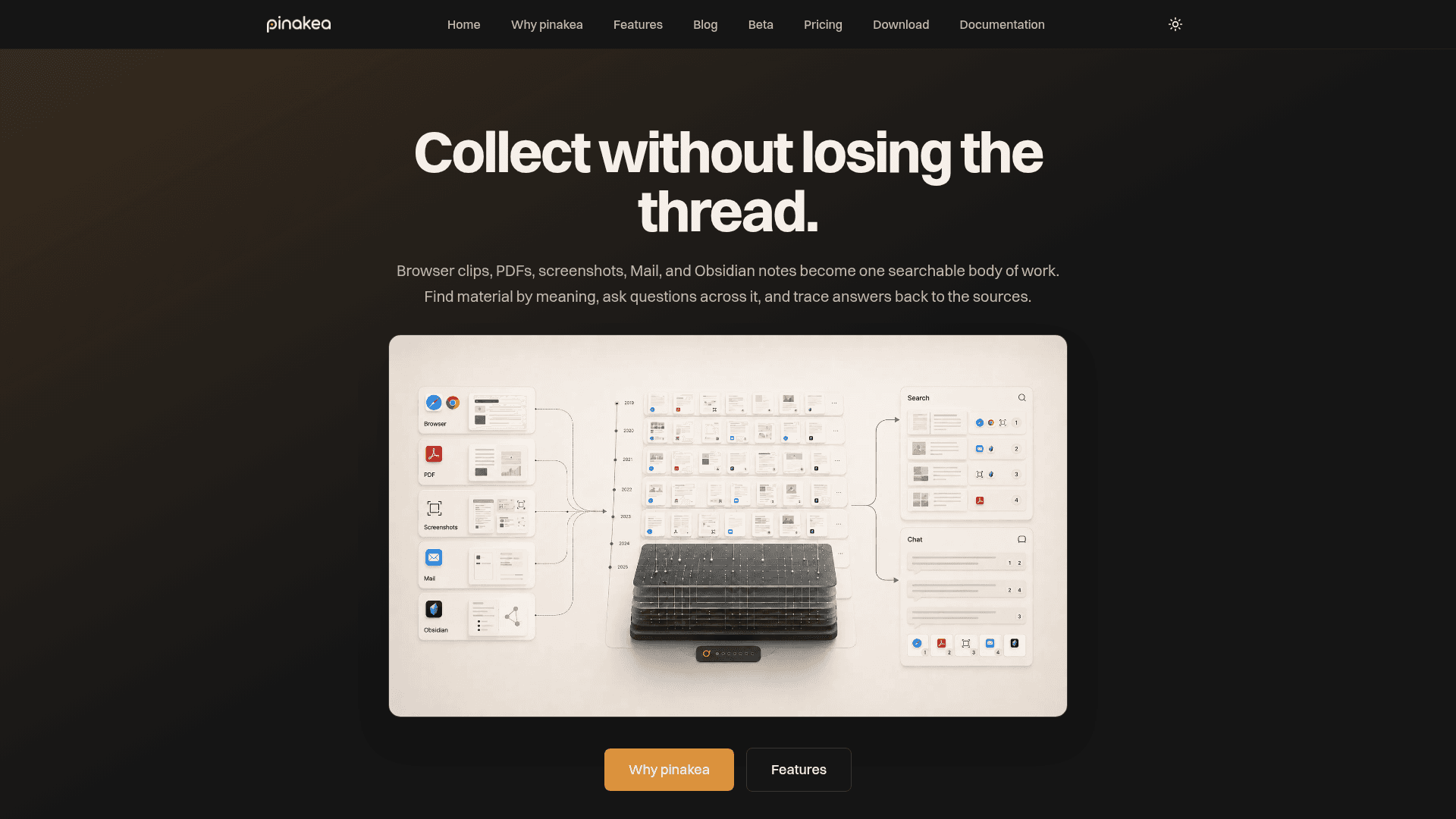
A native macOS app that unifies browser clips, PDFs, screenshots, Apple Mail, and Obsidian notes into one searchable knowledge base with semantic search and AI-powered chat.
At a Glance
For getting started — includes AI enrichment, semantic search, and a one-time 30-day trial for chat and deep summaries.
Engagement
Available On
Listed May 2026
About pinakea
pinakea is a native macOS desktop application that turns scattered saved content — browser clips, PDFs, screenshots, Apple Mail, and Obsidian notes — into a single searchable body of work. It indexes originals where they already live rather than moving them, then enriches each item with AI-generated titles, tags, micro summaries, and semantic embeddings so material can be found by meaning rather than exact keywords. The tool is currently in public beta, with applications open and shortlisted testers invited into a private download cohort.
What It Is
pinakea sits in the category of personal knowledge management and AI-powered research assistants, but with a strong emphasis on traceability and local data control. Its core job is to make large, mixed archives of saved material findable and queryable without requiring users to reorganize or re-file anything. Every search result, summary, and chat answer links back to the original source — whether that is an Obsidian note, a PDF on disk, an email, or a clipped web page.
How the Capture and Enrichment Pipeline Works
When content enters pinakea, an automated AI pipeline processes it in the background:
- Browser clips from Chrome, Chromium, and Safari are converted to clean Markdown and deduplicated by canonical URL.
- Files and folders are indexed in place — text, Markdown, PDFs, images, and HTML.
- Apple Mail is indexed locally without OAuth, with account and date-range controls.
- Obsidian vaults are ingested Markdown-first with frontmatter support and deep links back to
obsidian://. - Feedbin stars import full text and stay in sync.
- YouTube transcripts are extracted when videos are clipped, making spoken content searchable.
Each item receives chunking and embeddings, micro summaries, AI-generated titles, and AI-generated tags automatically.
Two AI Modes: Online and Mixed
pinakea offers two processing modes. Online Mode is the recommended default and routes automatic item processing through OpenRouter using models such as Qwen3 Embedding 8B and Gemini 2.5 Flash Lite, with parallel processing for faster initial indexing. Mixed Mode keeps automatic item processing (embeddings, micro summaries, titles, tags) on the Mac while still using OpenRouter for chat and long summaries — suited for smaller sets where avoiding remote processing cost matters more than speed. The app tracks remote spend in both modes so users can monitor OpenRouter usage directly.
Integrations and Extensions
pinakea is designed to meet users in their existing workflows rather than replace them:
- Chrome and Safari browser clippers with one-click saving, offline queueing, and smart deduplication.
- Obsidian companion plugin for opening or chatting about the current note directly in pinakea, running entirely locally with no network required.
- Raycast extension for search, recent items, clipping URLs, chat, and daily summary commands from anywhere on the desktop.
- Browser access (server mode) lets users open their library in a browser on another device — phone, tablet, or laptop — with search, chat, and clipping. Off by default, local-network only when enabled, password protected, with optional remote access via Tailscale.
- MCP bridge allows pinakea to be used inside Claude Desktop, Cursor, Codex, or other MCP-capable clients, enabling search and chat across the library from within those tools.
Data Privacy and Local Control
The privacy model is a core design principle. Original files, the pinakea database, and the local index stay on the user's Mac. pinakea does not upload or store content on its own servers. Cloud AI usage is bring-your-own-key via OpenRouter, with no pinakea surcharge or hidden markup. Content goes directly from the Mac to the AI provider over encrypted connections.
Current Status: Public Beta
pinakea is currently in a public beta phase. The beta application is open, and shortlisted testers are invited into a private download cohort. The pricing page notes that paid checkout and device activation happen inside the app via Settings → License, with billing handled through Paddle as Merchant of Record.
Community Discussions
Be the first to start a conversation about pinakea
Share your experience with pinakea, ask questions, or help others learn from your insights.
Pricing
Free
For getting started — includes AI enrichment, semantic search, and a one-time 30-day trial for chat and deep summaries.
- AI titles, tags, and micro summaries
- Semantic search
- Chat with your library (50 during trial)
- Deep summaries (50 during trial)
- Browser access during trial
Pro Monthly
Unlimited chat and deep summaries with browser access and MCP bridge. Monthly subscription, cancel anytime.
- Everything in Free
- Unlimited chat across your library
- Unlimited deep summaries
- Browser access
- MCP bridge
- Use on up to 5 Macs
- Cancel anytime (effective at period end)
Pro Lifetime
One-time purchase for unlimited chat and deep summaries in the purchased major version.
- Everything in Free
- Unlimited chat across your library
- Unlimited deep summaries
- Browser access
- MCP bridge
- Use on up to 5 Macs
- Includes this major version
- 12-month grace period for next major version upgrade
Capabilities
Key Features
- Semantic search across all saved content
- AI-generated titles, tags, and micro summaries
- Chat with your entire library or a focused selection
- Citations linking answers back to original sources
- Browser clipping for Chrome, Chromium, and Safari
- Apple Mail indexing without OAuth
- Obsidian vault integration with deep links
- Feedbin stars import and sync
- YouTube transcript extraction
- Long summaries on demand for items, days, or dayparts
- Online Mode with OpenRouter for best-of-class models
- Mixed Mode for local automatic item processing
- MCP bridge for use inside Claude Desktop, Cursor, and other MCP clients
- Browser access (server mode) for other devices
- Raycast extension for search, clip, and chat
- Saved and renameable chat history
- Unlimited items, sources, and sets
- Full export and copy workflows
- Bring-your-own-key OpenRouter integration with spend tracking
- No pinakea server — data stays on your Mac