
Qursor
A Chrome extension that lets you inspect UI elements visually and export structured, code-aware context for AI agents to make precise UI fixes faster.
At a Glance
Free forever plan with limited daily picks.
Engagement
Available On
Listed Jun 2026
About Qursor
Qursor is a Chrome browser extension built for developers, designers, and product teams who want to give AI agents precise UI context instead of vague screenshots. It works on any website — production, staging, or localhost — and requires no code changes or configuration to get started. The tool is bootstrapped and positions itself as a lightweight, affordable utility that pays for itself in saved AI credits and fewer retries.
What It Is
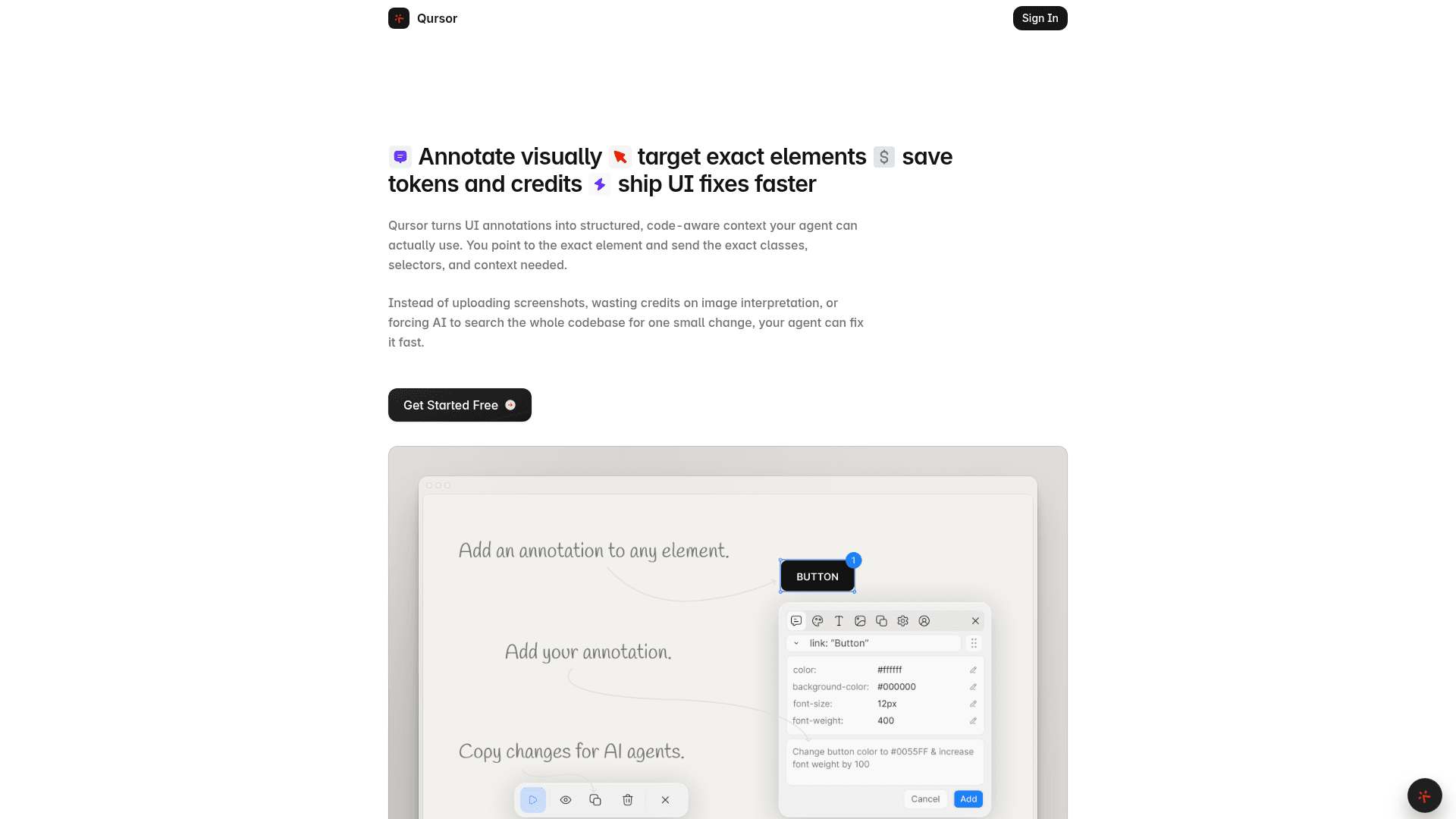
Qursor is a visual UI inspection and annotation tool that sits in the browser and captures the exact element context — classes, selectors, styles, spacing, colors, fonts — needed to make targeted UI changes. Rather than uploading a screenshot and asking an AI to interpret the image and hunt through a codebase, users point at the specific element, optionally annotate or edit styles directly, and copy a structured output that AI coding agents like Claude or Cursor can act on immediately. The core workflow is: install the extension, hover to inspect, click to select, copy to export.
Core Inspection Capabilities
Qursor surfaces a range of element details on hover and click without requiring DevTools:
- Typography inspection: font family, size, weight, line height, letter spacing
- Color inspection: text, background, border, and other color values; includes an eyedropper for picking colors from images and live interfaces, with hex and other standard web color format output
- Spacing details: padding, margins, gaps, and layout spacing
- Component extraction: copy buttons, cards, and full UI sections as clean HTML, CSS, or JSX; download assets directly
- Asset download: surface and download SVGs, PNGs, and JPGs individually or in bulk without digging through network tabs
- Annotation mode: add notes for changes without editing styles directly, then include those notes in the exported context
How It Fits Into an AI Coding Workflow
The central value proposition is token and credit efficiency. Instead of sending a screenshot and asking an AI to interpret the image, locate the relevant code, and guess at the right selector, Qursor exports a compact, structured block containing the exact element target and any edits or annotations. The homepage states this reduces image interpretation overhead, eliminates codebase-wide searches for a single small change, and cuts down on retries. The exported output is plain text that pastes directly into any AI prompt — the tool is explicitly compatible with Claude, Cursor, and other AI coding agents.
Audience and Collaboration Use Case
Qursor targets three overlapping groups: developers doing vibe coding or AI-assisted UI work, designers handing off specs, and product managers or clients reviewing live interfaces. The client feedback workflow lets non-technical stakeholders install the extension, open a staging or production URL, point at the exact element they want changed, annotate it, and send structured feedback that can go straight to an AI agent or developer without a clarification loop. The homepage frames this as reducing back-and-forth between design, product, and engineering.
Setup and Deployment
Qursor is installed from the Chrome Web Store in under 30 seconds. After pinning the extension to the toolbar, users click a bubble in the bottom-left corner of any page to launch the inspector. No account setup, API keys, or codebase changes are required to begin inspecting. The extension works on Chrome across production sites, staging URLs, and localhost environments.
Community Discussions
Be the first to start a conversation about Qursor
Share your experience with Qursor, ask questions, or help others learn from your insights.
Pricing
Free
Free forever plan with limited daily picks.
- 3 picks every day
- Comment on anything
- Colour picker
- Font detect
- Assets download
Yearly
Unlimited picks billed once per year.
- Unlimited picks
- Comment on anything
- Colour picker
- Font detect
- Assets download
- Copy components
Lifetime
One-time payment for permanent access with no recurring fees.
- Unlimited picks
- Comment on anything
- Colour picker
- Font detect
- Assets download
- Copy components
Capabilities
Key Features
- Visual UI element inspection
- Typography details (font family, size, weight, line height)
- Color inspection and eyedropper
- Spacing and layout inspection (padding, margins, gaps)
- Annotation mode for change notes
- Click-to-edit styles directly
- Structured context export for AI agents
- Component extraction (HTML, CSS, JSX)
- Asset download (SVG, PNG, JPG)
- Bulk asset export
- Color palette view
- Works on production, staging, and localhost
- Client feedback workflow
- No DevTools required