
EveryDev.ai
Sign inSubscribe
  1. Home
  2. Tools
  3. Spacecake
Spacecake icon

Spacecake

AI Coding Assistants

Open-source desktop interface for Claude Code that lets you run agents in the terminal and edit markdown visually.

Visit Website

At a Glance

Pricing

Open Source

Free and open-source desktop application

Engagement

Available On

macOS
Linux
API

Resources

WebsiteDocsGitHubllms.txt

Topics

AI Coding AssistantsDevelopment EnvironmentsCommand Line Assistants

About Spacecake

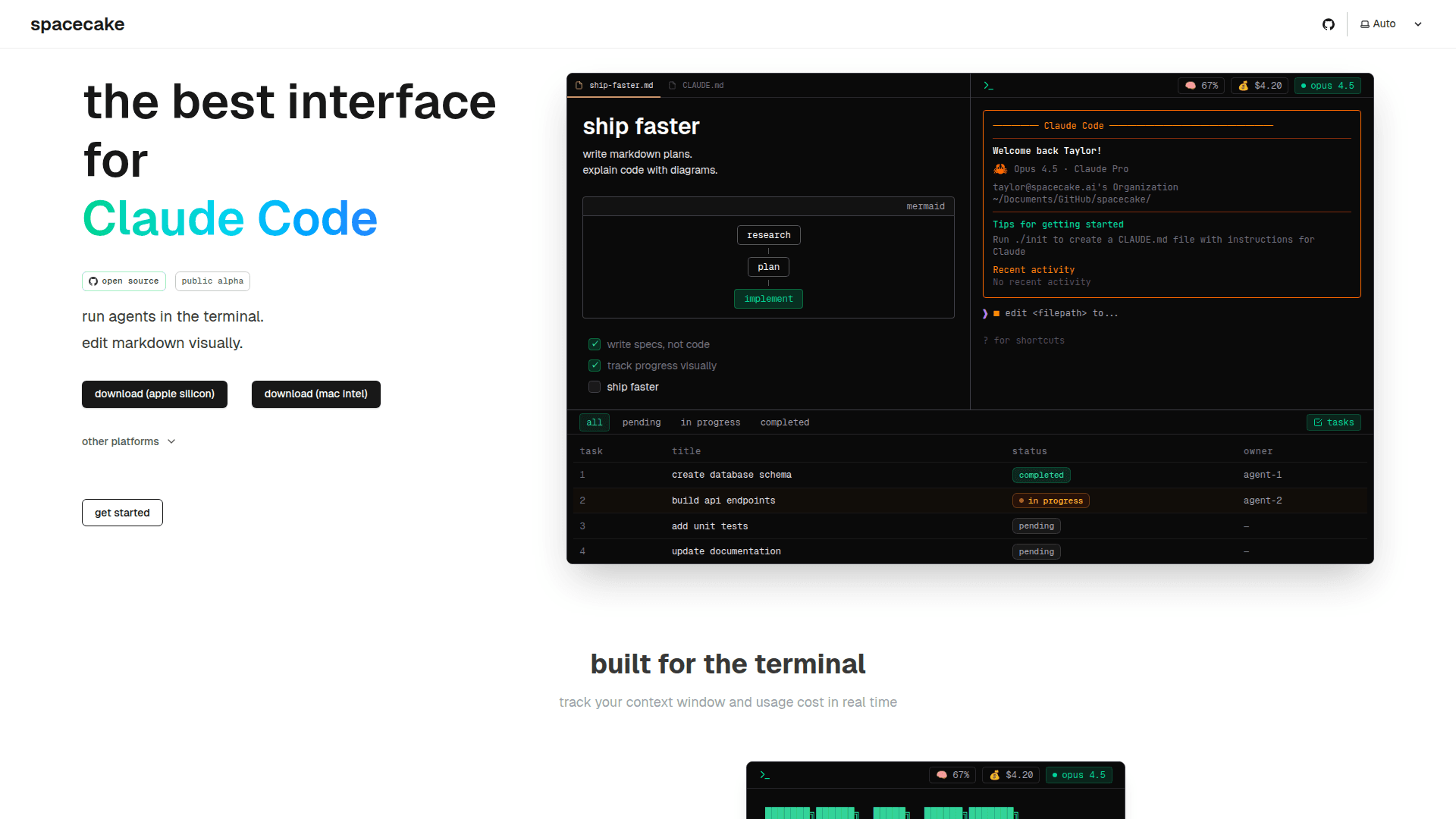
Spacecake is an open-source desktop application designed as the best interface for Claude Code. It enables developers to run AI agents in the terminal while providing visual markdown editing capabilities for spec-driven development. Currently in public alpha, Spacecake bridges the gap between terminal-based AI coding assistants and visual development workflows.

  • Integrated Terminal powered by Ghostty allows you to run Claude Code directly within the application, with Claude automatically knowing which file you're editing and providing real-time context window and usage cost tracking.

  • Visual Markdown Editing with WYSIWYG features lets you write specs instead of code, create markdown plans, and explain code with Mermaid diagrams for better documentation and planning.

  • Task Monitoring displays what Claude is working on in real time, showing pending, in-progress, and completed tasks that sync automatically with Claude Code, helping you keep agents on track.

  • Rich Code Blocks powered by CodeMirror provide syntax highlighting and proper code formatting within your markdown documents.

  • Codebase Navigation enables you to jump between specs and implementation with ease using the built-in file tree.

  • Custom Rules Configuration allows you to define your stack, style preferences, and testing frameworks in JSON format, ensuring Claude follows your conventions.

  • Progress Tracking lets you split features into actionable steps and monitor their progress visually, making spec-driven development more manageable.

To get started, download the appropriate version for your platform (macOS Apple Silicon, macOS Intel, Debian, or Linux AppImage) from the releases page. The application integrates seamlessly with Claude Code, providing context window monitoring and usage cost tracking in real time. Write your specifications in markdown, let Claude handle the implementation, and track progress through the visual task interface.
Spacecake

Community Discussions

Be the first to start a conversation about Spacecake

Share your experience with Spacecake, ask questions, or help others learn from your insights.

Pricing

OPEN SOURCE

Open Source

Free and open-source desktop application

  • Integrated terminal with Ghostty
  • Visual markdown editing
  • Real-time task monitoring
  • Context window tracking
  • Usage cost tracking
View official pricing

Capabilities

Key Features

  • Integrated terminal with Ghostty
  • Visual markdown editing
  • Real-time task monitoring
  • Context window tracking
  • Usage cost tracking
  • Rich code blocks with CodeMirror
  • Mermaid diagram support
  • WYSIWYG editing
  • Codebase navigation
  • Custom rules configuration
  • Spec-driven development
  • Task filtering by status
  • Automatic task sync with Claude Code

Integrations

Claude Code
Ghostty
CodeMirror
Mermaid
API Available
View Docs

Reviews & Ratings

No ratings yet

Be the first to rate Spacecake and help others make informed decisions.

Developer

Spacecake Labs

Spacecake Labs builds open-source developer tools for AI-assisted coding workflows. The team develops Spacecake, a desktop interface for Claude Code that combines terminal-based agent execution with visual markdown editing. Their focus is on spec-driven development and making AI coding assistants more accessible through intuitive interfaces.

Read more about Spacecake Labs
WebsiteGitHub
1 tool in directory

Similar Tools

OpenCode icon

OpenCode

OpenCode is an open-source AI coding agent that runs in the terminal and web, enabling developers to use free or external models with a privacy-first, no-account workflow.

Claude Canvas icon

Claude Canvas

A TUI toolkit that gives Claude Code its own display for spawning interactive terminal interfaces.

Caudex icon

Caudex

A lightweight, fast, and intuitive terminal application designed specifically for Claude Code with multi-tab management and context monitoring.

Browse all tools

Related Topics

AI Coding Assistants

AI tools that help write, edit, and understand code with intelligent suggestions.

192 tools

Development Environments

AI-enhanced code editors and IDEs that improve the coding experience.

74 tools

Command Line Assistants

AI-powered command-line assistants that help developers navigate, search, and execute terminal commands with intelligent suggestions and context awareness.

49 tools
Browse all topics
Back to all tools
Explore AI Tools
  • AI Coding Assistants
  • Agent Frameworks
  • MCP Servers
  • AI Prompt Tools
  • Vibe Coding Tools
  • AI Design Tools
  • AI Database Tools
  • AI Website Builders
  • AI Testing Tools
  • LLM Evaluations
Follow Us
  • X / Twitter
  • LinkedIn
  • Reddit
  • Discord
  • Threads
  • Bluesky
  • Mastodon
  • YouTube
  • GitHub
  • Instagram
Get Started
  • About
  • Advertise
  • Contact Us
  • Newsletter
  • Submit a Tool
  • Start a Discussion
  • Write A Blog
  • Share A Build
  • Terms of Service
  • Privacy Policy
Explore with AI
  • ChatGPT
  • Gemini
  • Claude
  • Grok
  • Perplexity
Agent Experience
  • llms.txt
Theme
With AI, Everyone is a Dev. EveryDev.ai © 2026
Main Menu
  • Tools
  • Developers
  • Topics
  • Discussions
  • News
  • Blogs
  • Builds
  • Contests
Create
Sign In
    Sign in
    0views
    0saves
    0discussions