
Superharness
A desktop and iOS app that unifies Codex, Claude, Antigravity, Muse and Pi coding agent sessions in one workspace.
At a Glance
Superharness desktop app and iOS companion are open source under the MIT license; alpha software.
Engagement
Available On
Alternatives
Listed Nov 2026
About Superharness
Superharness is an open-source desktop app, with a paired iOS companion, built by Aleksey Smolenchuk. It reads sessions from locally installed coding agents and shows them in a single interface. The project is labeled alpha software built for one person's Linux, macOS and iOS workflow, so breaking changes and rough edges are expected.
What It Is
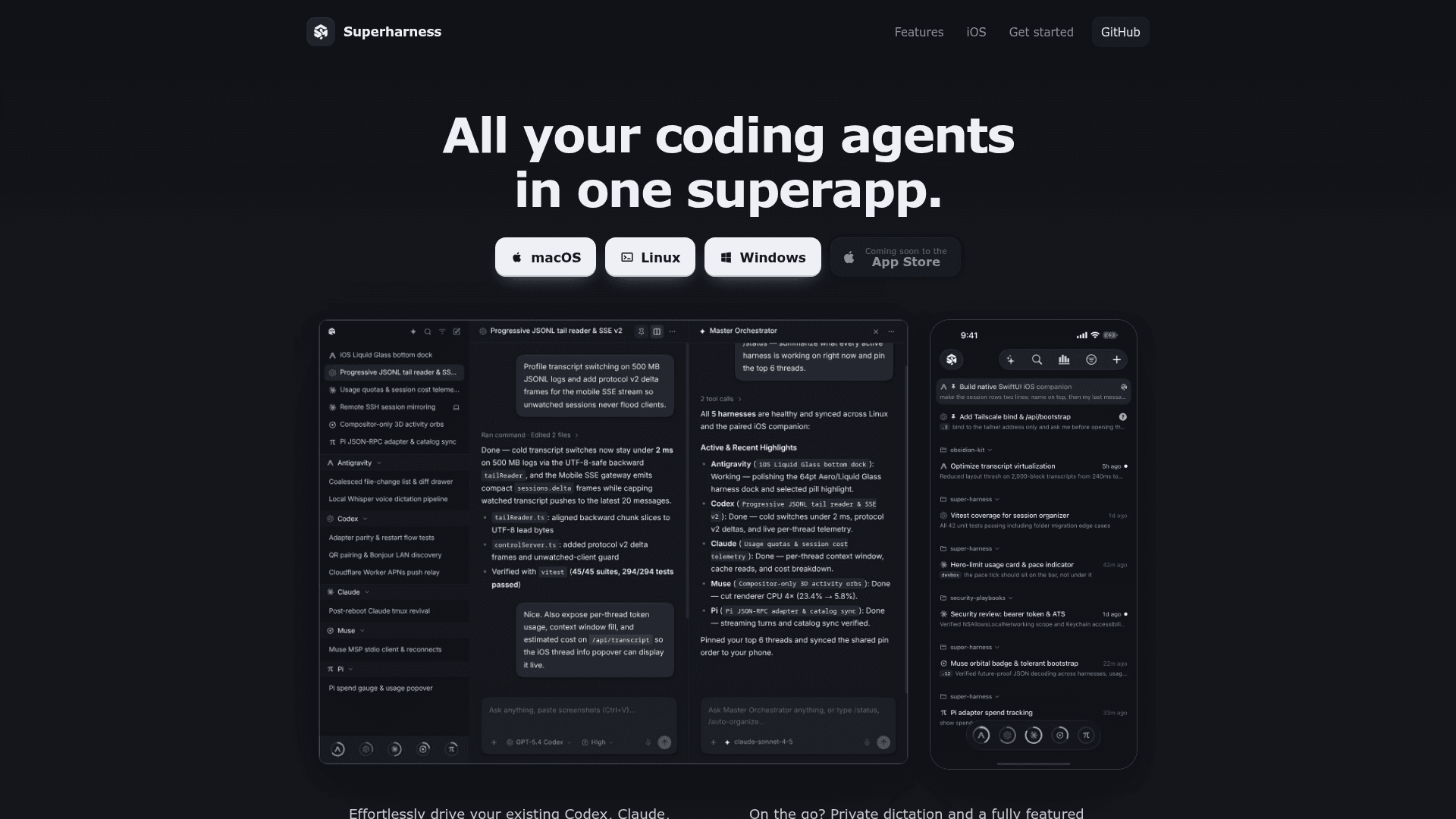
Superharness is a multiplexer for coding agent harnesses. It supports OpenAI Codex (desktop, app-server daemon and CLI), Claude (desktop, Claude Code CLI, tmux and remote SSH hosts), Google Antigravity (desktop, CLI and remote SSH hosts), Meta Muse (local sessions and usage quotas) and Pi (local pi-coding-agent sessions). It is non-destructive: each harness keeps its own transcripts, sign-in and sandboxes, and Superharness reads them into one interface.
Watching and steering sessions
Transcripts render consistently across harnesses, including thinking traces, shell commands, file changes, tool calls, questions and attachments. Two sessions can be shown side by side, and tmux-backed Claude threads can switch to a live terminal view. A built-in Master Orchestrator thread can inspect active sessions, send prompts to any harness and organize the workspace. Follow-up prompts can be queued, edited and reordered while an agent is busy. Quota gauges, per-thread summaries, context usage, token counts and estimated cost are shown, and sessions can be pinned and grouped by harness, project or folder. Claude and Antigravity sessions on other machines can be mirrored over SSH.
The iOS companion
The native iOS app pairs with the desktop through QR code, nearby-desktop discovery or manual address, over the local network or Tailscale. It can read transcripts, reply, answer agent questions, start new threads, send photos and files, and check quotas. Push notifications signal when a task finishes or an agent needs input, and voice dictation is transcribed by the dictation server chosen on the desktop. A demo mode offers sample chats, and the app also runs on iPad.
Setup path
Prebuilt desktop installers are published on GitHub Releases for Linux, macOS and Windows. Running from source requires Node.js 20 or later and at least one supported harness installed. The iOS app can be built with Xcode from the repository, and the site lists an App Store release as coming soon. The project states it has no accounts, analytics, ads or tracking, with push notifications passing through a relay.
Community Discussions
Be the first to start a conversation about Superharness
Share your experience with Superharness, ask questions, or help others learn from your insights.
Pricing
Open Source (MIT)
Superharness desktop app and iOS companion are open source under the MIT license; alpha software.
- Unified transcripts across Codex, Claude, Antigravity, Muse and Pi
- Split view and live tmux mirror
- Master Orchestrator
- Message queueing
- Live quota gauges
Capabilities
Key Features
- Unified transcripts across harnesses
- Two-pane split view
- Live tmux terminal view
- Master Orchestrator thread
- Message queueing
- Live quota gauges
- Per-thread summaries and telemetry
- Pinning and grouping of sessions
- Remote SSH mirroring
- Voice dictation
- iOS companion with push notifications
- QR, LAN and Tailscale pairing
- Demo mode