
Termalin
Cross-platform SSH client with SFTP, RDP/VNC, a database client and a hosted MCP server that lets AI agents work on servers without holding keys.
At a Glance
For home labs and trying Termalin out. Free forever, commercial use included.
Every new account starts with a 14-day Pro trial; one trial per device.
Engagement
Available On
Alternatives
Listed Nov 2026
About Termalin
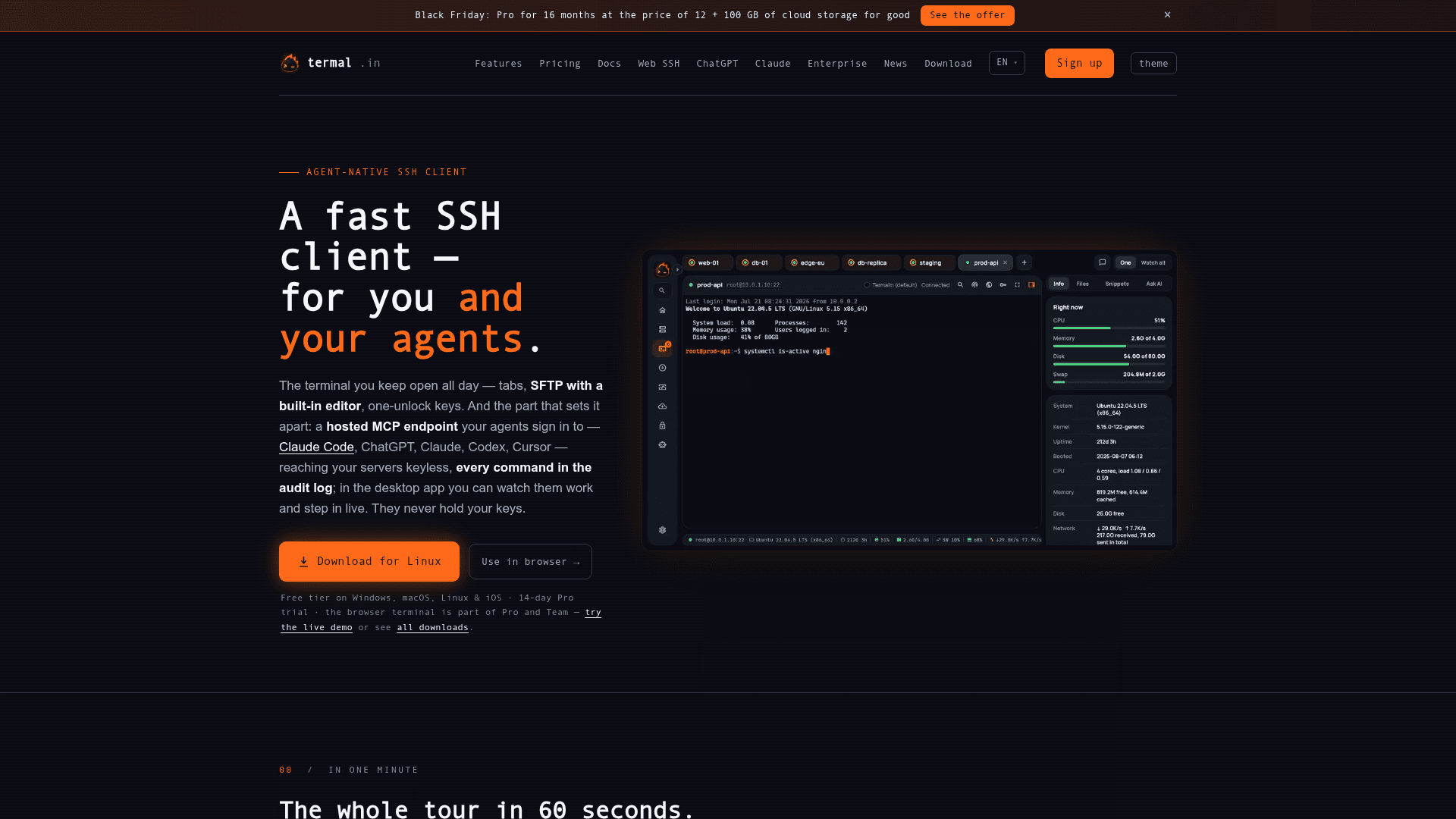
Termalin (termal.in) is a cross-platform SSH client for Windows, macOS, Linux and iOS, with a browser cabinet for other devices. It combines a tabbed terminal, SFTP with a built-in editor, remote desktops and a database client with an MCP server, so AI agents such as Claude Code, ChatGPT, Cursor and Codex can run commands on servers under rules the user sets. The site states that agents never hold the user's keys and that every command lands in an audit log.
What It Is
Termalin is an SSH and server-management client built for both people and agents. The desktop app offers browser-style tabs, a hosts sidebar, snippets, session restore, command suggestions, port forwarding, jump hosts, an SSH key agent and a master-password-encrypted vault. SFTP, FTP, Telnet, S3, Serial, RDP and VNC hosts open in the same workspace, and a database client covers 13 engines including PostgreSQL, MySQL, MongoDB and Redis.
How Agent Access Works
Termalin exposes an MCP server in two forms. The local server bundled with the desktop app has 22 tools and mirrors agent sessions to the screen so users can watch or step in. The hosted endpoint, with 36 tools, lets ChatGPT, Claude, Claude Code, Codex and Cursor sign in through OAuth or an API key and run commands, start background jobs, read or write files over SFTP, query databases and read metrics and alerts, even when no app is running. Each connection or API key gets a server scope and a policy: full, an allowlist of commands, or read-only. Every command is written to the audit log, and sessions can be recorded and replayed.
Connectors and Private Servers
A Connector is a small agent installed with one command on Linux, FreeBSD, macOS, Windows or in Docker. It dials out to Termalin, so no inbound port is opened, and logins use short-lived certificates from Termalin's CA instead of stored keys. Connectors enable the web terminal, remote desktops through the browser, hosted AI access, monitoring and backups.
Monitoring and Backups
Servers with a Connector get dashboards for CPU, memory, disk, network, containers and TLS certificates, with default-threshold alerts sent by email, push, Telegram, Slack, webhook and other channels. Encrypted backups of Linux server folders, and PostgreSQL or MySQL dumps, can be stored in Termalin's cloud, a user's own S3 bucket or another server. Docs state backups are encrypted so only the user holds the key.
Built-in AI Assistant
An optional assistant summarizes recorded sessions, explains selected output and turns plain requests into commands. It can use a built-in allowance, the user's own Anthropic key, or an OpenAI-compatible or local endpoint such as Ollama.
Community Discussions
Be the first to start a conversation about Termalin
Share your experience with Termalin, ask questions, or help others learn from your insights.
Pricing
Free
For home labs and trying Termalin out. Free forever, commercial use included.
- SSH, SFTP and a database client
- Local encrypted vault — no limit on hosts or keys
- Session recording, replay and the watch grid
- MCP agent, and the AI assistant with your own key
Pro trial
Every new account starts with a 14-day Pro trial; one trial per device.
- Backups can use up to 5 GB of cloud storage during the trial
Pro
For people running infrastructure 24/7.
- Everything in Free, plus:
- Encrypted sync across all your devices
- Web cabinet and a terminal in the browser
- Connectors and hosted MCP for AI apps
- Remote desktops in the browser, 4 open at once
- Internal web apps without port forwarding
- Encrypted backups of your Linux, Windows and macOS servers
- Server monitoring and alerts, 90 days of history
- Known vulnerability (CVE) checks on every server
- 25 GB cloud storage for recordings and server backups
- AI assistant: 400 requests a month
Team
For teams managing infrastructure together.
- Everything in Pro, plus:
- Seats and consolidated billing
- 100 GB cloud storage for recordings and backups
- Remote desktops in the browser, 10 open at once
- Server monitoring: two years of history
- AI assistant: 1,000 requests a month per seat
- Shared vault, roles and session sharing
Founders Pro Lifetime
One payment, Pro forever; no renewals.
- Everything in Pro, no renewals
- All future Pro features included
Enterprise
For organisations with strict requirements.
- Everything in Team, plus:
- SLA and priority support
- Dedicated manager, migration and onboarding
- SAML SSO and SCIM
- Agent governance preview
- SOC 2 planned
Capabilities
Key Features
- Tabbed SSH terminal with inline command suggestions and session restore
- SFTP/FTP/S3 file browsers with built-in editor and dual-pane transfers
- RDP and VNC remote desktops in tabs
- Database client for 13 engines
- Local and hosted MCP servers for AI agents
- Key custodian: agents never hold SSH keys
- Per-connection scope and policy (full, allowlist, read-only)
- Audit log and session recording with replay
- Keyless Connector with no inbound port
- Server monitoring and alerts
- Encrypted server backups
- Port forwarding and jump hosts
- Watch grid for live multi-session view
- End-to-end encrypted sync
- Browser web SSH cabinet
- Built-in AI assistant with bring-your-own model
- Browser extension for Chrome, Edge and Firefox