
Vicoa
Open-source agentic IDE that runs a team of coding agents like Claude Code and Codex in parallel and lets you steer them from desktop, web, or mobile.
At a Glance
Everything you need to run agents on your machine. Free forever.
Engagement
Available On
Alternatives
Listed Nov 2026
About Vicoa
Vicoa is an open-source AI orchestrator from the vicoa-ai organization for running multiple coding agents from any device. Developers start agents on a desktop, server, or other machine, then monitor and steer sessions from the web or iOS and Android apps. The source is available under AGPLv3 and the stack can be self-hosted.
What It Is
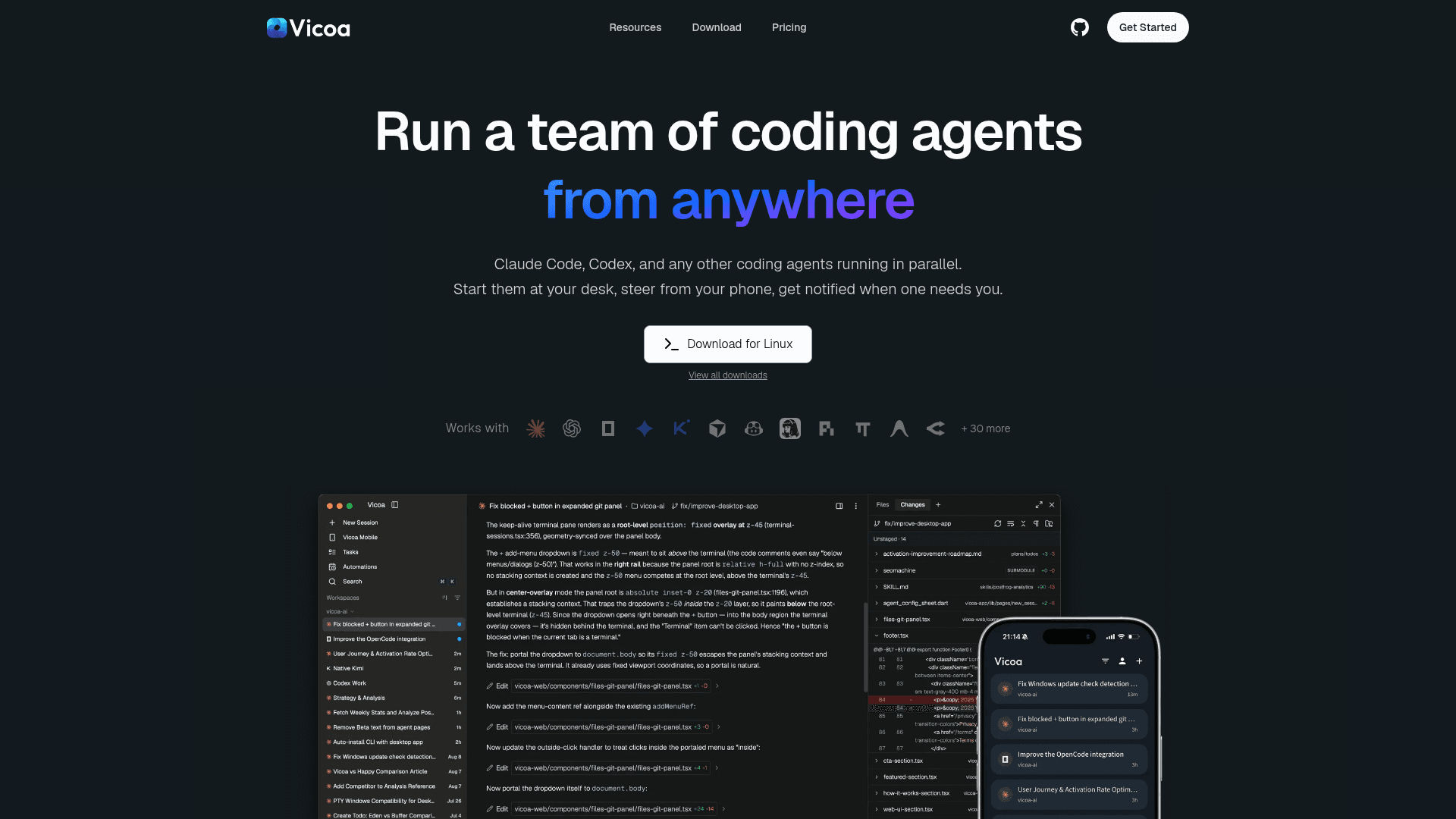
Vicoa is an agentic IDE and orchestration layer for command-line coding agents. A local daemon launches the agent CLIs you already have installed and authenticated, using your own credentials, and relays the conversation through a secure relay so clients can control them. The docs state that code stays on your machine and only the conversation is relayed.
Vicoa lists 40+ supported agents. Claude Code, Codex, Pi, Oh My Pi, and Antigravity have native integrations. OpenCode, Gemini, Cursor, GitHub Copilot, Kimi, and Hermes connect through the Agent Client Protocol (ACP). 30+ more are available via ACP, and any other ACP agent works with a custom launch command. It also supports models from many providers through OpenRouter with a bring-your-own key.
Workflow and Review Tools
Sessions can run side by side, each on its own git worktree and branch, with live status for every session in one list. Each session has a file browser, an editable Files panel, a built-in terminal, and inline git diffs with commit history. Messages support @file mentions, slash commands, # references to sessions and tasks, image and file attachments, queued messages, and interrupts. Permission modes can be switched mid-session.
A task board lets you start a session directly from a task. Cron-style automations run agents on a schedule. Live Preview opens a local dev server in the mobile app, and sessions can be shared by link.
Setup Path
Install the desktop app for macOS, Windows, or Linux, or run npm i -g @vicoa/cli (Node.js 18+) and start with vicoa. At least one supported agent CLI must be installed and signed in on the machine that runs agents. Mobile apps for iOS and Android sync with the same account, and push notifications alert you when an agent needs input or finishes. The repository also documents Docker-based self-hosting backed by Postgres.
Community Discussions
Be the first to start a conversation about Vicoa
Share your experience with Vicoa, ask questions, or help others learn from your insights.
Pricing
Free
Everything you need to run agents on your machine. Free forever.
- Desktop app for Mac, Windows & Linux
- Mobile & web remote control
- 40+ coding agents
- Bring your own subscriptions & API keys
- 1 remote machine
Pro
For power users and teams. Priced per user; team seats start at 2.
- Everything in Free, plus:
- Unlimited machines
- Unlimited automations
- Teams & shared projects
- Priority support
- Early feature access
Enterprise
Pro for your whole org, with admin controls. Custom pricing tailored to your organization.
- Everything in Pro, plus:
- Admin portal
- SSO & SCIM
- On-premise deployment
- Usage analytics
- Advanced security
- SLA & dedicated support
Capabilities
Key Features
- Run 40+ coding agents in parallel, each on its own git worktree
- Live status of all sessions in one list
- Mobile apps for iOS and Android with push notifications
- Inline git diffs and commit history review
- File browser and in-place file editing
- Built-in terminals, including remote machines
- Task board that starts agent sessions
- Cron-scheduled automations
- @file mentions, slash commands, and # references
- Voice dictation
- Live Preview of local dev server on phone
- Session sharing via link
- Permission modes and mid-session model switching
- CLI for sessions, tasks, and automations
- Self-hostable with Docker and Postgres
- OpenRouter models with bring-your-own key