
Voyager
Voyager is a next-generation macOS file manager that uses AI to summarize folder changes and help you stay on top of your work as it evolves.
At a Glance
Engagement
Available On
Listed Jul 2026
About Voyager
Voyager is a macOS file manager built to replace Finder, designed to keep your work readable as files change over time. It combines a modern file browsing interface with AI-powered context summaries, letting you ask questions about what changed in a folder and get a plain-language recap before you act. The app requires macOS 13 or later and is available as a one-time purchase.
What It Is
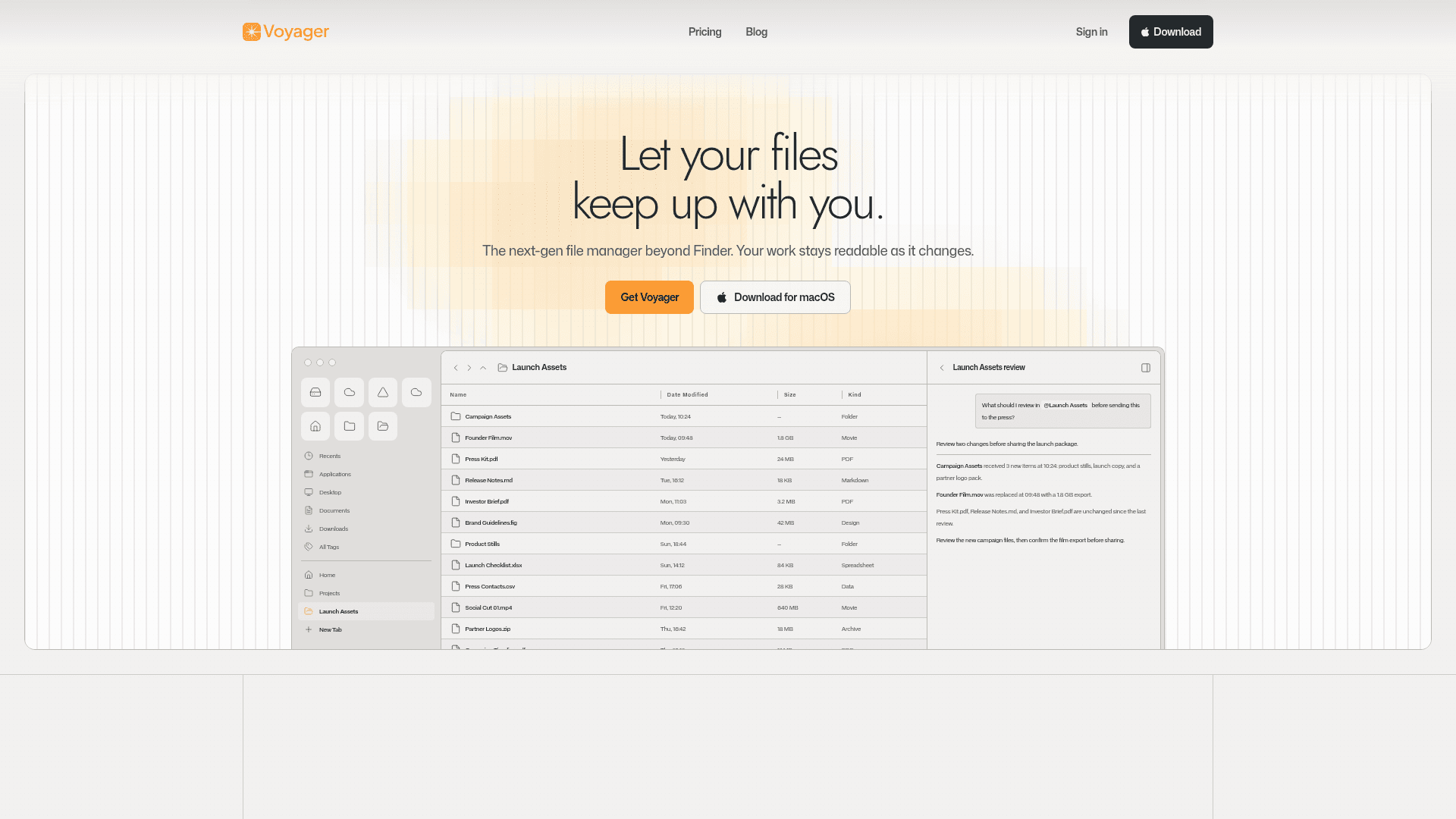
Voyager sits in the category of desktop file management tools, but adds an AI layer on top of the traditional folder view. Instead of just listing files by name and date, Voyager can summarize recent changes in a folder — for example, flagging that a video file was replaced, that new campaign assets arrived, or that certain documents are unchanged since the last review. Users can bring their own AI API key or (when available) use Voyager-hosted AI credits billed separately.
Core Workflow
The central interaction pattern is the "context review": you navigate to a folder, and Voyager surfaces a natural-language summary of what changed and what needs attention. The demo on the homepage shows a launch assets folder where Voyager identifies three new items added to a campaign subfolder, a replaced video export, and unchanged documents — then recommends what to review before sharing with the press. Users can ask follow-up questions about the folder context directly in the interface.
Deployment Model
Voyager is a native macOS desktop application, not a web or cloud tool. It runs locally on Mac hardware and requires macOS 13 (Ventura) or later. The AI features use a "bring your own key" model, meaning users supply their own API credentials for AI inference. Voyager-hosted AI credits are listed on the pricing page but marked as not yet available, indicating the product is in early access.
Early Access and Licensing
The pricing page notes an "early access offer" for the first 100 seats, with a Lifetime License option alongside the standard Personal License. The Lifetime tier supports up to 3 active Macs and includes lifetime updates, while the Personal License covers 1 Mac with 1 year of updates. Add-ons allow users to extend update access or add extra Mac activations. There is no recurring subscription for the core license.
Current Status
Voyager is in active early access as of 2026. The site references a changelog, a blog, and a Discord community, suggesting ongoing development. The AI Credits feature (Voyager-hosted inference) is listed on the pricing page but flagged as "not available yet," indicating the product roadmap includes hosted AI as a future addition. A free trial is accessible via test tokens redeemable in the account portal.
Community Discussions
Be the first to start a conversation about Voyager
Share your experience with Voyager, ask questions, or help others learn from your insights.
Pricing
Lifetime License
Early access offer for the first 100 seats. Covers 3 active Macs with lifetime updates and bring-your-own AI key. No annual renewal.
- 3 active Macs
- Lifetime updates
- Bring your own AI key
- No annual renewal
Personal License
One-time purchase for 1 Mac with 1 year of updates included. Renew updates after year 1.
- 1 active Mac
- 1 year of updates
- Bring your own AI key
- Renew updates after year 1
1-Year Update Extension
Extend update access after year 1 for the Personal License.
- Extends update access by 1 year
Extra Mac
Add one more active Mac to your account.
- Adds 1 additional active Mac to your license
Capabilities
Key Features
- AI-powered folder change summaries
- Natural language Q&A about folder contents
- Bring your own AI API key
- Modern file browser beyond Finder
- Recent files and tag views
- Multi-Mac license support
- One-time purchase licensing
- macOS native app