
A high-performance, open-source code editor built in Rust by the creators of Atom and Tree-sitter, designed for speed, multiplayer collaboration, and AI-assisted development.
At a Glance
About Zed
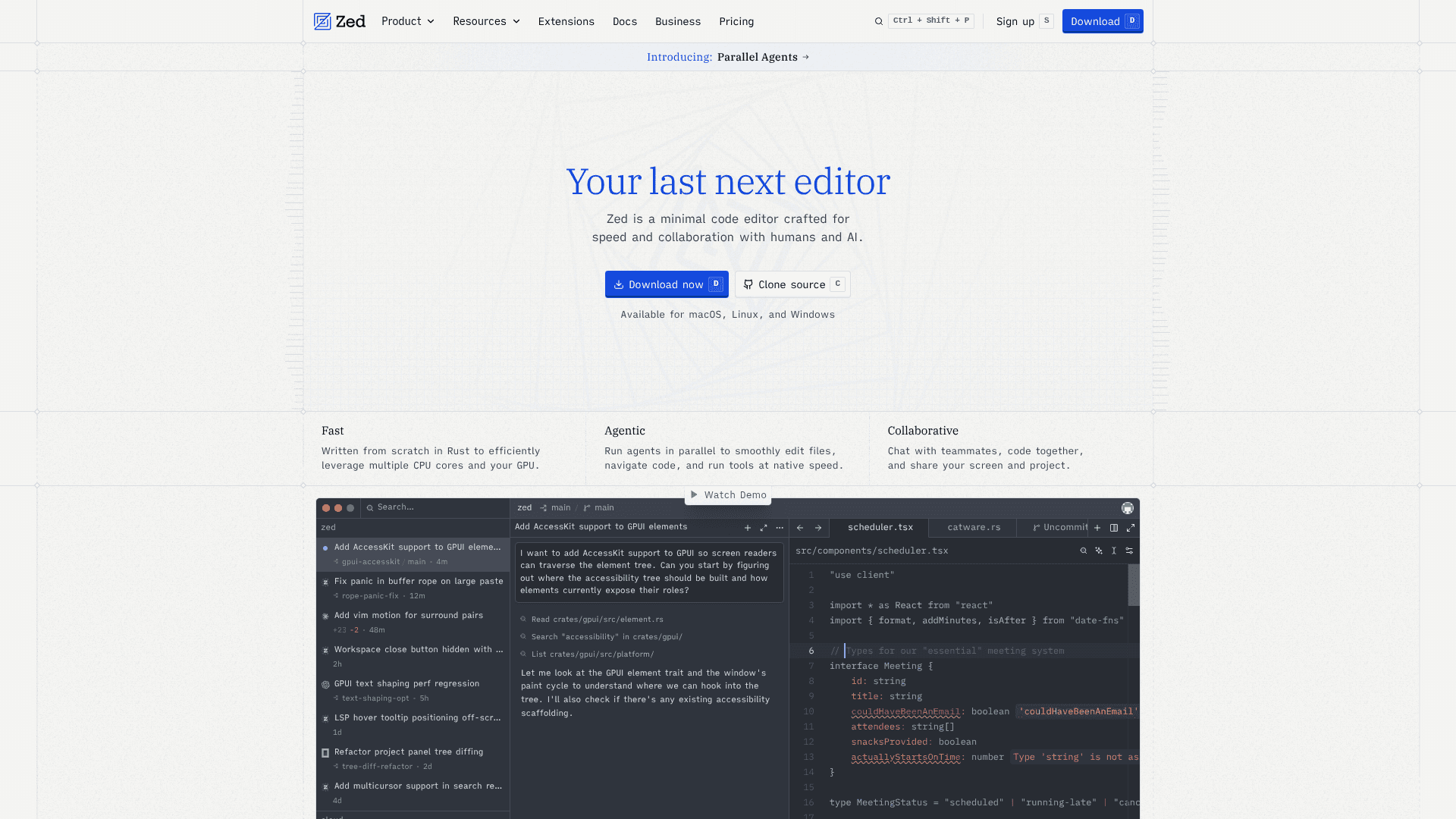
Zed is a code editor built from scratch in Rust by Nathan Sobo, Antonio Scandurra, and Max Brunsfeld — the team behind Atom, Electron, and Tree-sitter. It is available for macOS, Linux, and Windows, and its core source code is publicly hosted on GitHub. The editor emphasizes raw performance through GPU-accelerated rendering and multi-core CPU utilization, while also offering native multiplayer collaboration and deep AI integration.
What It Is
Zed is a desktop code editor in the same category as VS Code, Neovim, and JetBrains IDEs, but differentiated by its Rust-native architecture and first-class support for real-time collaboration. The homepage describes it as "a minimal code editor crafted for speed and collaboration with humans and AI." Unlike editors that bolt on AI features via extensions, Zed integrates agentic editing, inline AI assistance, and edit prediction directly into the core product. It supports Language Server Protocol (LSP) for language intelligence, Tree-sitter for syntax parsing, and the Debug Adapter Protocol (DAP) for native debugging.
Architecture and Performance
Zed is written entirely in Rust and uses a custom UI framework called GPUI that renders every frame on the GPU. The team states the editor is designed to "efficiently leverage multiple CPU cores and your GPU." This architecture is the primary reason the editor is positioned as faster than Electron-based alternatives. The project has accumulated over 83,000 GitHub stars and more than 8,500 forks as of mid-2026, with 1,623 contributors and 841 pull requests merged in a single recent month according to the homepage.
AI and Agentic Editing
Zed's AI layer is built into the editor rather than delivered as a plugin. Key AI capabilities include:
- Parallel Agents: Run multiple AI agent threads across several projects simultaneously without leaving the editor flow.
- Agentic Editing: Delegate file edits, code navigation, and tool use to an AI agent and review changes live.
- Edit Prediction: Powered by Zeta2, described as an open-weight language model that predicts the developer's next edit.
- Inline Assistant: Send selected code to a language model for in-place transformation.
- Any Agent, Any Tool: Supports external agents like Claude Agent, Codex, and OpenCode via the Agent Communication Protocol (ACP), and MCP servers for extending agent knowledge.
Supported AI providers include Anthropic, OpenAI, Google AI, Amazon Bedrock, GitHub Copilot, Deepseek, Mistral, Ollama, OpenRouter, Vercel, LM Studio, and others. Users can bring their own API keys or use Zed-hosted models.
Collaboration and Multiplayer
Real-time multiplayer is a core feature, not an add-on. Developers can share projects, follow collaborators' cursors across files, co-edit in the same buffer, and share their screen — all without leaving the editor. The collaboration model is described as aiming to "eliminate the distinction between local and remote projects as much as possible." Guests can open, edit, save files, search, and interact with the language server in a shared session.
Open-Source Model and Extensions
Zed's source code is publicly available on GitHub under a mixed license (the repository lists "Other/NOASSERTION," which covers multiple licenses for different components). The homepage states it is "built by a global, growing, and thriving community of thousands of developers." An extensions ecosystem provides language support, themes, and tooling — popular extensions include HTML (5.4M installs), TOML (1.1M), Catppuccin themes (884k), and Java (866k), among hundreds of others. Developers can create and publish their own extensions.
Update: v1.2.7
The latest stable release is v1.2.7, published on May 19, 2026. Recent blog posts from May 2026 cover local model support, ChatGPT subscription integration, and changes to Anthropic's Claude billing as it affects Zed users. The homepage prominently features Parallel Agents as the newest major capability, with a dedicated blog post and landing page. The roadmap and weekly release cadence signal active, ongoing development across performance, AI, debugging, and remote development features.
Community Discussions

Using Claude Code in Zed
Good news! Zed now can run Claude Code natively via ACP You will find this as of Sep 3, 2025 in version 0.202.5 of Zed in public beta, so be sure to update. If you’ve been waiting to pair Zed’s fast UI with Claude Code’s agentic power, it’s here. Why this matters Native UI, not just a terminal: Watc…

Set up Gemini CLI in Zed (5-min guide)
1) Open the Agent Panel In Zed, press cmd-? → + → Gemini CLI. This uses Zed’s new External Agents flow over ACP. :contentReference[oaicite:12]{index=12} 2) Install / upgrade Gemini CLI If you don’t have it, Zed can install a compatible version automatically. To install or upgrade yourself: Zed requi…
Pricing
Personal
The next-generation code editor. Free forever.
- 2,000 accepted edit predictions
- Unlimited use with your own API keys
- Support for external agents like Claude Agent, Codex CLI, and more
- Fast performance and multiplayer collaboration
- Weekly releases
Pro
The next-generation code editor + AI. Supercharge your development.
- Unlimited edit predictions
- $5 of tokens included per month
- Usage-based billing beyond $5
- Fast performance and multiplayer collaboration
- Weekly releases
Business
The editor your team loves, with the org-level controls you need.
- Org-wide AI model policies
- Data governance controls
- Unified spend visibility
- Unlimited edit predictions
- Role-based access controls
- Prompt sharing and Edit Prediction training off by default
- Track hosted AI spend per member
Capabilities
Key Features
- Parallel Agents - run multiple AI agent threads across projects
- Agentic editing with live progress tracking
- Edit Prediction powered by Zeta2 open-weight model
- Inline AI assistant for in-place code transformation
- Native multiplayer collaboration with cursor following
- Built-in screen sharing
- GPU-accelerated rendering via custom GPUI framework
- Language Server Protocol (LSP) support
- Debug Adapter Protocol (DAP) native debugger
- Native Git support (staging, committing, diff viewing)
- Multibuffer editing across multiple files
- Vim and Helix modal editing modes
- Remote development support
- Integrated terminal emulator (Alacritty backend)
- Project-wide search with editable multi-buffer results
- Outline view with syntax-tree navigation
- Multi-cursor editing
- Syntactic code folding and selection
- Extensions ecosystem for languages and themes
- CLI tool for command-line access
- Built-in REPL via Jupyter kernels
- Rainbow brackets
- Inlay hints
- Dev container support
- Bring-your-own API keys for AI providers