Claude Code Security Guidance Plugin: Catch Vulnerabilities Before PR

Anthropic shipped a security-guidance plugin for Claude Code on May 26, 2026, available to every Claude Code user through the plugin marketplace. It catches vulnerabilities in the code Claude writes while the session is still open, before anything reaches a pull request or a human reviewer.
AI coding assistants now write more of the code that reaches production, and the security-review load on human engineers has climbed with it. Catching problems at the point of generation, instead of at the PR stage, moves the security check earlier in an AI-assisted workflow.
The plugin runs automatically once installed. There's no separate command to invoke.
The three-layer review system
Anthropic's documentation describes three points in Claude's working loop where it operates, each at a different depth.
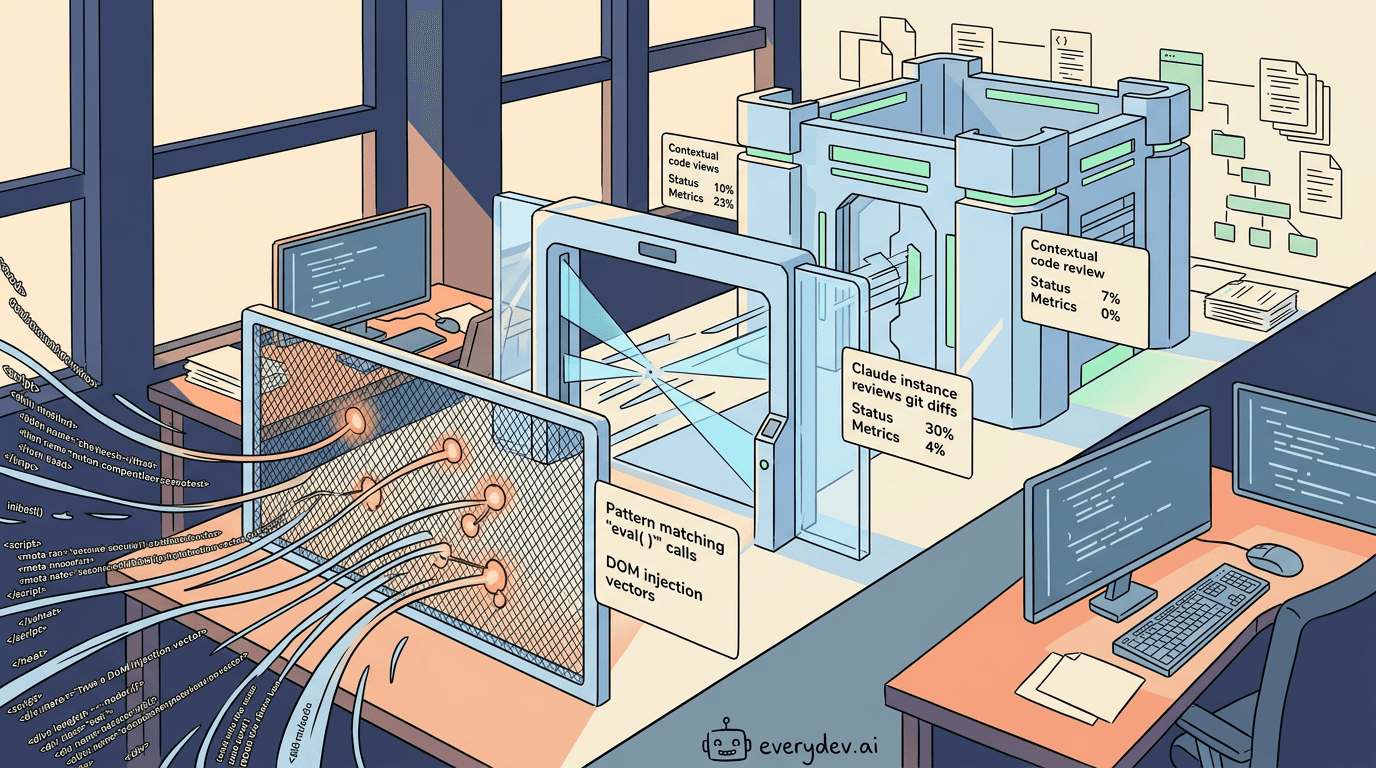
- The first layer fires on every file edit. It runs a deterministic pattern match against the new content, looking for known risky calls: dynamic code execution like
eval()andos.system(), unsafe deserialization throughpickle, DOM injection vectors like.innerHTMLanddangerouslySetInnerHTML, and edits to.github/workflows/files that can carry repository-level permissions. It makes no model call and adds no usage cost. Each pattern fires once per file per session so it doesn't flood the conversation. - The second layer runs at the end of each turn. Once Claude finishes responding, the plugin computes a git diff of everything that changed during the turn and sends it to a separate Claude instance running a security review. That reviewer starts from the diff alone, with no context about the original approach. That's the right call: you don't want the model that wrote the code grading its own work. When the reviewer finds issues, the plugin re-prompts Claude with the findings and Claude fixes them in the same session. This layer catches what a string match can't: authorization bypass, insecure direct object references, server-side request forgery, weak cryptography. It covers up to 30 changed files per turn.
- The third layer triggers when Claude runs
git commitorgit pushthrough its Bash tool. This is a deeper agentic review that reads the surrounding code, including callers, sanitizers, and related files, to judge whether a finding holds up in context. The point is to keep false positives down on patterns that look dangerous in isolation but are safe in a given codebase. It's capped at 20 reviews per rolling hour, and when its findings duplicate what the end-of-turn review already flagged, the plugin skips re-prompting Claude.
The internal numbers
Anthropic's team reported a 30-40% drop in security-related comments on pull requests opened with the plugin, based on their internal rollout and benchmarks. Take that figure seriously, but read it in context: it comes from Anthropic's own codebase and workflows, and your results will depend on how much security-sensitive code your team writes and how mature your review process already is. A drop that size still suggests the plugin is catching real problems, not adding noise that engineers eventually learn to ignore.
Installing it
You need three things first: Claude Code CLI 2.1.144 or later, Python 3.8 or later on your PATH (the plugin tries python3, python, then py -3), and a git repository in the directory you work in. The per-edit pattern check runs anywhere, but the end-of-turn and commit reviews diff against git state and skip silently outside a repo.
Install it from inside a Claude Code session, off the official Anthropic marketplace:
/plugin install security-guidance@claude-plugins-official
Pick user scope when prompted, so it loads in every new local session on your machine. If Claude Code says the marketplace isn't found, add it first and retry:
/plugin marketplace add anthropics/claude-plugins-official
Then apply it to the current session without a restart:
/reload-plugins
On first run the plugin builds a virtual environment under ~/.claude/security/ and installs the Claude Agent SDK into it, which needs pip and network access. If that step fails, the commit review falls back to a single-shot review instead of the deeper agentic one. After that it runs on its own. If reviews don't show up, check ~/.claude/security/log.txt.
Customization and org-level deployment
The plugin has two extension points. Both matter when you deploy it to a team.
The first is a Markdown guidance file. Drop a claude-security-guidance.md into .claude/ and write your threat model and review checklist in plain language; the model-backed reviews load it as extra context. This is where you encode org-specific policy: which routes require role checks, which logging fields are off-limits, which comparison function to use for token validation. Anthropic's docs are explicit that these rules guide the reviewer; they aren't deterministic guardrails. A rule that tells the reviewer to ignore a vulnerability class won't suppress those findings.
The second extension point is a YAML or JSON patterns file for the per-edit string match. You can add regex or substring rules scoped to specific file paths. The plugin loads up to 50 custom rules and skips any regex that looks prone to catastrophic backtracking.
Deploying to a team takes one commit. Add the plugin declaration to .claude/settings.json and every developer who clones the repo gets it. Admins can turn it on organization-wide through managed settings. One caveat from Anthropic: user-scoped plugins don't carry into Claude Code on the web, since those sessions run on Anthropic's infrastructure rather than your machine. Teams on web sessions need the project-level or managed-settings route.
Confirming it's actually running
The plugin is invisible until it fires, with no status indicator, so it's easy to assume it's working when it isn't. After installing, reload it with /reload-plugins or start a fresh session. Hooks bind at session start, so a session you had open before installing won't have it.
To see a check fire, you have to make Claude write a triggering pattern, and the obvious test backfires. Ask Claude to set element.innerHTML from a user-supplied string and it refuses, rewrites the code to use textContent, and the dangerous string never lands, so the per-edit check has nothing to match. Good instinct from Claude, useless as a test.
Two triggers that actually work:
- Ask Claude to add a comment line to a file under
.github/workflows/. That's a built-in pattern and the edit is harmless, so it goes through and the warning fires. - Use one of your own rules. Custom patterns flag conventions, not dangerous code, so Claude writes the trigger without protest. We added a rule for raw
revalidateTag()calls and asked Claude to write one; the reminder showed up right after the edit.
Two false alarms to rule out
When a custom rule looks dead, it's usually one of these, and both cost us time.
The first: YAML gets skipped silently. The patterns file accepts YAML, but the plugin's bundled Python environment doesn't ship PyYAML, so a .yaml file is ignored with no error in your session. The only trace is in the log: skipping ... security-patterns.yaml: PyYAML not installed (use .json). Write the file as .claude/security-patterns.json instead, since JSON parses on any Python install.
The second: your own context answers before the plugin does. If a custom reminder overlaps with something Claude already knows, from CLAUDE.md, earlier conversation, or persistent memory, you can't tell whether the warning came from the plugin or from Claude itself. We hit this exactly. A rule about a past caching regression looked like it passed, but Claude already knew that lesson, so the test proved nothing. To isolate the plugin, add a throwaway rule that matches a string nothing else references:
{
  "rule_name": "selftest",
  "substrings": ["XYZZY_SELFTEST"],
  "reminder": "Plugin reminder fired. (Temporary test rule.)"
}
Ask Claude to write a file containing XYZZY_SELFTEST. If the reminder appears, your rules are loading. Delete it afterward.
Write reminders as guidance, not commands. A reminder that tells Claude to "reply with token X" gets treated as a prompt injection arriving through tool output and is ignored, which makes it a poor test signal.
The log is the source of truth
When in doubt, read ~/.claude/security/log.txt. It records every hook call, the YAML-skip message, and each end-of-turn and commit review. If a layer stays silent, the log tells you why: the directory isn't a git repository, the session has no Anthropic authentication, or the PyYAML skip above.
What the plugin doesn't replace
Anthropic frames the plugin as one layer in a defense-in-depth stack, and that's accurate. It doesn't block writes or commits. It surfaces findings as instructions to Claude, Claude addresses them in conversation, and the review model can still miss things. Its job is to cut the volume of problems that reach later stages, not to be the only check.
A typical stack looks like this:
| Stage | Tool | What it covers |
|---|---|---|
| In session | Security guidance plugin | Common vulnerabilities in code Claude writes, fixed in the same session |
| On demand | /security-review | A one-time pass on the current branch, run when you ask |
| On pull request | Code Review (Team and Enterprise plans) | Multi-agent correctness and security review with full codebase context |
| In CI | Your static analysis and dependency scanners | Language rules, supply-chain checks, and policy enforcement the plugin doesn't attempt |
Each later stage catches what the earlier ones miss. The plugin and /security-review both ship with Claude Code: the plugin fires on its own as Claude works, while /security-review is a command you run against a branch when you want a one-off sweep.
The model-backed reviews use Claude Opus 4.7 by default, and both the end-of-turn and commit reviews count against your usage like any other Claude request. If you run high-volume coding sessions, budget for that.
What to watch next
The architecture is built entirely on Claude Code's hooks system, and Anthropic published the source in its official plugins repository. You can read exactly how it runs a separate model call from a hook and feeds the result back into the live session, even if the security use case isn't yours. Any team building its own Claude Code integrations can reuse that pattern.
If your team takes security seriously, the next step is short: install the plugin, write a claude-security-guidance.md that matches your real threat model, and treat the 30-40% comment reduction as a floor to measure against, not a number you're promised. The open question for the next few months is whether Anthropic pushes the same hooks pattern into other review dimensions, like performance, accessibility, or license compliance.
References
| Source | URL |
|---|---|
| code.claude.com | https://code.claude.com/docs/en/changelog |
| code.claude.com | https://code.claude.com/docs/en/security-guidance |
Sponsored
ChatGPT Codex
OpenAI's agentic coding tool that runs in ChatGPT, your IDE, and the terminal to handle complex engineering tasks like bug fixes, refactors, and PR reviews.
View toolAbout the Author
Senior Software Engineer
Hi everyone, I'm a vibe coder and a software enthusiast, hit me up with any questions on vibe coding tools
Comments
No comments yet
Be the first to share your thoughts