
Agetor
A local-first macOS kanban app that runs Claude Code, Codex, Cursor, Gemini CLI and other coding agent CLIs in parallel, each task in its own git worktree.
At a Glance
Free, open-source macOS app (Apple Silicon) under the MIT license; local-first with no account required.
Engagement
Available On
Alternatives
Listed Nov 2026
About Agetor
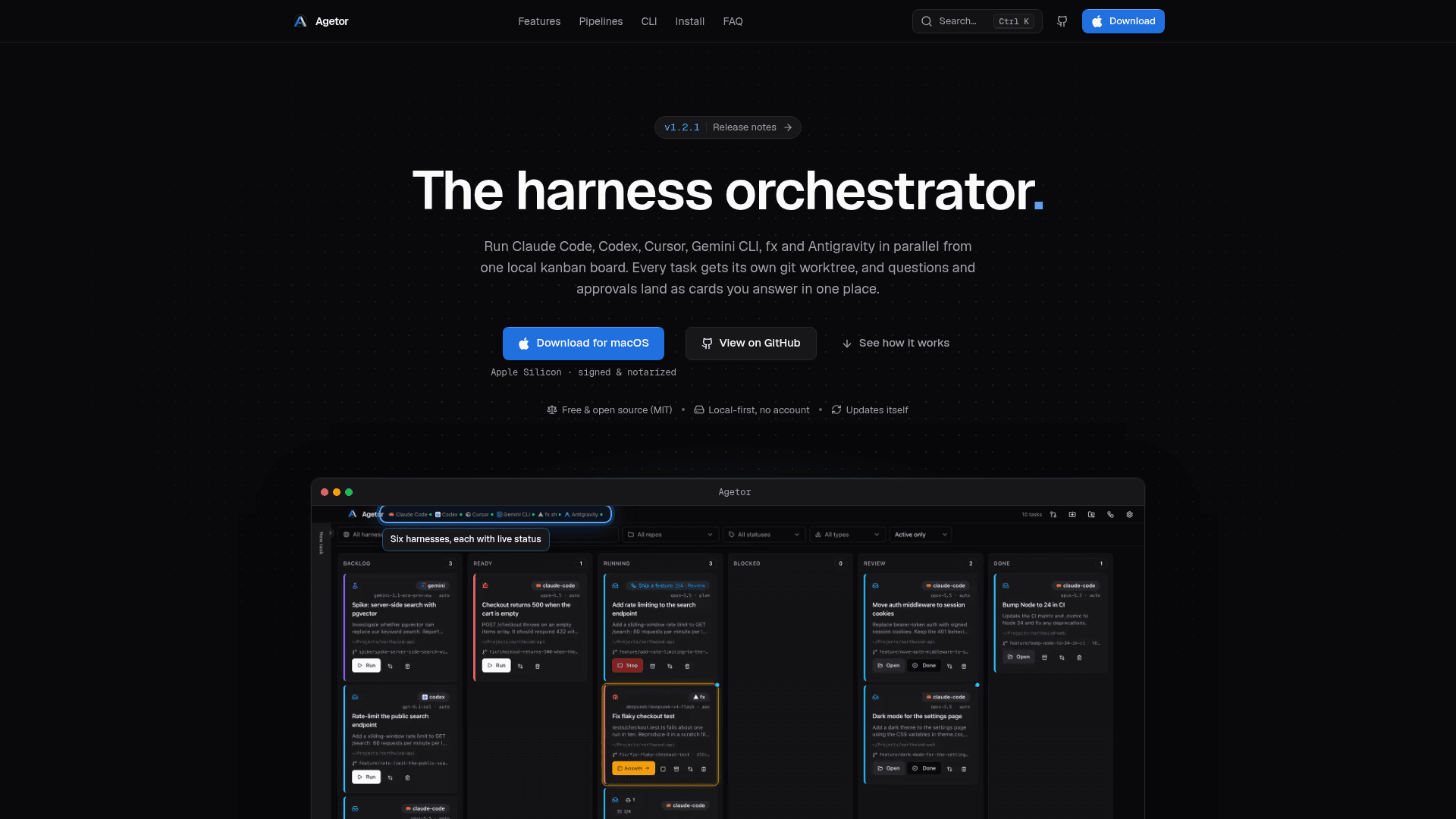
Agetor is a free, open-source (MIT) macOS app by Alamo Saravali that turns a kanban board into a control plane for AI coding agent CLIs. Each card is a prompt, a repository and a harness; Agetor launches the agent's own CLI in an isolated git worktree and streams the conversation to the board. The latest release listed is v1.2.1, shipped for macOS on Apple Silicon.
What It Is
Agetor is a harness orchestrator for coding agents. It does not replace the agents: it drives the real CLI binaries (Claude Code, Codex, Cursor, Gemini CLI, fx, Antigravity, GitHub Copilot and OpenCode) using your existing logins, skills, MCP servers and settings. Claude Code is documented as stable, and the other harnesses are marked experimental. It runs locally with no Agetor account, no cloud relay and no telemetry.
How a Task Flows
You create a Task, Bug or Spike card, choose a project, branch and harness (or a saved Agent), and press Run. With worktree isolation on, each task gets its own branch and git worktree from a pinned base commit, so several agents can work on one repository at once. Cards move through Backlog, Ready, Running, Blocked, Review and Done as runs start, stall or finish. Questions, plan approvals and permission prompts appear as cards you answer in the panel, and you can review diffs, send lines back to the agent, commit and push, and open pull requests on GitHub, GitLab or Bitbucket Cloud.
Agents, Pipelines and Stacks
An Agent is a saved harness setup with model, effort, mode, speed, instructions and skills. Pipelines chain Agents into a reusable graph such as Plan, Implement and Review, with structured handoffs, branching, fan-out, loops and optional human review steps, all from a single board card. Harness stacks let you order accounts of the same harness so a task continues on a backup account when one hits a usage limit.
CLI and Setup
The agetor CLI drives the same board from the shell, with a full-screen live dashboard and commands to add, run, answer, review and manage tasks, projects, harnesses, Agents and pipelines. It installs with a checksum-verified script and works with or without the desktop app. The desktop app is a signed, notarized DMG that updates itself; building from source needs Bun 1.3.5 or later, Git, tmux and at least one harness CLI. Linux and Windows builds are not yet built or tested.
Community Discussions
Be the first to start a conversation about Agetor
Share your experience with Agetor, ask questions, or help others learn from your insights.
Pricing
Open Source (MIT)
Free, open-source macOS app (Apple Silicon) under the MIT license; local-first with no account required.
- Local-first, no account
- Kanban board with a git worktree per task
- Runs Claude Code, Codex, Cursor, Gemini CLI, fx and Antigravity
- Pipelines chaining Agents
- Updates itself
Capabilities
Key Features
- Kanban board that moves cards automatically as runs start, stall, fail or finish
- Per-task git worktree and branch with pinned base commit
- Runs Claude Code, Codex, Cursor, Gemini CLI, fx, Antigravity, GitHub Copilot and OpenCode
- Reusable Agents (saved harness profiles)
- Pipelines with handoffs, branching, fan-out and loops
- Live structured transcript with questions and approvals as cards
- Diff review and pull request creation for GitHub, GitLab and Bitbucket Cloud
- Harness stacks with backup account failover
- Model discovery from harness CLIs
- Import Claude Code and OpenCode sessions
- Clone repositories with optional ELI5.md code tour
- Usage meter and native macOS notifications
- agetor CLI with live dashboard
- Local-first with localhost-only token-protected API
- Export and import of Agents and Pipelines