
amux
Self-hosted control plane that runs Claude Code, Codex, Gemini CLI and other coding agents in parallel on a shared task board.
At a Glance
Free forever self-hosted amux with every feature, source-available under MIT + Commons Clause (not OSI open source). Model provider costs are separate.
Engagement
Available On
Alternatives
Listed Nov 2026
About amux
amux is an agent control plane from Mixpeek that runs AI coding agents in parallel and lets users manage them from a web dashboard, an iPhone/iPad app or a Mac app. It supports Claude Code, Codex, Gemini CLI, OpenCode and Ollama-backed agents, and is available self-hosted or as the hosted amux Cloud. The source is public under an MIT + Commons Clause license.
What It Is
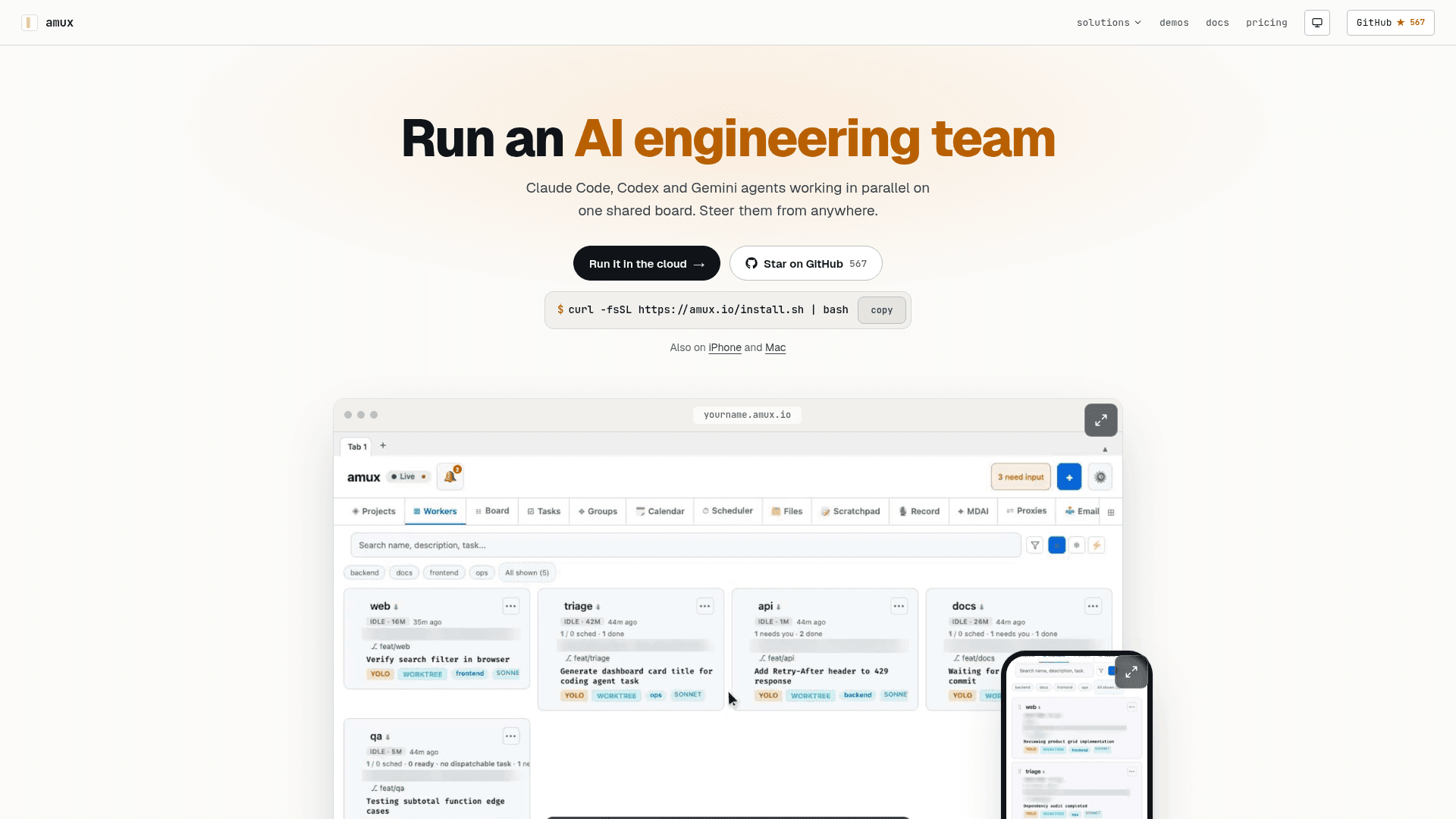
amux is a single Rust binary with SQLite storage that runs each agent as a real CLI session in tmux. A shared kanban board with atomic task claiming keeps agents from taking the same work, and agents can message or @mention each other to hand off tasks or request reviews. Users register a session against a project directory, start it, open the dashboard, and send tasks or peek at output from the CLI, REST API or UI.
How the workflow runs
The dashboard shows live worker cards, the board, notes, a CRM, email, a file explorer, logs and a cron-style scheduler. Agents can use a shared Playwright browser with saved auth profiles, reusable skills, and global shared memory. Documented recovery behavior includes holding message delivery during provider usage limits and resuming at the reset time, re-attaching to tmux sessions after server restarts, and bringing workers back after macOS reboots. Restarting an agent whose process crashed is not built into the server.
Access and deployment
Self-hosting requires macOS or Linux, tmux 3.2+ and at least one signed-in agent CLI. Remote access is documented through Tailscale, with bearer-token authentication for non-localhost requests. The web dashboard installs as a PWA, a native iOS app is on the App Store, and a macOS 12+ app is distributed via GitHub releases. amux Cloud provides a dedicated always-on server at a yourname.amux.io address.
Licensing note
The Commons Clause prohibits selling amux itself as a product or service; the project describes itself as source-available rather than OSI-approved open source.
Community Discussions
Be the first to start a conversation about amux
Share your experience with amux, ask questions, or help others learn from your insights.
Pricing
Self-hosted
Free forever self-hosted amux with every feature, source-available under MIT + Commons Clause (not OSI open source). Model provider costs are separate.
- Unlimited agents & sessions
- Web dashboard & mobile PWA
- Usage-limit resume & stall alerts
- Agent-to-agent orchestration
- Kanban board & scheduler
Cloud Solo
Your own always-on server at yourname.amux.io
- Your own server: 4 vCPU, 8 GB RAM, 80 GB disk
- Everything in Self-hosted
- Ready at yourname.amux.io in about 3 minutes
- Runs 24/7 while your laptop sleeps
- Snapshot kept 30 days after you cancel
- Invite teammates by email
- iOS app sign-in
Cloud Team
For freelancers, agencies and small teams running agents across several projects
- Your own server: 8 vCPU, 16 GB RAM, 160 GB disk
- Everything in Solo
- Twice the room: more workers at once
Cloud Max
For large fleets and heavy builds
- Your own server: 16 vCPU, 32 GB RAM, 320 GB disk
- Everything in Team
- For large fleets and heavy builds
Concierge
We build and run automations for you on a computer you own; $5,000 one-time onboarding, then $5,000/mo plus ~$200/mo AI usage at cost
- $5,000 one-time onboarding, including first working workflow
- $5,000/mo support, maintenance and new automations
- ~$200/mo AI usage, passed through at cost
Capabilities
Key Features
- Run Claude Code, Codex, Gemini CLI, OpenCode and Ollama agents in parallel
- Shared kanban board with atomic task claiming
- Agent-to-agent messaging and @mentions
- Live worker cards and per-worker model switching
- Scheduler with cron-style recurring jobs
- Recovery from provider usage limits and macOS reboots
- Git panel, file viewer and terminal in the browser
- Browser automation with saved auth profiles
- Notes, CRM and email integration
- Reusable skills and slash commands
- Memory and rules per worker, group or globally
- iPhone/iPad app, Mac app and installable PWA
- REST API and CLI
- Land gate with tests and review before main
- Usage and cost tracking and searchable logs