Android CLI
Google’s CLI lets coding agents build, deploy, and inspect Android apps on emulators and remote physical phones through Android Device Streaming.
At a Glance
Remote-device service quota, separate from the locally installed CLI. Spark stops at its no-cost quota; paid overage requires Blaze.
Engagement
Available On
Listed Oct 2026
About Android CLI
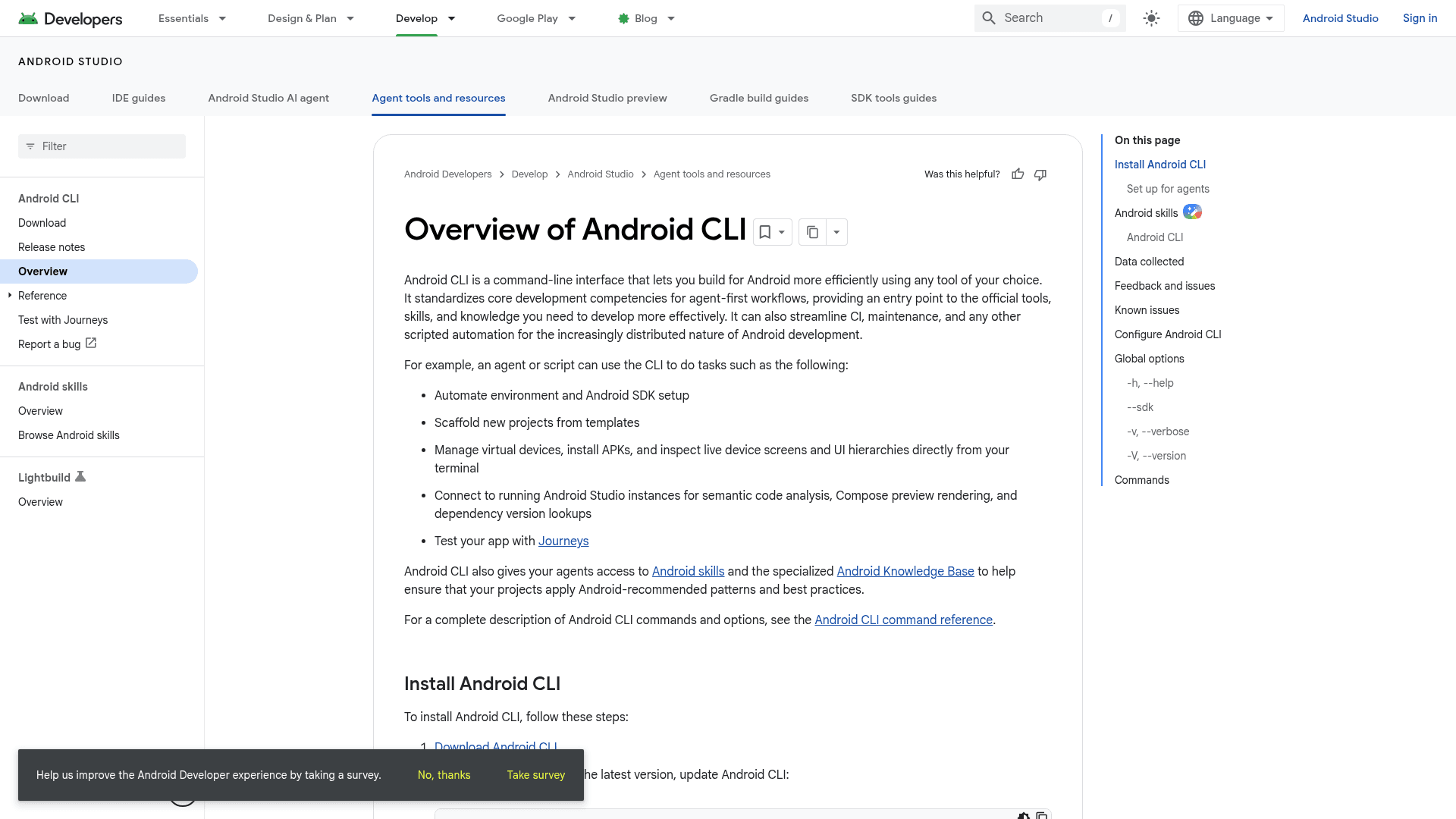
Android CLI is a command-line interface from Google's Android team that standardizes core Android development tasks for agent-first workflows. Agents or scripts can set up the SDK, scaffold projects, manage emulators, install APKs, inspect device screens, and reach Android skills and the Android Knowledge Base. It is distinct from the Android Studio IDE, although it can connect to a running Studio instance.
What It Is
Android CLI is a terminal entry point to official Android tooling, usable with any agent or editor of your choice. The documentation also describes it as a way to streamline CI, maintenance, and scripted automation. Commands are grouped by area, including auth, create, describe, device, docs, emulator, init, install, layout, run, screen, sdk, skills, studio, and update.
Agent Workflow
Running android init installs the android-cli skill so agents understand how to use the tool. Agents can then scaffold new projects from templates, automate environment and SDK setup, manage virtual devices, install APKs, and capture live device screens and UI hierarchies. Through the android studio commands they can connect to running Android Studio instances for semantic code analysis, Compose preview rendering, and dependency version lookups. The CLI also supports testing apps with Journeys.
Android Skills
The android skills commands add, find, list, update, and remove Android skills. These are markdown SKILL.md instructions published in the android/skills repository under the Apache License 2.0, intended to ground LLMs in Android best practices. The repository states its skills focus on workflows where evaluations show LLMs underperform.
Remote Physical Devices
The android device remote commands (connect, create, disconnect, extend, list, models, projects, remove) let you reserve and connect to remote physical Android devices. Per the Android Device Streaming documentation, these devices are hosted in Google's secure data centers and Android Partner Device Labs, reached over an ADB over SSL connection. They are real hardware, not emulators. The CLI requires Google sign-in and a Google Cloud project ready for streaming, including required APIs, permissions, and billing. Streaming usage follows Firebase quotas and billing. Devices are wiped and factory reset when a session ends.
Setup and Limits
Download the CLI and run android update to stay current. A .androidrc file can apply default flags such as --sdk. It runs on macOS, Linux, and Windows, with documented Windows limits: the android emulator command is currently disabled, and downloading from Windows PowerShell isn't supported. The CLI collects basic usage data, which can be disabled with the --no-metrics flag.
The Closed Development Loop
An agent can write code, build an APK, reserve a physical phone, deploy the APK through ADB, inspect its screen and UI hierarchy, and use the observed result to make the next fix. The September remote-device commands made physical hardware accessible from the terminal; the October release connects a new reservation to ADB automatically. Device inspection provides feedback, but teams still need assertions and appropriate tests to establish correctness.
Community Discussions
Be the first to start a conversation about Android CLI
Share your experience with Android CLI, ask questions, or help others learn from your insights.
Pricing
Android Device Streaming — Spark quota
Remote-device service quota, separate from the locally installed CLI. Spark stops at its no-cost quota; paid overage requires Blaze.
- 30 no-cost streaming minutes per project per month
Android Device Streaming — Blaze overage
USD 0.15 for each additional streaming minute after 30 no-cost minutes per project per month. Requires a billing-enabled project.
- Physical remote devices
- 30 no-cost minutes per project per month
- USD 0.15 per additional minute
Capabilities
Key Features
- Automated Android SDK and environment setup
- Project scaffolding from templates
- Emulator management (create, start, stop, list, remove)
- APK installation and app running from the terminal
- Live device screen capture and UI hierarchy inspection
- Remote physical device reservation via android device remote
- Android Studio integration for code analysis, Compose preview rendering, and version lookups
- Android skills install and update for coding agents
- Android documentation search and fetch
- Journeys-based app testing
- Configurable defaults via .androidrc
- Opt-out usage metrics with --no-metrics