
AQ
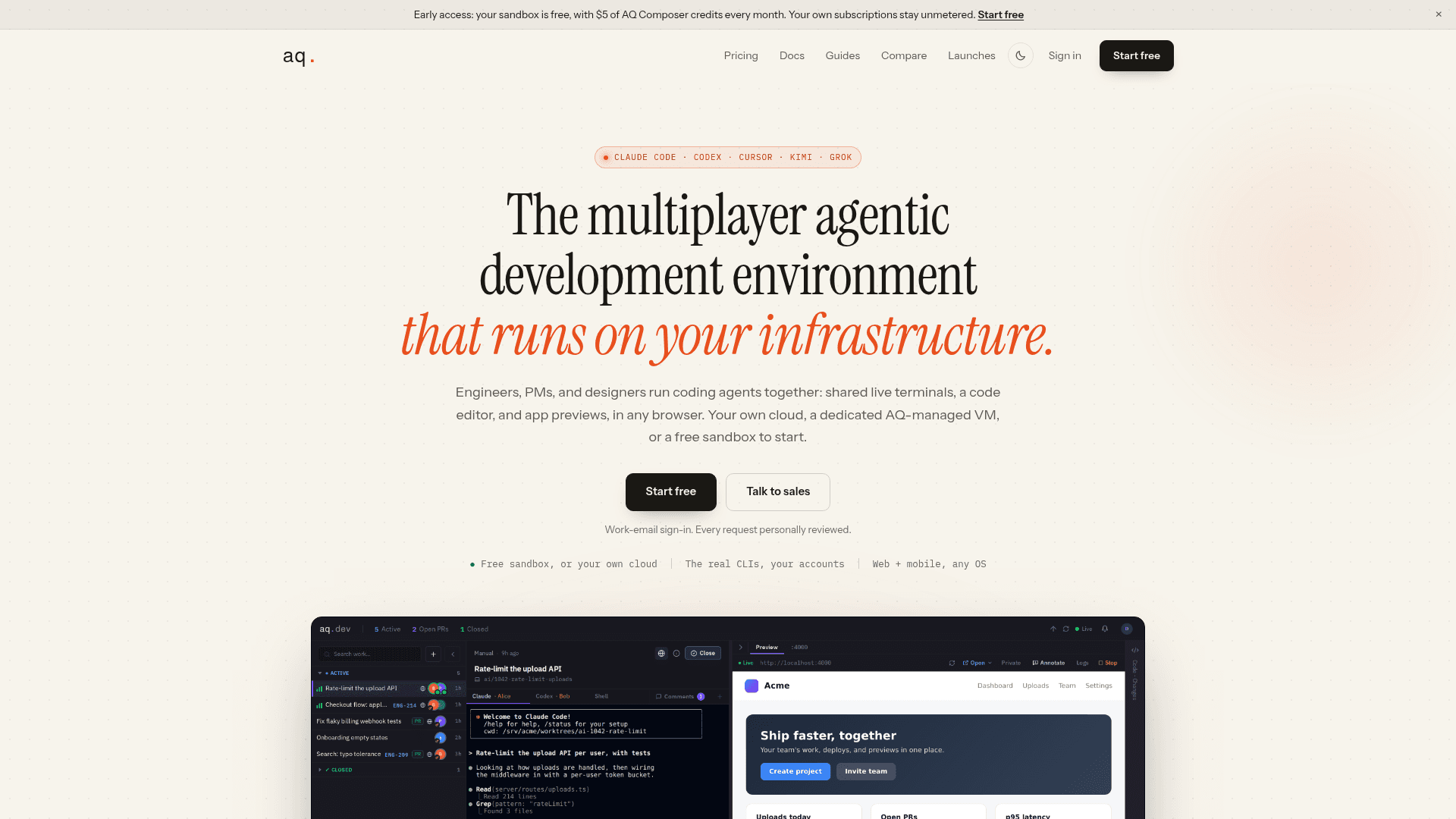
A multiplayer agentic development environment that lets engineering teams run AI coding agents like Claude Code and Codex together with shared live terminals, a code editor, and app previews in your own cloud.
At a Glance
About AQ
AQ is a browser-based multiplayer agentic development environment built by BetterLeap, Inc., currently in early access. It lets engineering teams — including PMs and designers — run AI coding agents like Claude Code, Codex, Cursor Agent, Kimi, and Grok together in shared live sessions, backed by dedicated infrastructure in your own cloud or an AQ-managed VM.
What It Is
AQ is a team-oriented coding harness, not an IDE plugin or a proprietary model wrapper. The core idea is that AI coding agent sessions should be shared, live places a whole team can enter together — watching, steering, and reviewing the same run — rather than single-player tools that produce diffs in isolation. Each workspace gives a task its own isolated git worktree, a persistent terminal session, a code editor, and a live app preview, all accessible from any browser on any OS.
How the Multiplayer Model Works
The workspace is the central unit. When a teammate opens a workspace, they see the same live terminal, the same editor, and the same preview as the person who started it — not a replay. Control can be handed off with one click: the recipient types as the session owner, the owner retains their own input, and control can be revoked at any time. This means when an agent needs a decision, the person with the answer can already be in the room rather than receiving a Slack summary after the fact.
- Parallel workspaces: Each task gets its own git worktree (
ai/{id}-{slug}), so parallel agents never collide on files or dependencies. - Persistent sessions: Terminals run in tmux on the VM, so closing a laptop doesn't stop the agent. Reopening the workspace from any device — including mobile — resumes the exact session.
- Guest links: People outside the team (founders, clients) can view a workspace preview without a seat.
Linear and GitHub Integration
Work enters AQ from Linear and exits as GitHub pull requests. Labeling a Linear issue ai-task automatically creates a workspace in the team sidebar and moves the issue to In Progress; status syncs both ways, and workspace ownership follows the Linear assignee. On the exit side, agents commit, push, and open pull requests using each user's own GitHub credentials, and AQ tracks every PR — opened, merged, and closed — on its workspace card.
Infrastructure and Deployment Model
AQ is explicit that execution happens on dedicated machines, not shared multi-tenant infrastructure. Teams can connect VMs from their own cloud account (AWS, GCP, etc.) for full custody of code, worktrees, and CLI credentials, or use a dedicated AQ-managed VM created with one click. The free sandbox is a private AQ-managed VM in an isolated network. The aq-runner doctor CLI command diagnoses runner issues, and runner health is visible in the product UI.
Supported Agents and API Surface
AQ supports Claude Code, Codex, Cursor Agent, Kimi, Grok, and Antigravity CLI, plus plain shell sessions. Each user connects CLIs with their own accounts, so model spend stays on the team's own subscriptions and AQ does not mark up usage. AQ also ships a built-in agent called AQ Composer that runs on AQ-hosted models with credits included per seat. Beyond the UI, the workspace lifecycle is scriptable via a versioned REST API, signed webhooks, and an MCP server at aq.dev/mcp that gives Claude, Cursor, or any MCP client the same surface with a single browser sign-in.
Current Status: Early Access
AQ is in early access as of mid-2026, with docs first published July 10, 2026 and updated September 12, 2026. Sign-up requires a work Google account and personal review by the AQ team, typically within a day or two. The product is described as moving fast, with early teams shaping the roadmap. The early-access pricing is explicitly promotional and locked for the first 12 months for teams that join during the promotion.
Community Discussions
Be the first to start a conversation about AQ
Share your experience with AQ, ask questions, or help others learn from your insights.
Pricing
Free
A personal sandbox, created for you. Solo. Nothing to install.
- Private AQ-managed sandbox VM in isolated network
- Every agent CLI: Claude Code, Codex, Cursor Agent, Kimi, Grok, Antigravity CLI
- Code editor, live previews, and Linear and GitHub integration
- $5 of AQ Composer credits every month
- Your own agent subscriptions stay unmetered
Team
Your own cloud, your whole team. Unlimited seats, shared workspaces, and dedicated infrastructure.
- Unlimited seats with shared workspaces
- Guest links and public preview links for reviews
- Connect VMs in your own cloud account
- Or use a dedicated always-on AQ-managed VM
- Risk-free invitations: seat billed only when accepted
- $40 of AQ Composer credits per seat every month
- All Free plan features
Enterprise
For larger deployments with dedicated infrastructure, procurement, and security review.
- Dedicated infrastructure
- Procurement support
- Security review
- Founder on the call
Capabilities
Key Features
- Multiplayer live terminal sharing with one-click control handoff
- Isolated git worktree per workspace for parallel agent tasks
- Persistent tmux sessions that survive laptop sleep and network changes
- Live app preview with shareable URLs and pinnable comments
- Linear integration: label-to-workspace with bidirectional status sync
- GitHub integration: agents commit, push, and open PRs with each user's own auth
- AQ Composer built-in agent with included monthly credits
- Support for Claude Code, Codex, Cursor Agent, Kimi, Grok, and Antigravity CLI
- Bring-your-own cloud VM or use a dedicated AQ-managed VM
- REST API, signed webhooks, and MCP server for workspace automation
- Mobile-accessible workspaces from any browser
- Guest links for external reviewers without a seat
- Code editor and live preview side by side in the browser
- aq-runner doctor CLI for diagnosing runner issues