EveryDev.ai
Subscribe
Home
Tools

5,901+ AI tools

  • Featured
  • Gems
  • Trending
  • New
  • Rate tools
  • Compare
  • Arena
Categories
  • Agents2972
  • Coding2248
  • Infrastructure1067
  • Projects818
  • MCP794
  • Research744
  • Analytics565
  • Marketing527
  • Design488
  • Testing476
  • Data442
  • Security412
  • Integration288
  • Communication284
  • Prompts283
  • Extensions238
  • Voice213
  • DevOps190
  • Commerce183
  • Web128
  • Learning123
  • Finance44
AI Tools by Topic
  • AI Coding Assistants
  • Agent Frameworks
  • MCP Servers
  • AI Prompt Tools
  • Vibe Coding Tools
  • AI Design Tools
  • AI Database Tools
  • AI Website Builders
  • AI Testing Tools
  • LLM Evaluations
Follow Us
  • X / Twitter
  • LinkedIn
  • Reddit
  • Discord
  • Threads
  • Bluesky
  • Mastodon
  • YouTube
  • GitHub
  • Instagram
Get Started
  • Users
  • Rate Tools
  • About
  • Editorial Standards
  • Corrections & Disclosures
  • Community Guidelines
  • Advertise
  • Contact Us
  • Newsletter
  • Submit a Tool
  • Start a Discussion
  • Write A Blog
  • Share A Build
  • Terms of Service
  • Privacy Policy
Explore with AI
  • ChatGPT
  • Gemini
  • Claude
  • Grok
  • Perplexity
Agent Experience
  • llms.txt
Theme
With AI, Everyone is a Dev. EveryDev.ai ©
    1. Home
    2. Tools
    3. AutoSubs
    AutoSubs icon

    AutoSubs

    Speech Recognition
    Featured

    Open-source desktop app that generates subtitles on-device and integrates with DaVinci Resolve, Premiere Pro and After Effects.

    Visit Website

    At a Glance

    Pricing
    Open Source

    Free, MIT-licensed local AI subtitle app for Mac, Windows and Linux; no paid tier behind a feature flag.

    Engagement

    Available On

    Windows
    macOS
    Linux
    iOS
    API

    Resources

    WebsiteDocsGitHubllms.txt

    Topics

    Speech RecognitionVideoLocal Inference

    Alternatives

    FluidVoiceHandyOpenScreen
    Developer
    Tom MoroneyDublin, Ireland

    Listed Nov 2026

    About AutoSubs

    AutoSubs is an open-source desktop app by Tom Moroney that turns audio or video into timestamped subtitles using AI models that run locally. It works standalone or connects to DaVinci Resolve, Adobe Premiere Pro and After Effects. The latest GitHub release listed is v3.11.0, and the code is MIT licensed.

    What It Is

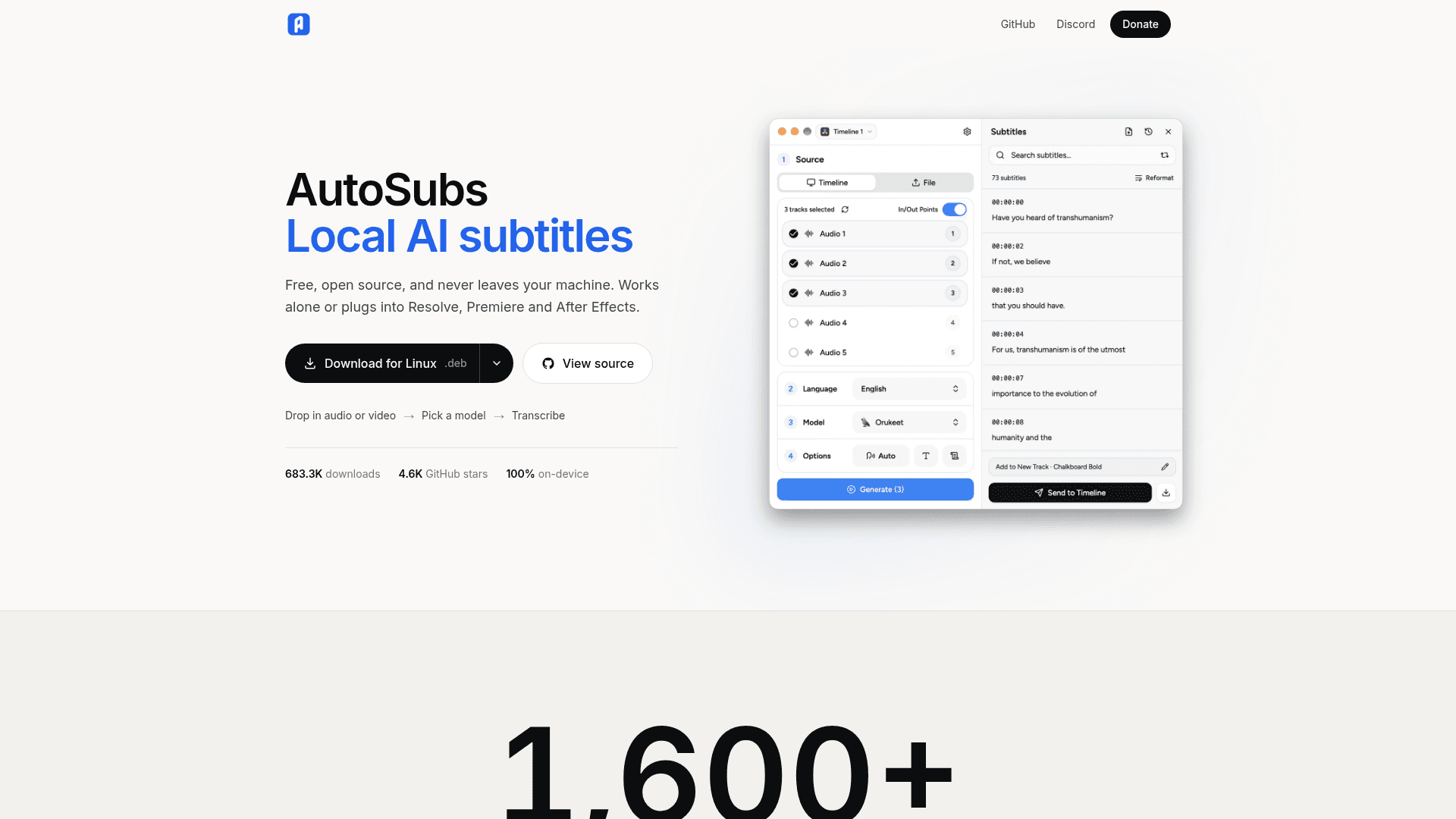
    AutoSubs is a local-first transcription and subtitling tool for video creators. The project states that processing happens on the user's machine, with no cloud upload, account or telemetry. Users drop in an audio or video file, pick a model and language or translation options, and transcribe. They can then edit speakers and subtitles and export as SRT, text, or to the clipboard.

    Models and Language Coverage

    Models are downloaded on demand from an in-app Model Manager. The README lists several families: Whisper, Moonshine, Parakeet (plus the community Orukeet variant), SenseVoice, Canary, Cohere Transcribe, GigaAM and Meta's Omnilingual ASR, which covers 1600+ languages. A speaker diarization model labels who is speaking, and a Silero VAD model handles voice activity detection. An optional MMS forced-alignment model provides word-level timestamps and is licensed CC BY-NC 4.0, separately from the MIT-licensed code.

    Editor Integrations

    In DaVinci Resolve, AutoSubs runs from the Workspace Scripts menu and sends styled subtitles back to the timeline. The Mac App Store version of Resolve is not supported. For Premiere Pro and After Effects, a bundled CEP extension loads automatically. It exports timeline audio for transcription, then imports subtitles as caption tracks in Premiere or as text layers in After Effects. A CLI is also documented in a separate guide.

    Formatting and Setup

    A subtitle formatter applies characters-per-line and per-second limits and script-aware line breaking. Per-speaker styling and preset styles are supported. Installers are provided for macOS (Apple Silicon and Intel), Windows, and Linux (.deb and .rpm), and macOS users can install via Homebrew.
    AutoSubs - 1

    Community Discussions

    Be the first to start a conversation about AutoSubs

    Share your experience with AutoSubs, ask questions, or help others learn from your insights.

    Pricing

    OPEN SOURCE

    Open Source

    Free, MIT-licensed local AI subtitle app for Mac, Windows and Linux; no paid tier behind a feature flag.

    • MIT-licensed code (AutoSubs code)
    • On-device transcription, no upload, no account, no telemetry
    • Speaker diarization and word-level timing
    • Integrates with DaVinci Resolve, Premiere Pro and After Effects
    • Optional MMS forced-alignment model weights are CC BY-NC 4.0 (noncommercial), licensed separately from the MIT code

    Capabilities

    Key Features

    • On-device speech-to-subtitle transcription
    • Multiple local model families including Whisper, Parakeet, Canary and Moonshine
    • Speaker diarization and per-speaker styling
    • Translation between languages
    • Word-level timing via forced alignment
    • Subtitle formatter with line and timing limits
    • Export to SRT, text or clipboard
    • DaVinci Resolve, Premiere Pro and After Effects integration
    • Command line interface
    • On-demand model manager

    Integrations

    DaVinci Resolve
    Adobe Premiere Pro
    Adobe After Effects
    Homebrew
    API Available
    View Docs

    Ratings & Reviews

    No ratings yet

    Be the first to rate AutoSubs and help others make informed decisions.

    Rate other tools you’ve used

    Developer

    Tom Moroney

    Tom Moroney is a software engineer from Dublin who works full-time at Workday on backend security and developer tooling. Outside work, he builds AutoSubs, an open-source cross-platform subtitle app. He is also developing SubSlate, a video editor.

    Dublin, Ireland
    Read more about Tom Moroney
    WebsiteGitHubLinkedIn
    1 tool in directory

    Similar Tools

    FluidVoice icon

    FluidVoice

    Free, open-source macOS dictation app with on-device AI enhancement via the Fluid-1 model — local-first, low-latency, and privacy-preserving.

    Handy icon

    Handy

    A free, open source desktop app that transcribes speech offline and pastes the text into any text field.

    OpenScreen icon

    OpenScreen

    Free, open-source desktop screen recorder and editor that turns raw captures into polished product demos with auto-zooms, local captions, and an optional AI editing agent.

    Browse all tools

    Related Topics

    Speech Recognition

    AI tools that convert spoken language into text.

    91 tools

    Video

    AI tools that generate or edit video — from text-to-video and animation to avatars, dubbing, and short-form clips.

    131 tools

    Local Inference

    Tools and platforms for running AI inference locally without cloud dependence.

    360 tools
    Browse all topics
    Back to all toolsSuggest an edit
    ratings
    discussions