
Catenary
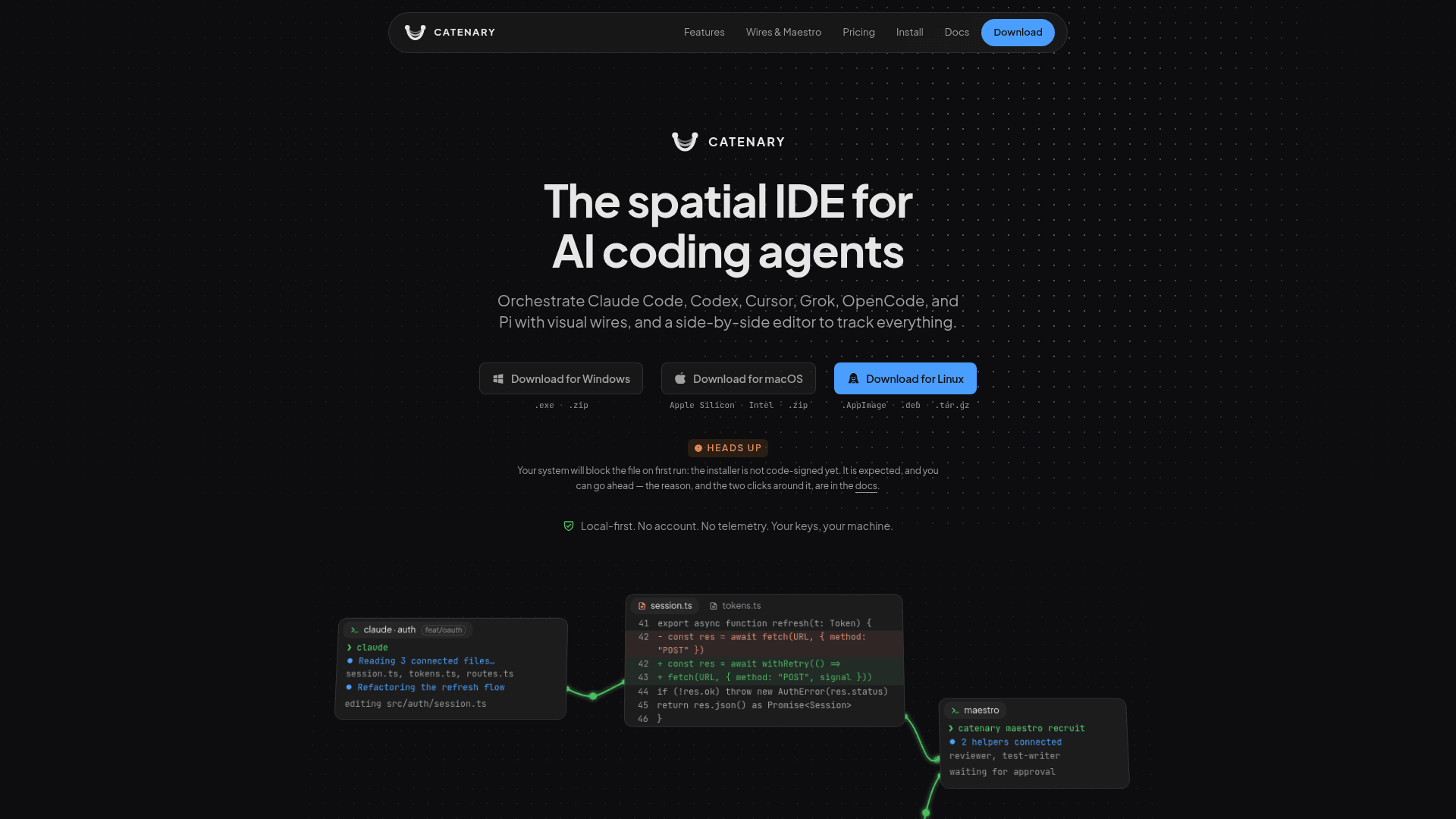
A local-first spatial IDE for orchestrating multiple AI coding agents on an infinite canvas, with visual wires, Monaco editor, and parallel git worktrees.
At a Glance
Full canvas, terminals, editor, browser, and git with no time limit. Limited to 1 project, 2 parallel tasks, and 2 Maestro helpers.
7-day full Pro access, no credit card required. Claimed once per install from inside the app.
Engagement
Available On
Listed Sep 2026
About Catenary
Catenary is a desktop IDE built around an infinite, zoomable canvas where terminals, editors, browsers, and AI coding agents float side by side. Created by Giorgio Nícolas de Arruda Bertino, it is designed specifically for running multiple AI coding agents simultaneously — Claude Code, Codex, Cursor, Grok, OpenCode, and Pi — without losing track of what each one is doing. The app is local-first by construction: no account, no telemetry, and no code ever leaves your machine.
What It Is
Catenary is a native Electron + Chromium desktop application that opens a local folder and provides an infinite canvas for spatial arrangement of development panels. It is not a cloud service and not an AI agent itself — it orchestrates the CLI-based agents you already have installed, using the API keys you already pay for. Canvas state is stored locally in .cate/workspace.json and .cate/session.json, so everything comes back exactly where you left it when you reopen a project.
Core Canvas Features
The canvas is the central metaphor: every panel — terminal, Monaco editor, browser, git worktree — floats in canvas space and can be panned, zoomed, and dragged freely. Key capabilities include:
- 1-Click worktrees & branches: The "New Agent Task" button creates an isolated branch with its own working directory and agent, color-coded throughout the sidebar and canvas, without touching the main working tree.
- Monaco with diffs: VS Code's editor is embedded in the canvas with side-by-side diffs of everything an agent touched, alongside a git-aware file tree.
- Context wires: Directed visual lines connect panels to agents, relaying context automatically when a source goes quiet or acting as standing permissions for downstream agents to pull from.
- Maestro Mode: One agent recruits, briefs, and wires a team of helpers (up to five by default, adjustable to ten). Every action Maestro takes opens an editable approval card before anything appears on the canvas.
- Multi-project & parallel branches: Each open project keeps its own canvas; tasks run in isolated worktrees with their own agents, and switching between projects restores state completely.
Privacy Architecture
Catenary's privacy model is unusually explicit. The homepage lists every outbound network call the app makes — exactly two hosts:
- A GET to
github.com/GioNicolas/catenary-releasesevery 15 minutes to check for updates (no data sent, only a version number received). - A POST to
thecatenary.app/api/license/activate,/deactivate, or/api/trial/claim— only triggered by user action when pasting a key, removing it, or claiming the trial. The only data sent is a SHA-256 machine ID (64 hex chars, irreversible, no name or email).
Source code, terminal output, file paths, prompts, agent conversations, and API keys are never sent anywhere. The analytics endpoint ships empty in every build, and the crash-reporter DSN was removed from the distribution entirely. The Pro license is verified offline via Ed25519 signature checked locally, so the app remains fully functional without an internet connection.
Supported Agents & Platform
Catenary supports Windows, macOS (Apple Silicon and Intel), and Linux (AppImage, .deb, .tar.gz). It works with any agent CLI the user has installed — Claude Code, Codex, Cursor, Grok, OpenCode, Pi, or local models via Ollama or LM Studio. The app does not proxy prompts; agents talk directly to Anthropic, OpenAI, Google, or a local endpoint using the user's own API keys.
Update: v1.0.4
The GitHub Releases repository (GioNicolas/catenary-releases) shows the latest published version as v1.0.4, released on 2026-09-07. The plan limits document was last updated on 2026-09-04 (with a prior version on 2026-08-28), indicating active early development. The installer is not yet code-signed, which the documentation acknowledges explicitly with instructions for bypassing the OS security prompt on first run. The 1.x line is the current release track, and Pro license holders receive updates within this line.
Community Discussions
Be the first to start a conversation about Catenary
Share your experience with Catenary, ask questions, or help others learn from your insights.
Pricing
Free
Full canvas, terminals, editor, browser, and git with no time limit. Limited to 1 project, 2 parallel tasks, and 2 Maestro helpers.
- Canvas, terminals, editor, browser, git — unlimited
- Unlimited connection wires
- 1 project open at a time
- 2 parallel tasks (isolated branches with agent)
- 2 Maestro Mode helpers
Pro Trial
7-day full Pro access, no credit card required. Claimed once per install from inside the app.
- All Pro plan limits for 7 days
- No credit card required
- Claimed once per installation
- Signed offline token valid for all 7 days
Pro
One-time lifetime purchase. Unlimited projects, parallel tasks, and Maestro helpers (5, adjustable to 10). Includes 1.x line updates and up to 2 activated computers.
- Canvas, terminals, editor, browser, git — unlimited
- Unlimited connection wires
- Unlimited projects open at the same time
- Unlimited parallel tasks
- 5 Maestro Mode helpers (adjustable 2–10)
- All 5 built-in squads
- Unlimited custom squads
- Up to 2 computers activated simultaneously
- 1.x line updates included
- Offline license verification via Ed25519
Capabilities
Key Features
- Infinite zoomable canvas for spatial panel arrangement
- Visual context wires between agents and panels
- 1-click git worktrees and isolated parallel branches
- Monaco editor with side-by-side diffs
- Embedded browser panels for dev server monitoring
- Maestro Mode: one agent recruits and briefs a team
- Multi-project support with per-project canvas state
- Real PTY terminals for running agent CLIs
- Support for Claude Code, Codex, Cursor, Grok, OpenCode, Pi
- Local-first: no account, no telemetry, no cloud routing
- Offline Pro license verification via Ed25519 signature
- 7-day Pro trial with no credit card required
- Built-in and custom agent squads
- Color-coded task tracking across sidebar and canvas