
Claude Command Center
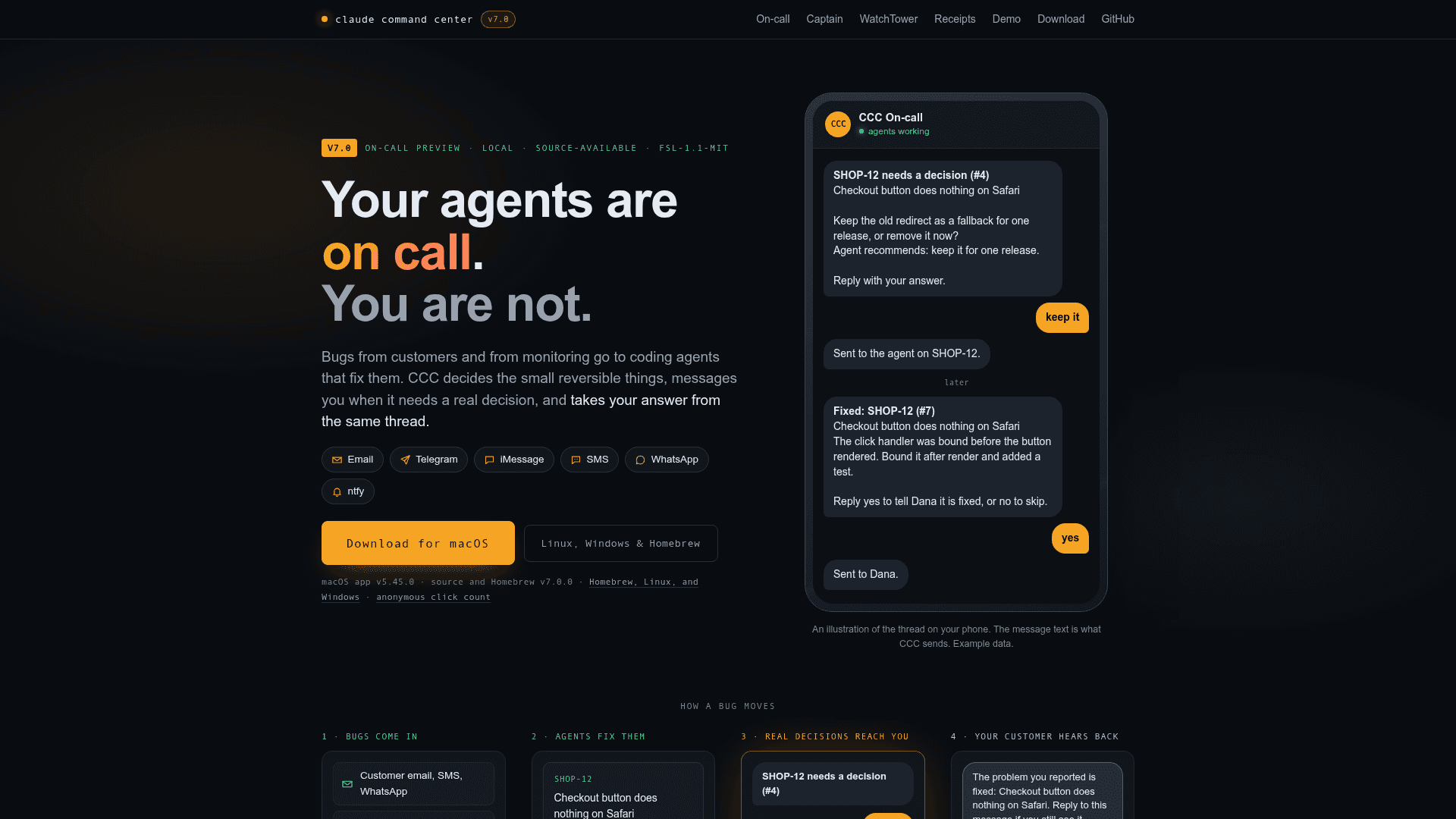
Local, source-available tool that routes bugs to coding agents and messages you for real decisions, with replies taken from the same thread.
At a Glance
Source-available (FSL-1.1-MIT), self-hosted local software; no account required and free to use at work. Not OSI open source.
Engagement
Available On
Alternatives
Listed Nov 2026
About Claude Command Center
Claude Command Center (CCC) is made by Amir Fish and runs on your own machine. Its On-call preview sends bugs from customers and monitoring to coding agents, decides small reversible choices, and messages you only when a real decision is needed. It is source-available under FSL-1.1-MIT, and On-call stays off until you turn it on.
What It Is
CCC is an agent fleet manager and on-call layer for people who ship a product and already use coding agents such as Claude Code or Codex. Reports arrive from GitHub issues, a support mailbox, Sentry, PostHog exceptions, URL uptime checks, any command you already run, or ccc oncall report. Each report becomes a deduplicated ticket in a WatchTower queue, and a worker agent picks it up in the repo you point it at. Agents open a commit or pull request according to how the queue is set up, and you decide what deploys.
How On-call Works
When an agent hits a question it cannot decide, you get one numbered message on a channel you configured. You reply in plain words in the same thread and the reply becomes the agent's answer. A switch lets agents decide minor reversible choices on their own, stating a recommendation and an undo, and every such decision is listed. Money, customer messages, public posts and anything irreversible always come to you. Agents can also ask or inform the reporting customer on the channel they wrote in on, with your approval by default.
Channels and Setup
Supported channels are email, Telegram, ntfy, iMessage, SMS, WhatsApp and a custom command for tools like Slack or Discord. SMS and WhatsApp need your own Twilio number, and iMessage needs a Mac. CCC polls from the machine it runs on, so no public URL or webhook is needed. That machine must stay on, because nothing is hosted for you. Setup starts with ccc oncall setup, then ccc oncall source add and ccc oncall status.
Session View and Engines
The browser session view shows every agent, what it is doing and its transcript. CCC reads each engine's on-disk state, so sessions started in a terminal appear too. It covers nine engines: Claude Code, Codex, Cursor, Antigravity, Kilo Code, Kimi Code, OpenCode, Grok and Devin, with documented gaps outside Claude Code. It also offers queues and workers, split conversations, search, group chat between sessions, phone access, and a ccc CLI with spawn, send and ask commands.
Community Discussions
Be the first to start a conversation about Claude Command Center
Share your experience with Claude Command Center, ask questions, or help others learn from your insights.
Pricing
Free
Source-available (FSL-1.1-MIT), self-hosted local software; no account required and free to use at work. Not OSI open source.
- Runs on your machine; nothing is hosted
- No account required
- Free to use at work under FSL-1.1-MIT (Competing Use excluded)
- Nine engines in one session view
- On-call preview (off until turned on)
Capabilities
Key Features
- Bug intake from GitHub issues, support mailbox, Sentry, PostHog, URL uptime checks and custom commands
- Deduplicated tickets in WatchTower queues with worker agents
- Numbered decision messages answered by replying in the same thread
- Switch for agents to decide small reversible choices with listed undo
- Customer questions and fixed notices with approval
- Channels: email, Telegram, ntfy, iMessage, SMS, WhatsApp, custom command
- Session view across nine agent engines
- ccc CLI for spawn, send, ask and sessions
- Phone access and local CI view
- Redacted run sharing