Main Menu
  • Tools
  • Developers
  • Topics
  • Discussions
  • News
  • Blogs
  • Builds
  • Contests
Create
    EveryDev.ai
    Sign inSubscribe
    Home
    Tools

    1,841+ AI tools

    • New
    • Trending
    • Featured
    • Compare
    Categories
    • Agents891
    • Coding869
    • Infrastructure377
    • Marketing357
    • Design302
    • Research276
    • Projects271
    • Analytics266
    • Testing160
    • Integration157
    • Data150
    • Security131
    • MCP125
    • Learning124
    • Extensions108
    • Communication107
    • Prompts100
    • Voice90
    • Commerce89
    • DevOps70
    • Web66
    • Finance17
    1. Home
    2. Tools
    3. CodexBar
    CodexBar icon

    CodexBar

    AI Coding Assistants

    A macOS menu bar app that provides quick access to OpenAI Codex CLI for AI-powered coding assistance.

    Visit Website

    At a Glance

    Pricing
    Free

    Free macOS menu bar app for Codex CLI access

    Engagement

    Available On

    macOS

    Resources

    Websitellms.txt

    Topics

    AI Coding AssistantsCommand Line AssistantsProductivity Extensions

    Alternatives

    Peon PingGemletNotchy
    Developer
    Peter SteinbergerVienna, AustriaEst. 2025$116M raised

    Listed Feb 2026

    About CodexBar

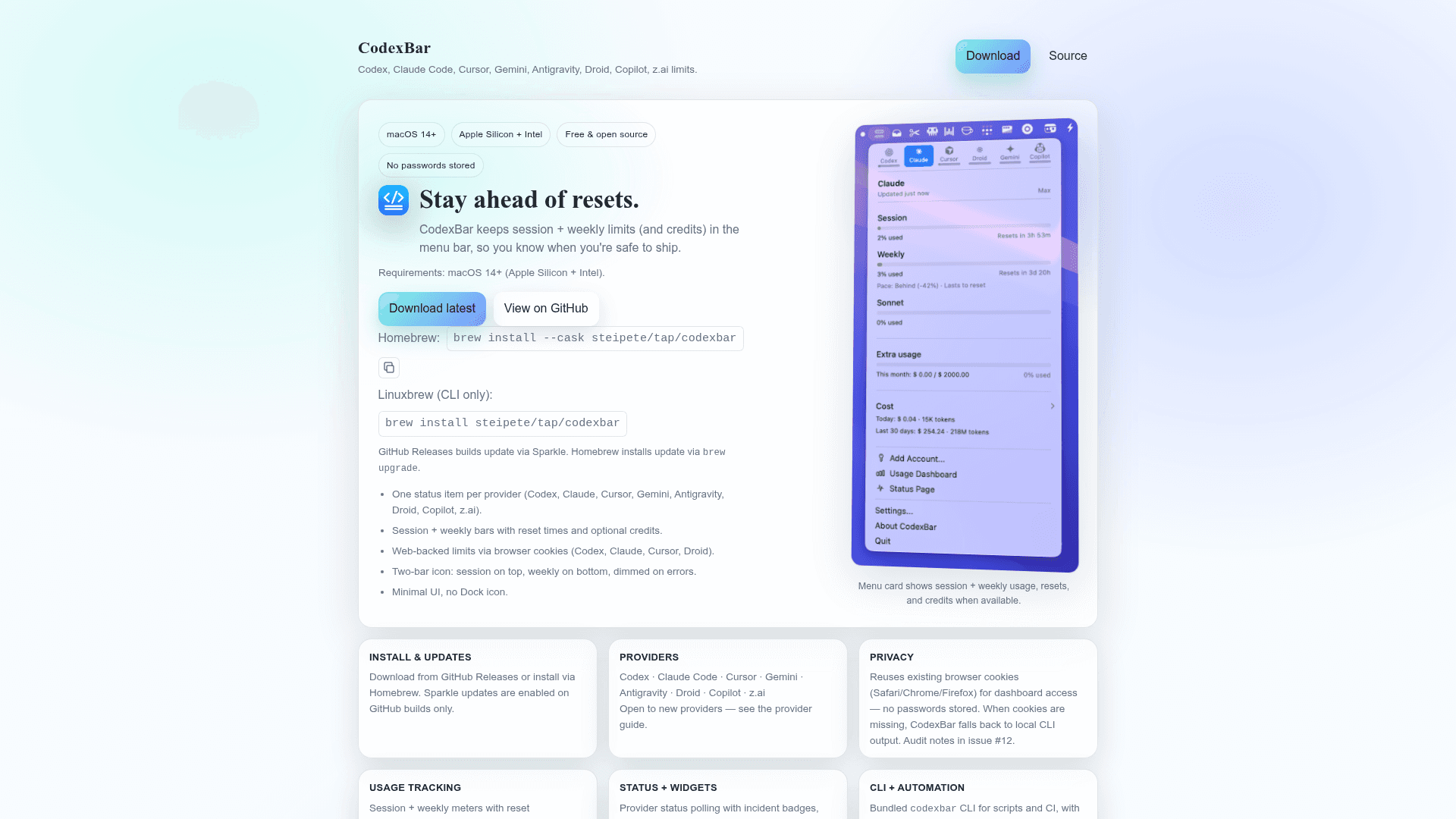
    CodexBar is a lightweight macOS menu bar application that brings OpenAI's Codex CLI directly to your fingertips. It provides instant access to AI-powered coding assistance without leaving your current workflow, making it easy to get code suggestions, explanations, and completions from anywhere on your Mac.

    The app sits quietly in your menu bar and activates with a simple click or keyboard shortcut, allowing developers to quickly interact with Codex for various coding tasks. Whether you need help writing a function, understanding a piece of code, or generating boilerplate, CodexBar streamlines the process by eliminating the need to switch between applications.

    • Menu Bar Integration provides always-available access to Codex CLI without disrupting your workflow or requiring you to open a separate terminal window
    • Quick Access enables rapid interaction with AI coding assistance through a simple click or customizable keyboard shortcut
    • Native macOS Experience delivers a seamless, lightweight application that follows macOS design guidelines and integrates naturally with your system
    • OpenAI Codex Integration connects directly to OpenAI's powerful Codex model for intelligent code suggestions and completions
    • Minimal Resource Usage runs efficiently in the background without consuming significant system resources

    To get started with CodexBar, download the application from the official website and install it on your Mac. Once installed, the app will appear in your menu bar. You'll need to configure your OpenAI API key to enable Codex functionality. After setup, simply click the menu bar icon or use the keyboard shortcut to open the interface and start typing your coding queries or requests.
    CodexBar - 1

    Community Discussions

    Be the first to start a conversation about CodexBar

    Share your experience with CodexBar, ask questions, or help others learn from your insights.

    Pricing

    FREE

    Free

    Free macOS menu bar app for Codex CLI access

    • Menu bar integration
    • Codex CLI access
    • Keyboard shortcuts
    • Native macOS app

    Capabilities

    Key Features

    • Menu bar integration
    • Quick access to Codex CLI
    • Keyboard shortcut activation
    • Native macOS application
    • OpenAI Codex integration
    • Lightweight background operation

    Integrations

    OpenAI Codex
    OpenAI API

    Reviews & Ratings

    No ratings yet

    Be the first to rate CodexBar and help others make informed decisions.

    Developer

    Peter Steinberger

    AI-powered tools from Swift roots to web frontiers. Every commit lands on GitHub for you to fork & remix.

    Founded 2025
    Vienna, Austria
    $116M raised
    1 employees

    Used by

    Dropbox
    Salesforce
    SAP
    Lufthansa
    +4 more
    Read more about Peter Steinberger
    WebsiteGitHubX / Twitter
    7 tools in directory

    Similar Tools

    Peon Ping icon

    Peon Ping

    Game character voice notifications for AI coding assistants when tasks complete or need permission, preventing missed terminal prompts.

    Gemlet icon

    Gemlet

    A native macOS menu bar app that provides keyboard-first, quick access to Google Gemini with chat organization, split panels, multiple profiles, and productivity features.

    Notchy icon

    Notchy

    A macOS menu bar app that puts Claude Code right in your MacBook's notch, with a floating terminal panel and automatic Xcode project detection.

    Browse all tools

    Related Topics

    AI Coding Assistants

    AI tools that help write, edit, and understand code with intelligent suggestions.

    344 tools

    Command Line Assistants

    AI-powered command-line assistants that help developers navigate, search, and execute terminal commands with intelligent suggestions and context awareness.

    101 tools

    Productivity Extensions

    Extensions and plugins that improve workflow and productivity.

    55 tools
    Browse all topics
    Back to all tools
    Explore AI Tools
    • AI Coding Assistants
    • Agent Frameworks
    • MCP Servers
    • AI Prompt Tools
    • Vibe Coding Tools
    • AI Design Tools
    • AI Database Tools
    • AI Website Builders
    • AI Testing Tools
    • LLM Evaluations
    Follow Us
    • X / Twitter
    • LinkedIn
    • Reddit
    • Discord
    • Threads
    • Bluesky
    • Mastodon
    • YouTube
    • GitHub
    • Instagram
    Get Started
    • About
    • Editorial Standards
    • Corrections & Disclosures
    • Community Guidelines
    • Advertise
    • Contact Us
    • Newsletter
    • Submit a Tool
    • Start a Discussion
    • Write A Blog
    • Share A Build
    • Terms of Service
    • Privacy Policy
    Explore with AI
    • ChatGPT
    • Gemini
    • Claude
    • Grok
    • Perplexity
    Agent Experience
    • llms.txt
    Theme
    With AI, Everyone is a Dev. EveryDev.ai © 2026
    37views