Cursor for iOS
Cursor's native iOS app lets developers launch AI coding agents, review diffs, and merge pull requests from anywhere on their iPhone.
At a Glance
About Cursor for iOS
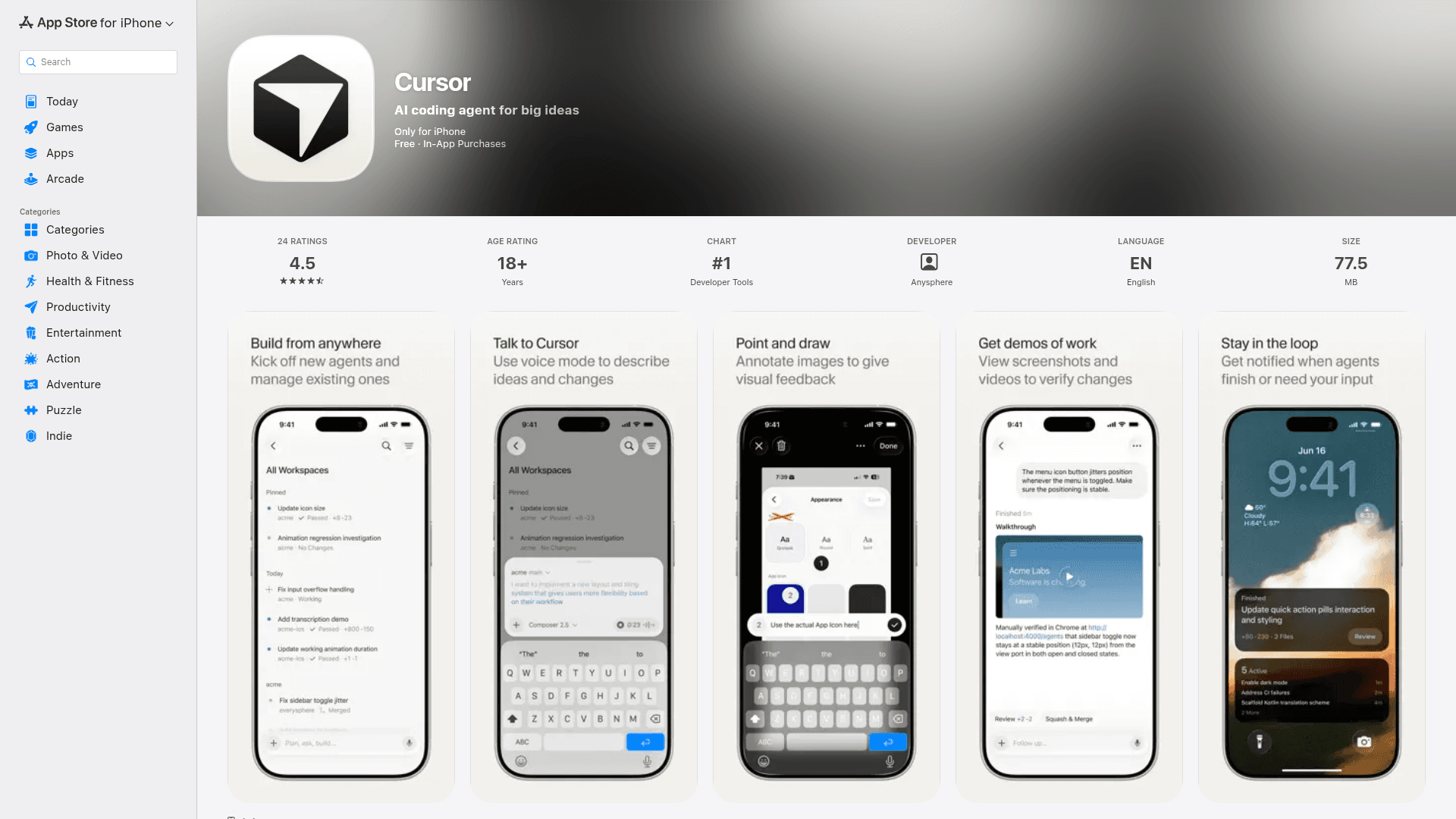
Cursor for iOS is the mobile companion to Anysphere's AI-native code editor, bringing the full agent-driven development workflow to iPhone. Released in public beta, the app lets developers kick off cloud agents, track progress, review generated artifacts, and merge pull requests without touching a laptop. It is available on the App Store and ranked #1 in Developer Tools at launch, according to the App Store listing.
What It Is
Cursor for iOS is a native iPhone app that extends the Cursor AI coding agent experience to mobile. Rather than a stripped-down viewer, it is designed as a first-class interface for launching and managing agents — both cloud agents running in isolated virtual machines and local agents running on a developer's own machine via Remote Control. The app targets professional developers and software teams who want to keep engineering work moving while away from their desks.
Core Capabilities
- Launch agents from anywhere — open a repo, describe a task by text or voice, and start an agent the same way you would on the desktop app
- Remote Control — direct agents already running on your local machine from your phone, with a setting to keep your computer awake while you're away
- Cloud agent handoff — send a local plan to a cloud agent or move an active session to the cloud; move it back to your machine before merging
- Visual feedback — take a screenshot, circle an issue, and drop annotations so agents receive precise visual context for UI fixes or design changes
- Diff review and PR merge — inspect file-level diffs and merge pull requests through a focused mobile diff experience
- Voice mode — describe bugs, brainstorm features, or request changes out loud; Cursor converts the conversation into actionable engineering work
- Live Activities and push notifications — lock-screen updates when an agent finishes, needs input, or is ready for review
How Cloud Agents Work
Cloud agents run in isolated virtual machines with full development environments. They can test changes in their own sandbox, iterate autonomously, and produce artifacts — videos, screenshots, and logs — that developers can review directly in the app. Because they operate asynchronously, cloud agents can run for longer periods and work toward merge-ready PRs without continuous intervention. The blog post notes that the experience of running cloud agents is intended to become indistinguishable from running them locally over time.
Workflows the Team Uses It For
The Cursor blog post describes several concrete workflows the team and early testers have adopted:
- On-call incident response — kick off an investigative agent from a phone when paged at lunch; return to a PR ready for review
- Customer bug fixes — start an agent to reproduce a time-sensitive issue reported while away from a desk
- Acting on mobile feedback — screenshot user feedback from X or other apps, annotate it, and send it to an agent as visual context for UI changes
Update: Public Beta Launch
Cursor for iOS launched in public beta in mid-2026, as described in the Anysphere blog post. The app requires iOS 26.0 or later and weighs 77.5 MB. It is available on all paid Cursor plans. The blog post also notes that Cursor's own agentic model, Composer 2.5, is available in the mobile app. Future plans mentioned include repo-less chats for tasks that don't require codebase context, and deeper MCP integrations for querying tools like Datadog and Slack.
Community Discussions
Be the first to start a conversation about Cursor for iOS
Share your experience with Cursor for iOS, ask questions, or help others learn from your insights.
Pricing
Hobby
Get started with Cursor for iOS at no cost with No credit card required and Limited Agent requests.
- No credit card required
- Limited Agent requests
- Limited Tab completions
Pro
Professional plan with Everything in Hobby, plus: and Extended limits on Agent for power users.
- Everything in Hobby, plus:
- Extended limits on Agent
- Access to frontier models
- MCPs, skills, and hooks
- Cloud agents
- Bugbot on usage-based billing
Pro+
Professional plan with Everything in Pro, plus: and 3x Pro limits on Agent for power users.
- Everything in Pro, plus:
- 3x Pro limits on Agent
- Access to frontier models
- MCPs, skills, and hooks
- Cloud agents
- Bugbot on usage-based billing
Ultra
Ultra plan with Everything in Pro, plus: and 20x Pro limits on Agent.
- Everything in Pro, plus:
- 20x Pro limits on Agent
- Access to frontier models
- MCPs, skills, and hooks
- Cloud agents
- Bugbot on usage-based billing
- Priority access to new features
Teams Standard
Designed for teams with Priced per user per month and Everything on Individual, plus: and collaboration features.
- Priced per user per month
- Everything on Individual, plus:
- Centralized team billing and administration
- Team marketplace for internal rules, skills, and plugins
- Agentic code reviews with Bugbot
- Cloud agents and automations with shared team context
- Usage analytics to understand team behavior
- Team-wide privacy mode
- SAML/OIDC SSO
Teams Premium
Designed for teams with Priced per user per month and Everything on Individual, plus: and collaboration features.
- Priced per user per month
- Everything on Individual, plus:
- 5x Standard limits on Agent
- Centralized team billing and administration
- Team marketplace for internal rules, skills, and plugins
- Agentic code reviews with Bugbot
- Cloud agents and automations with shared team context
- Usage analytics to understand team behavior
- Team-wide privacy mode
- SAML/OIDC SSO
Enterprise
Enterprise-grade solution with Everything on Teams, plus: and Pooled usage and dedicated support.
- Everything on Teams, plus:
- Pooled usage
- Invoice/PO billing
- SCIM seat management
- Repository, model, and MCP access controls
- Auto-run, browser, and network controls
- Audit logs and service accounts
- AI code tracking API
- Priority support and account management
Capabilities
Key Features
- Launch AI coding agents from iPhone
- Remote Control for agents running on local machine
- Cloud agents in isolated virtual machines
- Visual annotation — circle issues on screenshots
- Voice mode for describing tasks and bugs
- Diff review and pull request merging
- Live Activities and push notifications for agent status
- Artifact review — videos, screenshots, and logs
- Handoff between local and cloud agents
- Slash commands and frontier model selection
Integrations
Demo Video