
Open-source CLI that creates an isolated per-project VM sandbox with the project's toolchain for developers and coding agents.
At a Glance
devvm is free and open source under the MIT license.
Engagement
Available On
Listed Nov 2026
About devvm
devvm is an open-source command-line tool from devvmhq that gives each project folder its own isolated virtual machine, equipped with the toolchain the project calls for. It is meant for developers and for coding agents such as Claude Code, Codex and opencode, which run inside the VM instead of on the host. The project is MIT-licensed, and the latest release listed is v0.1.0.
What It Is
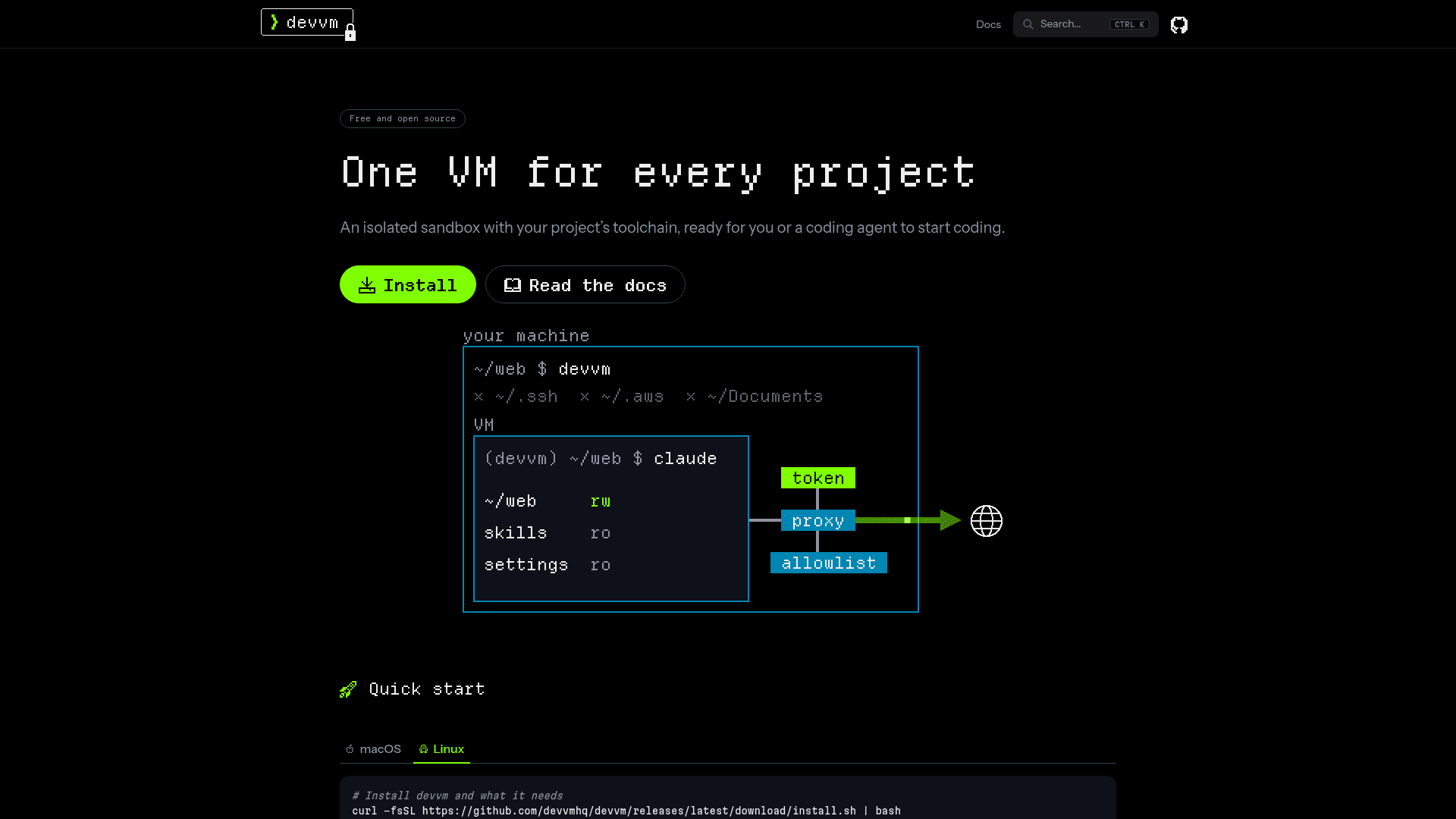
devvm is a sandbox manager for development work. Running devvm in a project folder shows what the new VM will get, including toolchains, agent, size and network tier, and asks whether to customize it. Confirming opens a shell in the VM at the same path as on the host, with a (devvm) prompt, and running devvm again in the folder reopens the same VM.
How the isolation works
The VM mounts only the project folder, so locations such as ~/.ssh, ~/.aws and ~/Documents stay out of reach. New VMs use the allowlist network tier, where traffic goes through a proxy on the host and only allowlisted hosts are reachable. Looser tiers (internet, open) and a stricter one (none) are available. Secrets such as the Claude Code token stay on the host: the VM holds placeholders and the proxy inserts the real values. On macOS, devvm locks .git hooks and config. With --clone, the VM works on its own clone of the repo and its work reaches the host repo only when fetched. The docs state that no sandbox closes every gap and list the remaining attack vectors.
Toolchains, agents and layers
devvm detects toolchains from project files, for example package.json yields node. Claude Code, Codex and opencode can run in the VM with the user's settings, skills and MCP servers, and devvm agent import copies them in from existing agents. Built-in layers are docker, nix and desktop, and devvm layer new creates custom layers. A VM can start from a container image with --from, or be configured from a project's devcontainer.json. Ports forward automatically, and devvm code opens the VM in VS Code over Remote-SSH.
Setup path
devvm runs on macOS 13 or newer and on Linux, on arm64 or x86_64, using Lima as its backend (Apple's Virtualization framework on macOS, QEMU on Linux). Install it with Homebrew or an install script, then run devvm doctor to check requirements. The first run builds a base image once, and later VMs are copies that start in seconds.
Community Discussions
Be the first to start a conversation about devvm
Share your experience with devvm, ask questions, or help others learn from your insights.
Pricing
Open Source
devvm is free and open source under the MIT license.
- MIT-licensed core CLI
- Isolated per-project VMs on Lima
- Runs Claude Code, Codex and opencode in the VM
- Network tiers and .git protection
Capabilities
Key Features
- Per-project isolated VM sandbox
- Automatic toolchain detection from project files
- Runs Claude Code, Codex and opencode inside the VM
- Network tiers with proxy allowlist
- Secrets kept on host via proxy placeholders
- Clone mode for working on a separate repo copy
- Built-in docker, nix and desktop layers plus custom layers
- Automatic port forwarding
- VS Code Remote-SSH via devvm code
- devcontainer.json support
- Start from a container image with --from
- Fast VM startup from shared base image
- On-host .git hook and config protection on macOS