
duet
A harness that lets an AI coding agent test features on a real Android phone and in visible Chrome browsers in one scenario, recording every step.
At a Glance
duet core harness (CLI and MCP server) released under the MIT License; install via npm as duet-qa.
Engagement
Available On
Alternatives
Listed Nov 2026
About duet
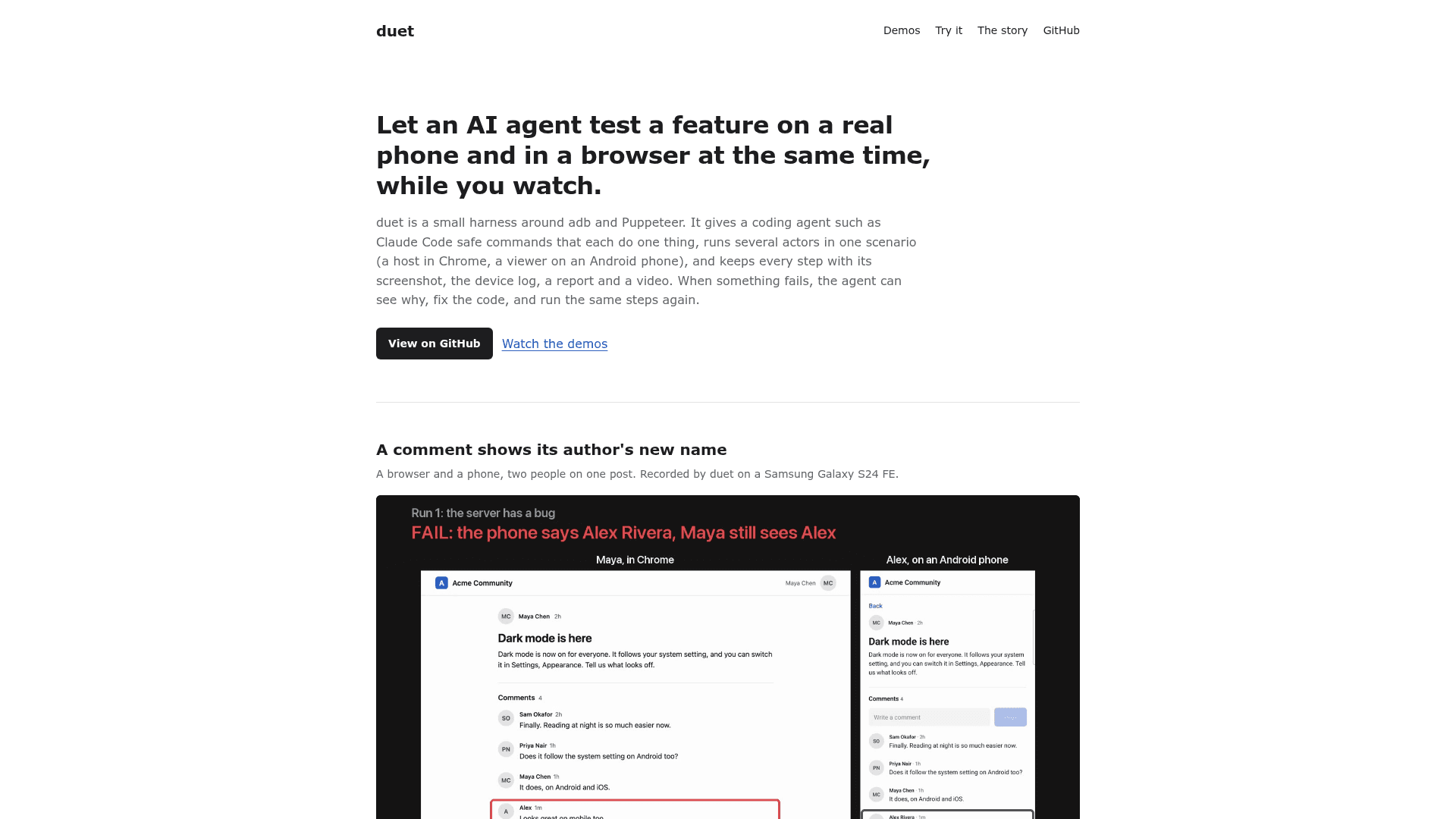
duet is an open-source harness around adb and Puppeteer, made by Aditya Singh, that lets an AI coding agent such as Claude Code test a feature the way a QA person would. It drives a real Android phone and visible Chrome windows in the same scenario while a person watches. Every step is saved with its screenshot, the device log, a report and optionally a video. The README labels the current status as early (0.1).
What It Is
duet is not a testing framework. It gives an agent safe commands that each do one thing, through an MCP server or a CLI. Examples are tapping by text on the phone, clicking by label in a browser, waiting for text, reading logcat since a mark, and taking screenshots. The agent can inspect why a step failed, fix the code, and rerun the same steps.
Multi-actor scenarios
A scenario is a YAML file naming actors, such as a host in Chrome and a viewer on a phone, with one actor: command step per line. Values can be saved from one actor, for example a sign-in code read from a browser page, and typed on another. Runs stop at the first failure and collect each actor's screenshot and each phone's log. The demos use small sample apps with planted bugs, run once with the bug (failing) and once with the fix (passing).
Evidence and recordings
Each run writes events to a run folder and builds an HTML report with the failure first. With --record, duet produces a captioned side-by-side video of all actors, which requires ffmpeg. MCP screenshots are returned as images scaled so the model can tap coordinates it reads off them.
Safety on a personal phone
Before every action duet checks which app is in front and whether the phone is awake and unlocked. It acts only inside the app under test, refuses screenshots while another app is showing, fails closed when it cannot read state, and never uninstalls the app or clears the log. The guard can be disabled for dedicated lab devices.
Setup path and limits
It requires Node 22.12+, Google Chrome, and adb with USB debugging for the phone, and installs from npm as duet-qa with the command duet. It supports Android and Chrome only, one phone per phone actor, and ASCII-only typing. It was tested end to end on a Samsung Galaxy S24 FE (Android 16) with Chrome 155 on macOS.
Community Discussions
Be the first to start a conversation about duet
Share your experience with duet, ask questions, or help others learn from your insights.
Pricing
Open Source (MIT)
duet core harness (CLI and MCP server) released under the MIT License; install via npm as duet-qa.
- MIT licensed
- CLI and MCP server for AI coding agents
- Drives Android phone via adb and Chrome via Puppeteer
- Step screenshots, device logs, reports and video recording
- Requires Node 22.12+, Google Chrome, adb with USB debugging for phone
Capabilities
Key Features
- Real Android phone actor over adb with guarded taps, typing, rotation and logcat
- Multiple named visible Chrome browser actors via Puppeteer
- YAML multi-actor scenarios with values passed between actors
- MCP server exposing every command as a tool
- HTML reports with screenshots and log excerpts
- Side-by-side captioned video recording of all actors
- Safety guard that checks the phone before every action
- JSON output and exit codes for each CLI command
- Install over existing app with re-signing
- Fake camera/microphone and tab screen sharing in browser actors